The difference between a classroom hobby and a future career in engineering lies in the tools you choose and the logic you apply. Most students hit a ceiling with low-quality kits that offer little more than basic entertainment. Finding the right robotics school project ideas using kits is about more than just assembly; it’s about bridging the gap between simple motion and professional-grade automation. You’ve likely felt the frustration of outgrowing block-based coding or struggling to document a complex build for a top grade. It’s a common hurdle. Transitioning from visual blocks to text-based Python can feel daunting without a clear path.
This 2026 engineering guide provides a structured roadmap to help you master industry-standard AIoT concepts and build high-performance robots. We’ll explore how to leverage the MC 4.0 platform, including the powerful MC4.0 Controller and modular MC Blocks. Prepare to move from basic concepts to advanced applications with a curriculum-aligned approach that guarantees both technical mastery and academic success. It’s time to stop building toys and start engineering solutions. Let’s begin the journey from the classroom to the laboratory.
Key Takeaways
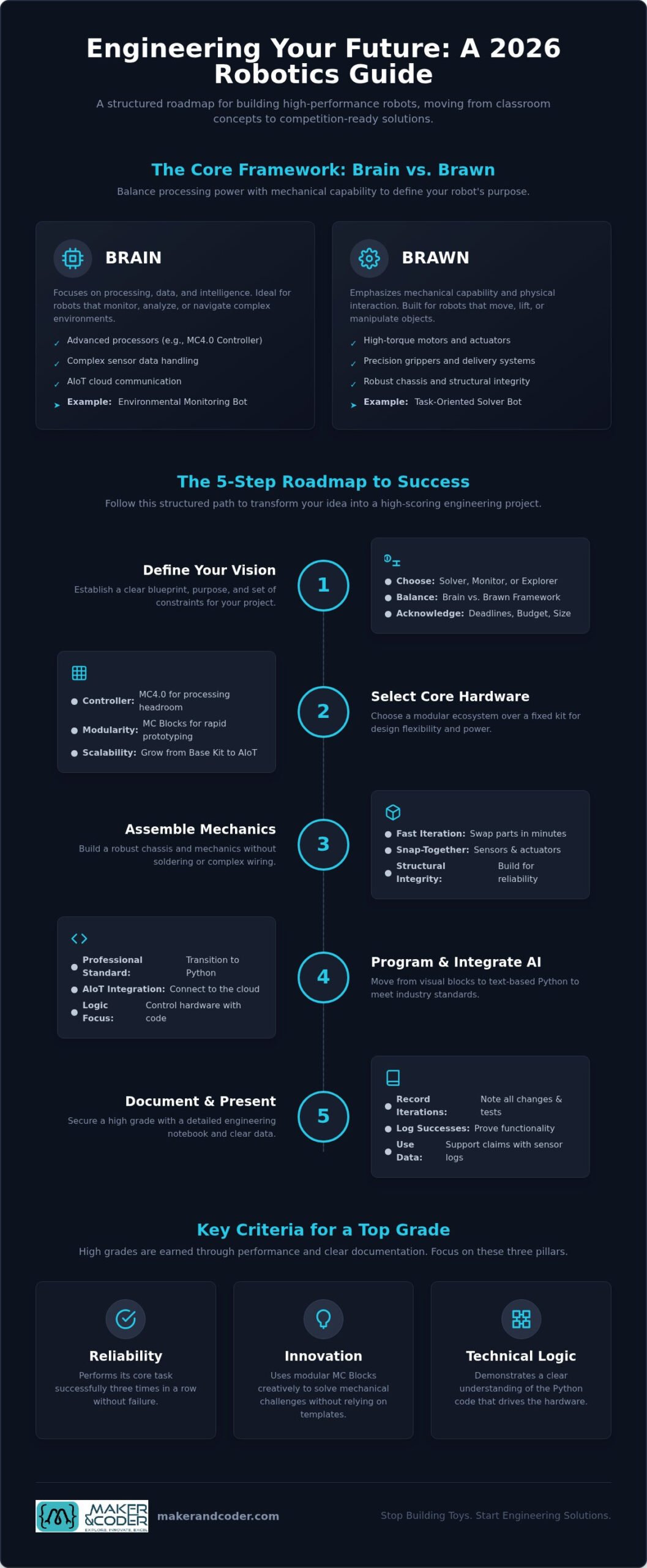
- Identify the core purpose of your robot using the Brain vs Brawn framework to balance processing power with mechanical capability.
- Explore curriculum-aligned robotics school project ideas using kits that empower you to solve real-world problems through innovation.
- Transition from visual coding to professional Python programming to meet the 2026 standards for high school engineering projects.
- Accelerate your build process with modular MC Blocks; these allow for rapid prototyping without sacrificing structural integrity.
- Secure a high grade by documenting every iteration and success within an engineering notebook, supported by data from the MC4.0 AIoT Kit.
Defining Your Vision: The Blueprint for a Successful School Robot
Success in engineering begins long before the first wire is connected. It starts with a clear, documented vision that transforms a collection of parts into a functional solution. A school project robot is a purposeful machine designed to demonstrate specific STEM principles through autonomous or remote action. To move beyond generic builds, you must first decide if your robot is a solver, a monitor, or an explorer. Each path requires a different strategic approach to hardware and software logic.
We use the “Brain vs. Brawn” framework to guide this initial design phase. A solver might require high mechanical “brawn” like precision grippers or high-torque motors. Conversely, a monitor needs the “brain” of an advanced processor like the MC4.0 Controller to handle complex sensor data and cloud communication. This balance is vital when brainstorming robotics school project ideas using kits for competitive or graded environments. You must also navigate rigid school deadlines, budget limits, and specific size requirements. Treat these constraints as creative boundaries. Understanding the broader context through an educational robotics overview helps align your project with established academic standards and industry expectations.
Choosing Your Project Category
Select a category that matches your specific learning goals and interests. Autonomous navigation projects focus on maze-solving or obstacle avoidance using ultrasonic sensors to map surroundings. If you prefer data science and connectivity, environmental monitoring bots use the MC4.0 AIoT Kit to report real-time classroom or outdoor data to a dashboard. Task-oriented bots use mechanical delivery systems or grippers to solve practical problems. Each category offers a unique way to apply the MC 4.0 platform to real-world engineering challenges while exploring various robotics school project ideas using kits.
Success Criteria and Grading Rubrics
High grades aren’t awarded for effort alone; they’re earned through consistent performance and clear documentation. Reliability is your first metric. You’ll need to ensure your robot performs its core task three times in a row without a single failure. Innovation follows, where you use modular MC Blocks creatively to solve mechanical challenges without relying on pre-built templates. Finally, demonstrate technical logic by showing a clear understanding of the Python code driving your hardware. This structured approach ensures your project stands out in any competition or classroom evaluation.
Selecting the Core Hardware: Why the Controller Matters
The controller is the central nervous system of any build. While many basic kits rely on underpowered boards that limit your potential, the MC4.0 Controller provides the processing headroom required for professional-level school projects. It’s the difference between a machine that simply reacts and one that thinks. High-performance robotics school project ideas using kits often fail during competition because of power management issues. When you’re driving high-torque motors, a standard battery might cause a brownout, resetting your controller at a critical moment. Selecting a power source that supports both your logic and your mechanics is essential for maintaining operational stability under load.
Moving from a “fixed” kit to a modular ecosystem is a pivotal step for any aspiring engineer. Fixed kits offer a single path to a single result, but modularity offers infinite design flexibility. By utilizing MC Blocks, you can snap together sensors and actuators without the need for soldering or complex wiring harnesses. This allows you to iterate rapidly. You can test a mechanical gripper, swap it for a sensor array, and reconfigure your chassis in minutes rather than hours. This agility is what separates a student project from an engineering prototype.
The MC 4.0 Ecosystem Advantage
The strength of the MC 4.0 platform lies in its universal connectivity. Every component is designed to communicate seamlessly, allowing you to focus on logic rather than troubleshooting hardware conflicts. You can start with the MC4.0 Base Kit to master the fundamentals of movement and then scale up to advanced AIoT kits as your project’s complexity grows. This scalability ensures that your hardware never becomes a bottleneck for your ambition. You can find the right brain for your next build by exploring professional-grade controllers and kits designed for high-level academic success.
Essential Sensors for 2026 Projects
Modern engineering demands high-precision data. For 2026, the most effective robotics school project ideas using kits leverage a specific suite of sensors to interact with the environment. Ultrasonic sensors are the standard for distance measurement and object avoidance, providing the “eyes” for autonomous navigation. Line trackers allow for high-speed precision in racer-style projects, while integrated environmental sensors enable smart-city simulations. These real-world applications are mirrored in professional settings, such as those highlighted by NASA’s Robotics Alliance Project, which showcases how student-led innovation contributes to the broader field of exploration. Using these tools correctly demonstrates a sophisticated understanding of how hardware interprets the physical world.
Ready to take your design to the next level? Our team is always available for discussing your specific project needs and helping you select the right components for your curriculum goals.
Step-by-Step Assembly: Engineering the Chassis and Mechanics
Engineering isn’t just about making things move; it’s about making them move reliably. When exploring robotics school project ideas using kits, the structural integrity of your chassis determines the success of every other system. A weak base leads to sensor misalignment and drivetrain failure. You don’t need saws or drills to build a professional-grade chassis. By using the modular MC Blocks within the MC 4.0 Kit, you can create rigid, durable support structures that snap together securely. This tool-less approach is ideal for the classroom, allowing for rapid adjustments without the mess or safety risks of traditional fabrication.
Selecting a drive system is a critical design choice that dictates how your robot interacts with its environment. Differential drive, using two wheels and a caster, offers simplicity and high torque for climbing small inclines. Omni-directional movement, however, allows your robot to slide laterally, which is perfect for complex maze-solving or tight-space navigation. Regardless of the system, secure your brain, the MC4.0 Controller, in a location that provides easy access to ports and buttons. Don’t bury it under a mountain of components. Neat cable management isn’t just for aesthetics; it prevents snagging and makes troubleshooting significantly faster during a high-stakes competition.
Mechanical Stability and Balance
Positioning heavy components like batteries low in the chassis is a fundamental engineering principle. A low center of gravity prevents tipping during high-speed turns or sudden stops. Reducing friction in the drivetrain is equally important. Ensure that axles are aligned and gears are clear of debris to maximize battery life and motor efficiency. With MC Blocks, you can build complex, multi-layered frames that remain lightweight yet incredibly strong, providing a stable platform for your sensors to gather accurate data without vibration interference.
Integrating Actuators for Movement
Actuators translate your code into physical action. Use DC motors when your project requires sustained speed or power for mobility. For precision angular control, such as a robotic arm or a steering mechanism, servo motors are the superior choice. Connect these peripherals directly to the MC4.0 Controller ports for instant feedback during the testing phase. Always test the mechanical range of motion manually before applying full battery power. This simple step prevents motor burnout and protects your mechanical linkages from over-extension during initial calibration and testing.
Bringing It to Life: Programming and AI Integration
Programming is where your mechanical assembly gains its intelligence. For 2026, the standard for high-level school projects has shifted away from simple apps toward professional environments. While exploring robotics school project ideas using kits, you’ll find that the most successful builds utilize Python-based logic. This transition from visual blocks to text-based code is essential for real-world skill development. It allows for advanced variable management and seamless AI integration. You can even connect your project to the cloud for remote data logging and control, transforming a standalone machine into a node within a larger, intelligent network.
AIoT is the integration of Artificial Intelligence with the Internet of Things to create responsive, data-driven machines.
Teaching your robot to make decisions based on sensor data requires a deep understanding of loops and conditionals. A simple “if-then” statement can prevent a collision, but a nested loop can allow a robot to navigate a complex maze while simultaneously reporting environmental data to a dashboard. This level of sophistication is what distinguishes an elite project from a basic classroom exercise. By leveraging the MC 4.0 platform, you can implement these advanced features without the steep learning curve often associated with industrial systems.
Coding Environments for Every Level
The journey starts with visual block-based coding for rapid logic prototyping. It’s a great way to map out the flow of your program without worrying about syntax errors. However, the MC4.0 Controller is designed to grow with you. Transitioning to Python unlocks the full potential of the hardware, allowing for sophisticated decision-making and data handling. You can utilize the MC Curriculum to master coding syntax through structured, project-based lessons. This roadmap ensures you aren’t just copying code, but understanding the underlying logic that drives high-performance machines.
Smart Logic and Troubleshooting
A professional engineer is defined by their ability to solve problems when things go wrong. Effective debugging strategies involve isolating hardware failures from software logic errors. You can use the MC4.0 Controller’s built-in feedback to monitor real-time performance and identify bottlenecks. Implementing PID control provides smooth, professional-grade navigation that far surpasses simple “on-off” logic. This data-driven approach allows you to fine-tune your robotics school project ideas using kits until they achieve perfect reliability. Consider these debugging steps:
- Isolate sensor inputs to verify they’re reading data correctly.
- Test motor outputs independently of sensor logic.
- Implement print statements to track variable changes in real-time.
Need help selecting the right software tools for your classroom? Contact our engineering team for personalized curriculum support.
The Grand Finale: Documentation and Presentation
Building a functional machine is only half the battle. To truly excel in a graded or competitive environment, you must prove the engineering process behind the movement. This is where many robotics school project ideas using kits fall short; they lack the evidence of rigorous testing and refinement. An Engineering Notebook serves as your professional record. It shouldn’t just list your successes. It must document every failure and iteration. Showing how you overcame a mechanical snag or a logic error demonstrates the critical thinking skills that judges and educators value most. It transforms your project from a simple build into a sophisticated engineering case study.
Use data to tell a compelling story. If you’ve used the MC4.0 AIoT Kit, you have access to real-time logs and performance metrics that most students overlook. Instead of claiming your robot is efficient, show a chart of battery consumption over time or a log of sensor response speeds. This empirical evidence turns a subjective presentation into an objective engineering report. Finally, master the “Elevator Pitch.” You must be able to explain your robot’s purpose, its technical logic, and its real-world application in under 60 seconds. Clarity and confidence are the final components of a winning project.
Creating a High-Impact Display
Visual communication is essential for a professional presentation. Use high-quality photos of the build process to illustrate the “from-to” journey of your project, highlighting the evolution from a bare chassis to a completed machine. Don’t hide your code. Feature specific snippets that solved your most difficult challenges, such as a custom PID loop or a complex sensor integration. Frame your work within a clear problem-solution narrative. If your robot optimizes a delivery route or monitors classroom air quality, make that impact the centerpiece of your display.
Next Steps in Your Robotics Journey
A successful school project is a gateway to the broader world of professional engineering. Don’t let the momentum stop at the classroom door. Move from internal assignments to regional and national robotics competitions where the MC 4.0 platform provides a competitive edge. Educators can explore advanced teacher training programs to establish dedicated robotics clubs or expand their school’s MC STEAM pathways. By integrating more complex MC Blocks, you can continue to evolve your designs, creating multi-functional, modular robots that prepare you for the technical challenges of the future.
Engineering Your Future: Beyond the Classroom
Mastering the transition from student to engineer requires more than just following a manual. It demands a sophisticated approach to design, logic, and data. By aligning your robotics school project ideas using kits with professional engineering standards, you move beyond simple construction into the world of true innovation. You now understand that a high-performance controller, a stable chassis, and clean Python code are the foundations of a successful machine. Every failure documented in your notebook is a step toward technical mastery.
The MC 4.0 platform is specifically built to support this journey of growth. Our ecosystem is aligned with K-12 global STEM curriculum standards and features a modular design used in professional teacher training programs. Whether you’re starting with block-based logic or deploying advanced Python scripts, our hardware scales with your ambition. It’s time to take your vision from the drafting board to the competition floor. Start your engineering journey with the MC 4.0 Kit today and build something that changes the world. The future belongs to those who build it.
Frequently Asked Questions
What is the best age to start building a robot for a school project?
Students can begin exploring robotics as early as age six or seven with simplified kits. However, the most impactful learning occurs in middle and high school when they can engage with advanced robotics school project ideas using kits that feature real-world logic. At this stage, learners possess the cognitive maturity to handle complex mechanical assembly and abstract programming concepts. Starting early builds a foundation of curiosity that matures into professional engineering capability.
Do I need to know how to code before I start building with the MC 4.0 Kit?
You don’t need prior coding experience to begin your robotics journey. The MC 4.0 platform is designed to guide you from zero knowledge to professional proficiency. Beginners typically start with visual block-based coding to understand logic flow without worrying about syntax. As your confidence grows, you’ll transition to Python for more granular control. This “low-floor, high-ceiling” approach ensures that every student can succeed regardless of their technical background.
What is the difference between a toy robotics kit and a professional platform like MC 4.0?
The primary difference lies in scalability and engineering standards. Toy kits are often “closed” systems designed for a single build with limited sensors and basic functionality. In contrast, a professional platform like MC 4.0 provides a modular ecosystem of MC Blocks and a high-performance controller. It supports industry-standard Python and integrates with AIoT concepts. While toys provide entertainment, professional platforms provide the technical skills required for university-level engineering success.
How much does it typically cost to build a high-level school robotics project?
Market data from 2026 shows that entry-level STEM kits often start around $70, while more advanced autonomous platforms can range from $200 to $600 depending on sensor complexity. Investing in a high-quality kit prevents the hidden costs of replacing underpowered components that fail during testing. For specific institutional needs or bulk classroom sets, it’s best to consult directly with providers to ensure you receive the most curriculum-appropriate hardware for your budget.
Can I use Python to program my school robot project in 2026?
Yes, Python is the industry standard for high school and university robotics projects in 2026. It offers the flexibility needed for advanced data logging, AI integration, and complex decision-making. Using Python for your robotics school project ideas using kits ensures your skills are transferable to the professional world. Our MC4.0 Controller fully supports Python, allowing you to move beyond basic movement into the realm of sophisticated automation and intelligent machine behavior.
What should I do if my robot’s motors aren’t responding to the code?
Start by verifying your power source and physical connections. Many motor failures are actually “brownouts” caused by a low battery that can’t supply enough current to the drivetrain. Ensure all cables are seated firmly in the MC4.0 Controller ports. If the hardware is secure, isolate your code logic by writing a simple script that only drives the motors at half-speed. This helps you determine if the issue is a syntax error or a mechanical bind.
How do I make my robot project stand out to science fair judges?
Focus on the “why” behind your build rather than just the “how.” Judges are impressed by robots that solve specific, real-world problems through innovative mechanical design. Use your MC4.0 AIoT Kit to gather and present empirical data, such as sensor accuracy or efficiency logs. A well-documented Engineering Notebook that details your iterations and failures shows a professional mindset. Clearly explaining your technical logic during the presentation demonstrates that you’ve mastered the engineering process.
What is an MC4.0 Controller and why is it preferred for STEM education?
The MC4.0 Controller is a high-performance central brain designed specifically for the demands of modern STEM education. It’s preferred because it offers the processing power required for AIoT applications while maintaining a user-friendly interface for students. Unlike basic microcontrollers, it provides seamless connectivity for modular MC Blocks and supports professional-grade Python programming. This combination of power and accessibility makes it the elite choice for classroom learning and high-stakes robotics competitions worldwide.