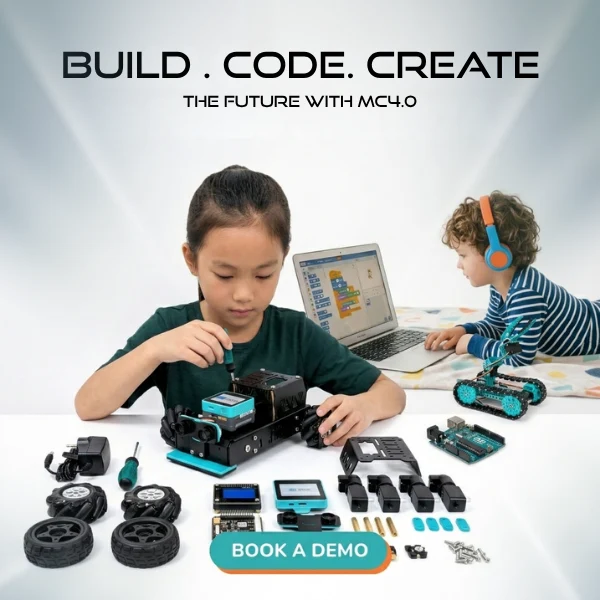

What if students could do more than build a device? They could help it sense, share, and respond to information. An AIoT kit for schools can make that kind of learning tangible by connecting artificial intelligence with internet-connected devices through practical projects. Choosing technology that fits classroom goals and teachers’ confidence, however, takes more than comparing hardware.
The key is to connect hands-on exploration to a clear learning pathway. Students need age-appropriate ways to investigate how devices collect information and how AI can help interpret it. Teachers need a plan that turns first experiments into structured learning, without requiring them to become technology specialists before they begin.
This guide explains what AIoT means in a K-12 classroom, what to evaluate in a kit, and how curriculum and educator support can shape implementation. You’ll also see how Maker & Coder’s MC4.0 AIoT Kit fits within an ecosystem that includes the MC 4.0 Controller, MC Blocks, K-12 curriculum, and teacher training programs. With a plan that supports student curiosity and teacher readiness, schools can move from introductory exploration to applied projects.
Key Takeaways
- Connect AIoT concepts to hands-on learning by helping students explore how connected devices gather information and respond to it.
- Use a clear project progression: introduce a concept, explore inputs, build a response, and reflect on results.
- Choose an AIoT kit for schools by comparing its fit with learning goals, student needs, project progression, teacher support, and classroom practicality.
- Plan teacher preparation and classroom reflection alongside hardware selection so technology supports, rather than replaces, educator guidance.
- Explore how hardware, K-12 curriculum, MC Blocks, the MC 4.0 Controller, and teacher training can work together to support classroom implementation.
What Is an AIoT Kit for Schools, and What Can Students Learn?
An AIoT kit for schools is a set of learning tools for exploring how artificial intelligence and connected devices can work together. Devices gather information from their surroundings, and AI can help interpret that information or guide a response. Students can use this process to investigate how technology senses, processes, and acts on data.
AIoT brings together two ideas. The Internet of Things (IoT) connects physical devices so they can collect or share information. Artificial intelligence (AI) refers to computer systems performing tasks such as recognizing patterns or making predictions. Artificial Intelligence of Things (AIoT) describes how these capabilities can combine: a device gathers data, and AI helps make sense of it or inform what happens next.
How AI and the Internet of Things Connect in a Classroom
A sensor detects something, such as light, sound, or temperature. Its readings become data, which can be compared or interpreted. A connected device can send or receive that data. For example, students might plan a classroom plant monitor that senses soil conditions and uses a rule or AI-based analysis to suggest when the plant may need attention. They can map what the system senses, what it does with the reading, and what response follows.
What Makes an AIoT Kit Educational Rather Than Just Technical?
Using a device or watching a demonstration can introduce a concept, but learning deepens when students investigate the system themselves. They can ask what a sensor detects, predict what might happen, test a response, and reflect on whether the result matches their expectation. These steps invite computational thinking and problem-solving.
Keep the focus on reasoning, not just the working build. Ask learners to explain what information their system uses, how it responds, and what they might change after testing. That explanation turns hardware into a prompt for observation and questioning, helping students connect abstract ideas with a tangible process.
For educators, the distinction is practical: a technical activity focuses on assembling or operating a device; an educational activity gives learners a question to investigate and a chance to explain their choices. A well-planned AIoT lesson makes room for both experimentation and reflection.
How Students Can Progress from AIoT Concepts to Hands-On Projects
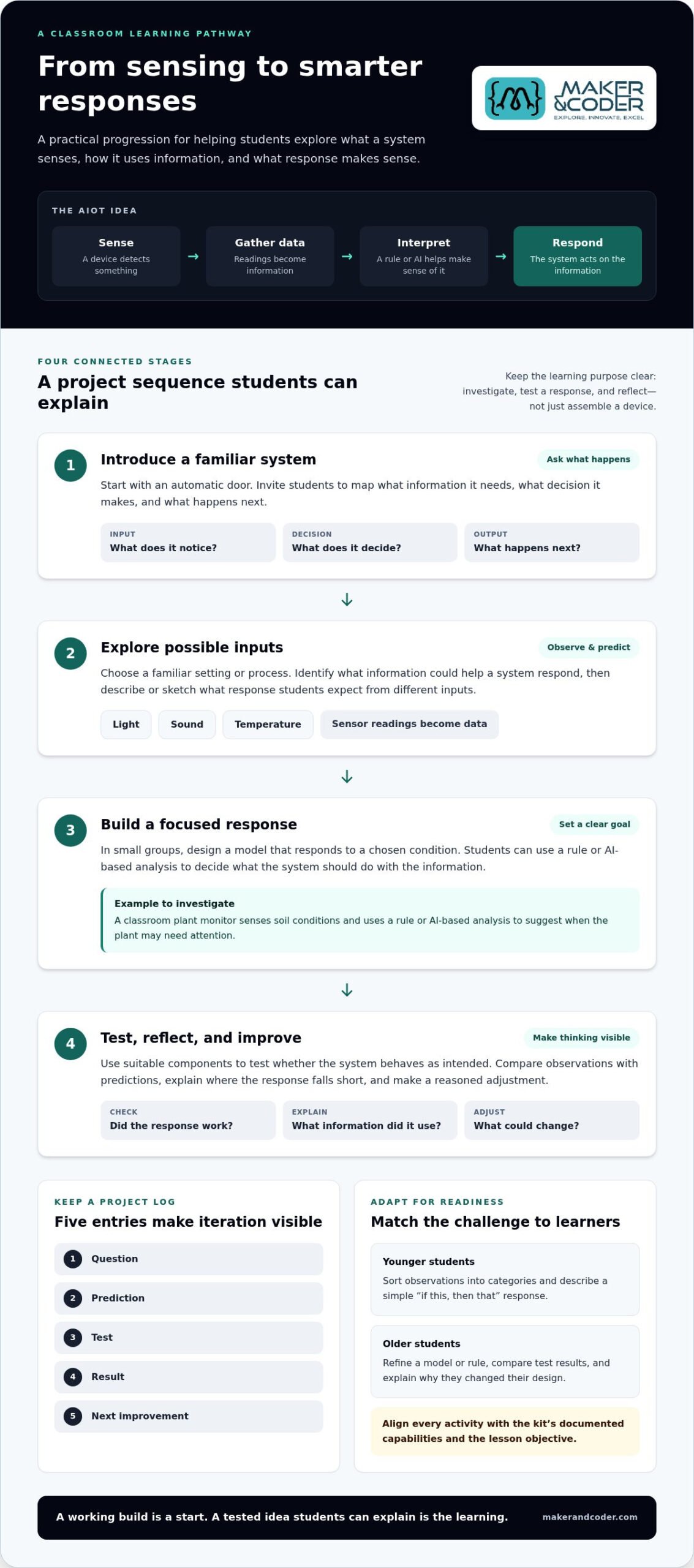
Students gain a clearer understanding of AIoT when they investigate what a system senses, how it uses information, and what response makes sense. A useful progression is straightforward: introduce a concept, explore possible inputs, build a response, then test and reflect on the result. This gives each activity a learning purpose, rather than making assembly the goal.
A Classroom-Friendly Sequence for Introducing AIoT
Start with a familiar system, such as an automatic door. Ask what information it needs, what decision it makes, and what happens next. Students can map the system’s inputs, its rule or decision, and its output. From there, small groups can take on a focused challenge with clear success criteria, such as designing a model that responds appropriately to a chosen condition.
Guide the sequence with questions: What should the system notice? What should it do with that information? How will the group tell whether its response worked? Students can record observations and compare them with their predictions. For a broader example of AIoT applied in an educational setting, researchers describe an AIoT-Based Smart Education System. It illustrates an application, rather than a required classroom project.
Example AIoT Projects to Adapt for Different Grades
Choose prompts that match learners’ experience and the capabilities of the hardware being used. Younger students might sort observations into categories and describe a simple “if this, then that” response. Older students can refine a model or rule, compare test results, and explain why they changed their design. Treat these as adaptable teaching ideas and match each activity to the kit’s documented capabilities and the lesson objective.
- Observe: Choose a familiar setting or process and identify what information could help a system respond.
- Predict: Have students sketch or describe the response they expect from different inputs.
- Test: Use suitable components to explore whether the system behaves as intended.
- Improve: Record results, identify where the response falls short, and make a reasoned adjustment.
Keep a simple project log with five entries: question, prediction, test, result, and next improvement. This makes iteration visible and gives students a structure for explaining their choices. Before adapting a prompt to an AIoT kit for schools, align the activity with its documented capabilities and the lesson’s learning objective. The goal is not merely a working build. It’s a tested idea students can explain.
How to Compare AIoT Kits for School Learning Goals
The best choice isn’t necessarily the kit with the most advanced-sounding feature. Start with the learning you want students to demonstrate, then compare how well each option supports that goal, the students’ readiness, and your classroom’s practical needs. Separate product information from planning questions so assumptions don’t become purchase criteria.
| Criterion | Verified information | Questions for school planning |
|---|---|---|
| Learning goals | Maker & Coder offers a K-12 MC Curriculum alongside its AIoT kit. | Which concepts or skills should students explore, and how will the activity support them? |
| Age fit | The curriculum is designed for K-12; fit for a specific grade and activity should be considered in context. | Can learners understand the task, use the materials, and explain their decisions? |
| Progression | The educational ecosystem includes the MC 4.0 Controller and MC Blocks. | Can students move from guided exploration toward more independent problem-solving? |
| Teacher support | Teacher training programs support classroom implementation. | What curriculum guidance and preparation will educators need for the intended lessons? |
| Classroom practicality | Lesson planning can account for setup, group work, testing, reflection, and storing materials. | How will groups share equipment, manage setup, reflect on results, and store materials? |
Which Learning and Curriculum Criteria Matter Most?
Begin with the objective, not the feature list. If the goal is for learners to explain how information informs a system’s response, choose an activity that gives them a chance to observe, test, and describe that relationship. Then consider whether the lesson can build from teacher-guided exploration to student-led decisions. Research examples, such as the AIoT-Based Smart Education System, can broaden educators’ understanding of possible applications, but they don’t establish what a particular classroom kit includes.
How to Assess Teacher Support and Classroom Practicality
A strong learning plan makes room for teacher preparation as well as student activity. Consider how educators can use structured curriculum and training, then map a lesson to the actual class period: setup, collaboration, testing, reflection, and pack-away. A promising activity should fit those conditions without losing its learning purpose.
Before selecting an AIoT kit for schools, have educators review a sample lesson or outline the sequence they intend to teach. Identify what students will do at each stage and what support the teacher will need. Compare MC 4.0 classroom kits against those learning goals and classroom requirements.
How Schools Can Prepare Teachers and Plan an AIoT Kit Rollout
A successful rollout starts before the first device reaches a desk. Give teachers a clear learning purpose, time to become familiar with the materials, and a manageable first activity. Then use student work and educator feedback to decide what to adjust before expanding the approach.
A School Readiness Checklist Before the First Lesson
Make the plan concrete. Identify who the students are, what they should learn, how the class will work, and how much teaching time is available. Assign responsibility for preparing materials, guiding the activity, and reviewing what happened afterward. A low-stakes introductory lesson can help students explore the process and raise questions without making a polished final project the first measure of success.
- Set the objective: Name the learning goal and how students will show their thinking.
- Plan the format: Decide how students will work together and how materials will be shared.
- Prepare the lesson: Review the activity in advance and identify likely questions or sticking points.
- Assign roles: Clarify who prepares, facilitates, and gathers feedback after the lesson.
- Reflect and refine: Review student explanations, project evidence, and teacher observations before planning the next activity.
Building Teacher Confidence Through Curriculum and Training
Hardware becomes easier to teach when educators can connect it to a purposeful sequence of classroom activities. Structured lesson guidance can help translate a kit into an instructional plan, while training gives teachers a chance to practise facilitation, explore the materials, and anticipate learners’ questions. This support strengthens the educator’s role: technology remains a tool for teaching, not a replacement for teacher judgment or interaction.
Start with one focused activity. Afterward, look for evidence of student reasoning, note where instructions or pacing need adjustment, and invite teachers to share what felt clear or challenging. Use those observations to refine the next lesson rather than scaling up before the classroom approach is ready. This measured cycle can help schools move from initial exploration to more confident, applied projects.
Maker & Coder’s K-12 MC Curriculum and teacher training programs support classroom implementation alongside the MC4.0 AIoT Kit. If your school is shaping a rollout, discuss your classroom goals with Maker & Coder and plan the educator support that will help bring them to life.
How Maker & Coder Brings AIoT Hardware, Curriculum, and Training Together
An AIoT kit for schools is most useful when educators can connect its hands-on potential to purposeful learning. Maker & Coder’s MC4.0 AIoT Kit sits within a wider educational ecosystem that includes the MC 4.0 Controller, MC Blocks, a K-12 MC Curriculum, and teacher training programs. Together, these offerings bring hardware, learning structure, and educator support into classroom planning.
Connecting the MC4.0 AIoT Kit with a K-12 Learning Pathway
The MC4.0 AIoT Kit is Maker & Coder’s AIoT offering for schools. The MC 4.0 Controller and MC Blocks are also part of the ecosystem, giving educators hardware and learning tools to incorporate into practical activities. The K-12 MC Curriculum helps teachers plan a sequence of learning, while training programs support educators as they prepare to guide students. Curriculum provides structure, while classroom outcomes depend on learning goals, lesson design, and teaching context.
This combination can help schools plan beyond a single activity. Start with the concepts learners should explore, then consider how hardware can support investigation and how curriculum can frame the learning. Teacher preparation helps bridge that plan to classroom facilitation. Explore MC 4.0 educational kits as part of planning how the ecosystem can align with your program’s needs.
Take the Next Step Toward Classroom AIoT Learning
Build your plan around four connected decisions: what students should learn, what role the hardware will play, how curriculum will shape the experience, and what preparation teachers need. Keeping those elements aligned makes it easier to move from initial exploration toward purposeful projects while keeping educators at the center of instruction.
Before planning next steps, outline the grades or learner groups you have in mind, your classroom goals, and your implementation priorities. Those details can focus planning around how the MC4.0 AIoT Kit and the wider MC 4.0 ecosystem could support your school’s direction.
Talk with Maker & Coder about your school and take the next step toward classroom AIoT learning.
Turn AIoT Ideas into Meaningful Classroom Learning
A successful AIoT kit for schools is more than a collection of hardware. Its value comes from aligning practical exploration with clear learning goals, a suitable progression of activities, and teacher readiness. Students can move from asking what a device senses to testing how a system responds, while explaining and reflecting on their decisions.
Choose with the classroom in mind: consider the learning objectives, how activities fit your students, and what support educators need to guide them. Maker & Coder brings these elements together through the MC4.0 AIoT Kit within its MC 4.0 educational hardware ecosystem, a structured K-12 MC Curriculum, and teacher training programs designed to support educators. These resources can help schools plan a thoughtful path from exploration to applied projects.
Start by outlining your school’s goals, intended learners, and implementation priorities. Talk with Maker & Coder about AIoT learning for your school and take a practical next step toward hands-on learning. With a clear plan and educators at the center, students can turn curiosity into projects they understand and can explain.
Frequently Asked Questions
What is an AIoT kit for schools?
An AIoT kit for schools is a set of educational tools for exploring how artificial intelligence (AI) and the Internet of Things (IoT) can work together. IoT devices gather or share information, while AI can help interpret information or guide a response. In a classroom project, students might investigate what a device senses, what happens to that data, and how a system could respond.
What is the difference between AI and IoT in a classroom project?
IoT connects physical devices that collect or share information, while AI refers to computer systems performing tasks such as recognizing patterns or making predictions. In a classroom project, a sensor might detect a condition and provide data. AI could then help interpret that information. The ideas are related but distinct: connected hardware gathers or communicates data, and AI helps make sense of it.
What can students learn with an AIoT kit?
Students can explore how systems gather information, process it, and respond. A well-planned activity can invite them to make predictions, observe results, test ideas, and explain what they would change. These experiences offer a practical context for computational thinking and problem-solving. The specific learning depends on the activity, the students’ needs, and how the teacher connects hands-on work to lesson objectives.
How do schools choose an AIoT kit?
Begin with learning goals, then compare how well each kit supports the intended activities, learner readiness, classroom conditions, and teacher preparation. Consider whether students can progress from guided exploration to more independent problem-solving. Review documented product details and curriculum support separately from planning needs such as setup, group work, lesson time, and storage. The most advanced feature isn’t necessarily the best educational fit.
Do teachers need technical experience to teach AIoT?
Teachers don’t need to approach AIoT as technical specialists, but preparation helps them guide activities with confidence. Start with a clear learning objective and a focused introductory lesson, then practise the activity and consider the questions students may raise. Structured curriculum can help turn hardware into classroom instruction, while teacher training provides an opportunity to build familiarity and practise facilitation. Educators remain central to interpreting and guiding the learning.
How can an AIoT kit fit into a K-12 curriculum?
Connect the kit to an existing learning objective rather than treating it as a standalone demonstration. For example, a lesson can ask students to examine how information guides a system’s response, then document and explain their observations. Maker & Coder offers a K-12 MC Curriculum designed to support a structured educational pathway alongside its hardware. Teachers can adapt lesson planning to their learners and classroom context.
Can students use an AIoT kit for group projects?
Yes. Group work can give students opportunities to share observations, compare predictions, and explain design choices. Before starting, define the task and how students will collaborate. Roles such as recording results, tracking tests, and presenting the group’s reasoning can make participation clear. Plan around the available materials and class format, and give each student a meaningful way to contribute to the investigation.
How should a school prepare before introducing an AIoT kit?
Identify the learner group, learning objective, lesson format, and available teaching time. Decide who will prepare materials, facilitate the activity, and review student work afterward. Give educators time to explore the kit and use curriculum or training to prepare. Begin with a low-stakes activity that welcomes student questions, then gather teacher feedback and review student explanations to refine the next lesson.