
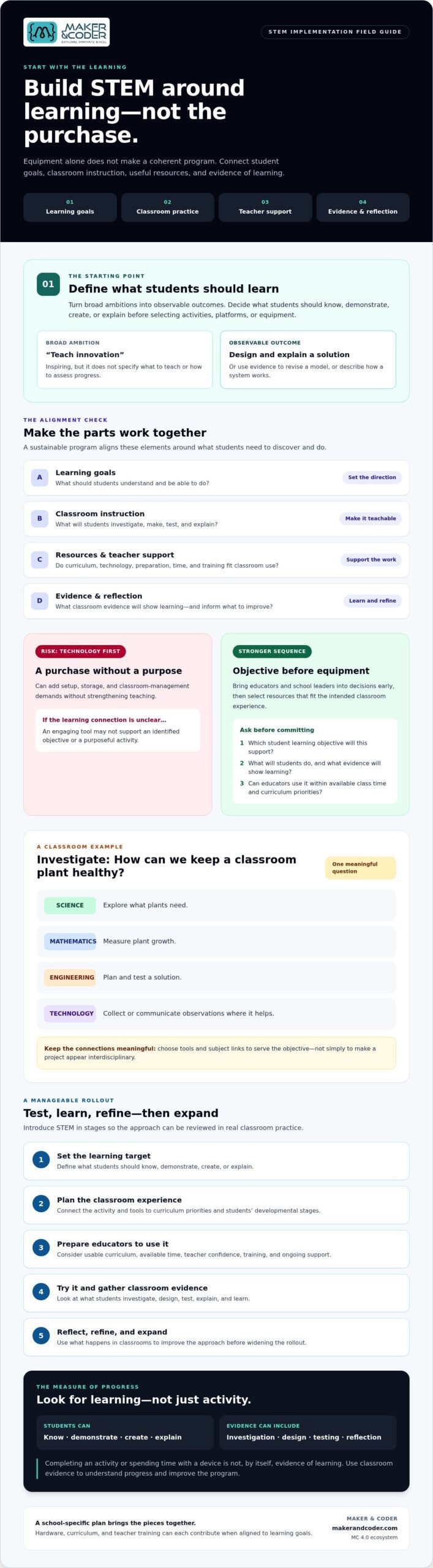
Buying STEM equipment is often the easiest part of implementation, and the least reliable measure of whether it will work. Avoiding common mistakes in STEM implementation starts with a clearer question: what should students learn, and what will help teachers bring that learning to life? Without clear goals, it’s difficult to choose activities, technology, or meaningful ways to assess progress.
Hands-on STEM can spark curiosity and build practical skills, but even promising tools can gather dust when educators lack time, confidence, or training, or when technology isn’t connected to the curriculum. A successful program takes more than a purchase. It brings learning goals, classroom instruction, teacher support, and technology together around what students need to discover and do.
This guide explains how to set learning goals before choosing equipment, give educators usable curriculum and support, and assess progress using classroom evidence. You’ll also learn how to introduce STEM in manageable stages and refine your approach over time, turning individual activities and tools into a more sustainable learning experience.
Key Takeaways
- Avoiding common mistakes in STEM implementation starts by defining what students should learn before selecting equipment or platforms.
- Assess how curriculum, teacher preparation, learning activities, and technology will work together in everyday classroom practice.
- Compare implementation options by their fit with learning goals, classroom usability, and the preparation and support educators will need.
- Use a phased rollout to test your approach, gather classroom evidence, and refine the program before expanding it.
- Explore how hardware, curriculum, and teacher training, including Maker & Coder’s MC 4.0 ecosystem, can contribute to a school-specific implementation plan.
Avoiding Common Mistakes in STEM Implementation Starts with Clear Learning Goals
Enthusiasm can launch a STEM initiative, and equipment can make it feel tangible. Neither guarantees a coherent program. Without clear learning goals, schools may struggle to choose activities, prepare teachers, or tell whether students are learning. Avoiding common mistakes in STEM implementation begins by deciding what students should understand and be able to do before selecting tools.
Implementation means more than introducing a device or hosting a one-off project. It is sustained classroom practice that connects learning goals with instruction, resources, and reflection. A useful working definition is: Successful STEM implementation is the ongoing alignment of student learning goals, classroom instruction, appropriate resources, and evidence-based reflection. Schools shape that alignment around their learners and priorities rather than following one universal formula.
How do schools define meaningful STEM learning outcomes?
Turn broad ambitions into outcomes you can observe. “Teach innovation” may sound inspiring, but it doesn’t tell educators what to teach or how to assess progress. A more useful outcome might be for students to design and explain a solution to a problem, use evidence to revise a model, or describe how a system works. Match the intended work to students’ developmental stages and existing curriculum priorities.
Completing an activity or spending time with a device isn’t, by itself, evidence of learning. Ask what students will know, demonstrate, create, or explain. The broad field of Science, technology, engineering, and mathematics (STEM) can take different forms across schools, so define the learning that matters in your instructional context.
Why does a technology-first plan often fall short?
A purchase made before instructional planning can add setup, storage, and classroom management demands without strengthening teaching. A tool may be engaging, but if it doesn’t support an identified objective or fit a purposeful activity, its role in learning remains unclear.
Before committing, ask:
- What specific student learning objective will this tool support?
- What will students do with it, and what evidence will show their learning?
- Can educators use it within available classroom time and existing curriculum priorities?
Bring teachers and school leaders into the decision early. Educators can assess whether an activity fits classroom practice, while school leaders can consider how it supports broader instructional priorities. This shifts the conversation from “Which technology should we buy?” to “What learning experience are we trying to enable?” That’s a stronger basis for selecting resources and evaluating their value.
Build STEM Implementation Around Curriculum, Teachers, and Classroom Practice
Clear outcomes give a program direction. The next challenge is ensuring that curriculum, learning activities, educator confidence, and technology reinforce one another in daily classroom practice. If one piece is missing, a promising project can become an isolated event rather than part of students’ learning progression.
How can schools connect STEM tools to curriculum?
Begin with the objective, then design the activity and choose tools that serve it. For example, students investigating how to keep a classroom plant healthy could explore plant needs in science, measure growth using mathematics, plan and test a solution through engineering, and use technology to collect or communicate observations where it helps. The connections should be meaningful, not added simply to make a project appear interdisciplinary.
Check that the task fits learners’ developmental stages and the curriculum priorities being taught. Then clarify what students will investigate, make, test, and explain. The Texas Education Agency’s STEM implementation tools offer a reference for instructional planning and classroom challenges. Verify standards mapping against the relevant local curriculum rather than assuming a resource aligns automatically.
Hands-on work becomes purposeful when students do more than assemble or operate something. They investigate a question, design an approach, test it, and reflect on what the evidence suggests. This cycle gives educators opportunities to connect activity to learning and adjust instruction as students make progress.
What teacher support helps STEM implementation last?
A product demonstration may introduce a tool, but educators also need time to experience the activity as learners, plan how it fits a lesson, and anticipate where students may need guidance. Set aside time for preparation, troubleshooting, peer exchange, and reflection. Clarify how teachers can seek help as their classroom needs and confidence develop.
Teacher readiness helps turn STEM resources from occasional classroom novelties into tools educators can use with purpose and confidence. Professional learning should include preparation and continued support, not just a single session attached to a purchase. Avoiding common mistakes in STEM implementation means planning for the people who will make the learning happen.
For schools considering a connected approach, Maker & Coder offers a K-12 MC Curriculum designed to integrate with its hardware, along with teacher training programs. Evaluate these options against your instructional needs rather than treating them as substitutes for school-specific planning. When comparing classroom hardware, consider it alongside the curriculum and educator support your implementation will require.
Compare STEM Implementation Options Before Choosing Hardware or a Program
Once learning priorities and classroom needs are clear, compare possible approaches against the same teaching criteria. A device’s features matter less than whether educators can use it to support intended learning within their available time, curriculum, and resources. No option is automatically right for every school.
| Approach | Learning-goal fit | Teacher preparation | Classroom usability and support |
|---|---|---|---|
| Standalone hardware | Educators may need to develop or source activities that connect the tool to learning goals. | Teachers may need time to explore the hardware and plan its instructional use. | Check setup, storage, classroom management, and what support the provider includes. |
| Curriculum-supported tools | Activities and resources may provide a clearer link between technology and intended learning. | Review how much preparation is needed to adapt materials for your learners and curriculum. | Check whether the activities fit the timetable and available classroom resources. |
| Broader supported ecosystem | Hardware, curriculum, and educator development can be considered together. | Review what training is offered and whether it prepares teachers for the activities they’ll lead. | Confirm the scope of ongoing support and assess whether the approach fits local capacity. |
What should schools evaluate in a STEM learning solution?
Look beyond feature lists. Ask how clearly the solution connects activities to curriculum and intended student learning. Consider setup, classroom management, flexibility across age groups, and the educator’s role while students work. Confirm directly with the provider what training and ongoing support are available. Clear answers help schools assess the full implementation commitment, not just the equipment.
When does an integrated STEM ecosystem make sense?
An integrated approach may be worth exploring when educators want hardware and curriculum considered together, especially if they need a more structured starting point. It still needs to suit the school’s learners, timetable, subject priorities, and capacity to prepare teachers. Review materials and support before deciding. Integration alone doesn’t guarantee classroom fit.
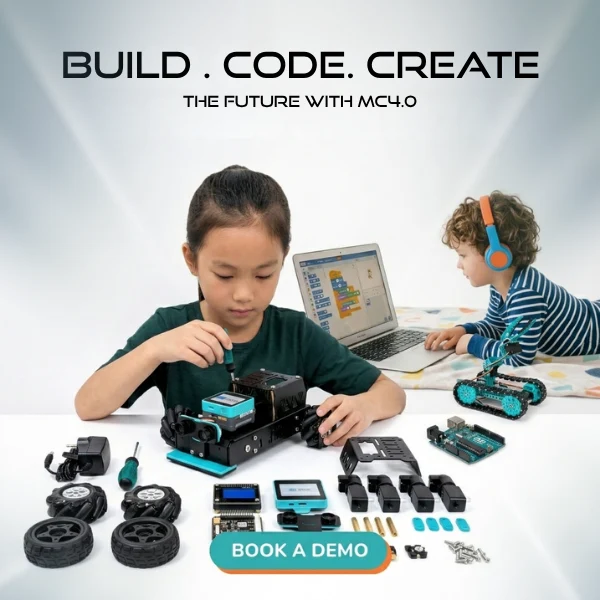
Maker & Coder offers MC 4.0 hardware, modular MC Blocks, a K-12 MC Curriculum designed to integrate with its hardware, and teacher training programs. Schools can assess these components together against their own goals rather than treating them as a universal solution. Explore the classroom STEM hardware options as part of that evaluation.
Use local context to guide the choice: student age range, priority subjects, educator readiness, existing equipment, and instructional time all matter. A useful comparison makes those needs visible. That’s a practical step toward avoiding common mistakes in STEM implementation and selecting an approach teachers can use.
Use a Phased STEM Implementation Plan to Avoid Common Rollout Mistakes
A phased rollout gives schools room to learn from classroom use before expanding a program. Begin with a scope educators can prepare for and support, rather than expecting an immediate school-wide transformation. Assign responsibilities according to local capacity: school leaders can coordinate priorities and resources, educators can shape lessons and share classroom observations, and implementation partners can clarify the training or product support they provide.
Use this sequence to move from intention to informed next steps:
- 1. Define goals. Specify what students should learn and what evidence could demonstrate that learning.
- 2. Assess readiness. Review educator experience, available instructional time, classroom resources, and practical barriers such as setup or access.
- 3. Prepare educators. Let teachers experience the activities, plan lessons, and identify questions or support needs before introducing them to students.
- 4. Pilot. Select a manageable classroom scope and connect each activity to the learning goals. Prepare materials, lesson plans, access, and classroom routines in advance.
- 5. Review. Gather student work, educator feedback, participation observations, and notes on barriers. Look at what students learned, not only whether they used the equipment.
- 6. Refine. Use what the pilot reveals to adjust activities, training, resources, or the scope of the next phase.
How can a school pilot STEM activities responsibly?
Choose a pilot that fits educators’ capacity and makes the intended learning visible. Before the first activity, confirm that materials are ready, teachers understand the lesson flow, students can access what they need, and classroom routines are clear. During the pilot, educators can note where learners become engaged or stuck and save examples of student work. These observations provide practical evidence for improvement without requiring arbitrary success targets.
How should schools review and improve a STEM program?
Compare classroom practice with the original goals. Equipment usage alone can’t show whether students investigated, designed, tested, or explained ideas as intended. Review student work alongside educator observations and feedback. Then decide what to change: teachers may need more preparation time, an activity may need clearer instructions, materials may need adjustment, or the pilot may need to stay at its current scope while the school builds readiness.
Keep the review focused. Record what supported learning, what interrupted it, and what questions need further exploration. This cycle helps schools make thoughtful decisions before expanding and gives educators a voice in shaping the next phase. If you’re considering training or classroom resources, evaluate Maker & Coder’s offerings alongside local goals and readiness. To discuss a school STEM implementation plan, share the learning priorities and classroom needs you’re working to address.
Make STEM Implementation Sustainable with the Right Ongoing Support
Sustainable STEM learning doesn’t come from a single purchase or launch. It grows when clear learning goals guide classroom activities, educators have preparation and support, selected tools fit the school’s context, and leaders review what happens in practice. That cycle helps schools move from introducing technology to making informed choices about how it serves instruction over time.
How can an integrated hardware and curriculum offer support educators?
Maker & Coder offers the MC 4.0 hardware platform, modular MC Blocks, a K-12 MC Curriculum designed to integrate with its hardware, and teacher training programs to support educators implementing STEM technology. Together, these offerings give schools components to consider across hardware, curriculum, and teacher development. They are not a guaranteed outcome or a substitute for planning around local goals.
Evaluate classroom fit alongside equipment. Do the curriculum and activities support the intended learning? Can educators prepare to use the materials within their timetable and existing priorities? What training is available, and what support can the provider confirm? These questions keep the focus on what students and teachers will experience, not just what a school will acquire. Schools exploring equipment can review the MC 4.0 classroom kits as one part of that evaluation.
What should school leaders do next?
Before choosing equipment, bring the implementation picture into focus. Document:
- Learning priorities: What should students know, do, or create?
- Educator needs: What preparation, training, and classroom support would help teachers lead the activities?
- Practical constraints: What time, existing resources, and classroom conditions will shape implementation?
- Review approach: What student work and educator feedback will help the school decide what to refine?
Take that information into a provider conversation. Ask how the curriculum, hardware, and training relate to your goals, and clarify what support is available rather than assuming it. This makes the discussion more useful and gives school leaders a basis for comparing options.
A thoughtful implementation plan can evolve as educators learn from classroom experience. Keep goals visible, respond to teacher feedback, and choose tools for their fit with learning. Schools can contact Maker & Coder about STEM implementation to explore whether its offerings suit their needs.
Build a STEM Program That Grows with Your School
Sustainable STEM implementation begins with clear learning goals, then connects those goals to curriculum, classroom-ready activities, suitable tools, and educator support. A phased rollout gives teachers and school leaders room to learn from student work and classroom experience before deciding what to refine or expand. That’s the practical path to avoiding common mistakes in STEM implementation: make decisions based on learning and local needs, not equipment alone.
Maker & Coder offers MC 4.0 hardware and modular MC Blocks, a K-12 MC Curriculum designed to integrate with its hardware, and teacher training programs that support educators implementing STEM technology. Schools can evaluate these options together against their goals, educator needs, and implementation capacity. They are components to assess, not a substitute for school-specific planning or a guarantee of results.
Ready to explore what could fit your classrooms? Discuss your school’s STEM implementation needs with Maker & Coder. With a thoughtful plan and appropriate support, educators can turn curiosity into purposeful, hands-on learning that develops over time.
Frequently Asked Questions
What are the most common mistakes in STEM implementation?
Common pitfalls include buying technology before setting learning goals, underestimating teacher preparation, separating activities from curriculum, and failing to review classroom experience. These are risks to plan for, not inevitable outcomes. Schools can reduce them by aligning goals with curriculum, preparing educators to use tools purposefully, and gathering feedback from lessons and student work. Avoiding common mistakes in STEM implementation means treating equipment, instruction, educator support, and reflection as connected parts of a sustained program.
How can schools avoid technology-first STEM implementation?
Define what students should learn before comparing products. Then assess whether each tool supports the intended activity, fits classroom conditions, and can be used confidently by educators. Involve teachers early, since they can identify lesson-planning needs and practical classroom constraints. Before making a purchase, check preparation time, student access, setup, and what training or ongoing support the provider offers. This keeps learning, not equipment, at the center of the decision.
Why is teacher training important for STEM implementation?
Teachers need more than access to equipment. They need time to understand activities, connect them to learning goals, and guide students through unfamiliar tasks. Practical training lets educators experience the work they’ll facilitate, while preparation time helps them adapt lessons to classroom needs. Peer learning and continued support can help teachers share approaches and address questions as they arise. A single training session can introduce a tool, but it can’t guarantee sustained classroom implementation.
How should a school measure whether its STEM program is working?
Return to the program’s stated learning goals and review relevant classroom evidence. This might include student work, classroom observations, participation, and educator feedback. Choose indicators that match the objectives rather than relying on a universal score or counting equipment use alone. For example, if students are expected to explain a design decision, review their explanations and work. Use the evidence to adjust activities, educator preparation, resources, or the program’s scope.
Should schools pilot a STEM program before rolling it out widely?
A manageable pilot can help a school test lesson flow, educator preparation, classroom routines, and resource needs before expanding. Set clear learning goals and decide in advance what observations, student work, or teacher feedback to collect. Afterward, review what needs adjustment and whether the approach fits the school’s capacity. A pilot is most useful when its findings inform next steps. It shouldn’t be treated as proof of results beyond the classrooms or activities included.
What should schools compare when choosing a STEM solution?
Compare how well each option supports learning goals and fits the curriculum, classroom routines, and learners’ needs. Also review usability, teacher training, ongoing support, and the resources required to run the activities. Involve educators in the evaluation and confirm product details directly with the provider. A feature list alone won’t show whether a solution suits daily instruction. The strongest fit depends on the school’s subject priorities, age range, existing resources, and implementation capacity.
Can hardware alone create an effective STEM program?
Hardware can enable hands-on activities, but an effective program also depends on learning goals, curriculum connections, educator readiness, and classroom planning. Before buying, clarify how students will use the tools and what learning the activities are meant to support. Consider setup, preparation, student access, and what training or support is available afterward. Equipment is one part of implementation, not a guarantee of student outcomes. Its value depends on how well it serves purposeful instruction.