What if a classroom project could move beyond making a device respond to code and help students explore how connected technology gathers information and acts on it? An AIoT education kit can bring artificial intelligence and the Internet of Things into hands-on learning, but it is not the same as a basic coding or robotics kit. That distinction matters when choosing hardware for real lessons, not just judging what looks impressive on a product page.
It is reasonable to ask whether activities will suit your students and connect to clear learning goals. This guide explains what an AIoT education kit can teach, how to evaluate options for your classroom, and how to plan a practical rollout with support for educators. We’ll clarify how AIoT projects differ from introductory coding and robotics, what to check before selecting a kit, and how curriculum and teacher training can help turn exploration into a structured learning pathway. Maker & Coder’s MC4.0 AIoT Kit is part of a broader ecosystem that includes curriculum and teacher training, providing one example to consider as you compare options.
Key Takeaways
- Use an AIoT education kit to help students connect physical devices, data, and intelligent analysis through practical exploration.
- Look for a learning pathway that suits students’ ages and experience, with clear documentation and room to progress.
- Before choosing a kit, confirm what’s included and what may require separate curriculum, accessories, or teacher training.
- Plan a manageable pilot: set learning goals, try a focused classroom activity, then review teacher feedback before expanding.
- Consider how the MC4.0 AIoT Kit relates to Maker & Coder’s wider hardware, curriculum, and teacher training offerings.
What Is an AIoT Education Kit, and What Can Students Learn?
Artificial intelligence of things, or AIoT, brings artificial intelligence together with the Internet of Things (IoT). Connected devices gather and share information from their surroundings, while AI methods can help identify patterns in that data or support decisions. The Artificial Intelligence of Things (AIoT) overview offers further background on the concept and its applications.
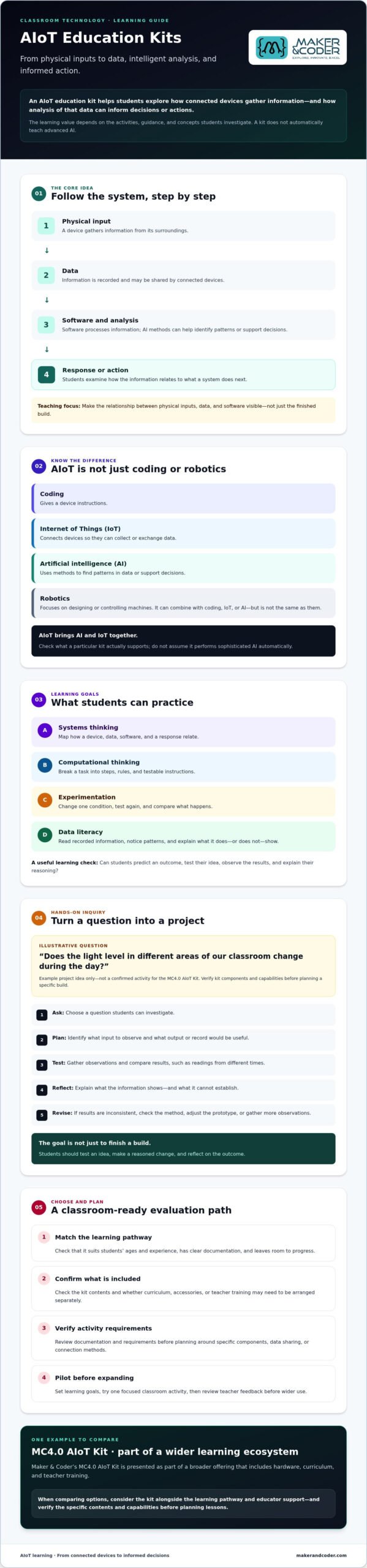
An AIoT education kit is a set of learning tools that helps students explore how connected devices collect data and how intelligent analysis can inform decisions or actions. In class, the value lies in making the relationship between physical inputs, data, and software visible. A kit can introduce these ideas, but it does not automatically teach advanced AI. The depth of learning depends on the activities, guidance, and concepts students investigate.
How is AIoT different from coding, robotics, and IoT?
Coding gives a device instructions. IoT connects devices so they can collect or exchange data. AI involves methods for finding patterns in data or supporting decisions. Robotics focuses on designing or controlling machines. Robotics can be combined with coding, IoT, or AI, but it is not the same as any of them.
Illustrative scenario, not a confirmed kit activity: Students imagine a connected classroom temperature sensor. They could discuss how code records readings, how the data could be shared, and how analysis might reveal a recurring pattern. The aim is to examine each part of the system, not assume that a kit performs sophisticated AI automatically.
Which learning goals can an AIoT kit support?
Start with observable student actions rather than broad promises. An AIoT education kit can provide a context for practicing:
- Systems thinking: Mapping how a device, data, software, and a response relate.
- Computational thinking: Breaking a task into steps, rules, and testable instructions.
- Experimentation: Changing one condition, testing again, and comparing what happens.
- Data literacy: Reading recorded information, noticing patterns, and explaining what it does or doesn’t show.
Ask students to predict an outcome, test their idea, observe the results, and explain their reasoning. These steps connect hands-on exploration to learning goals without promising a particular measured gain. They also help educators check whether students understand the process from physical input to interpretation, rather than simply following instructions.
How an AIoT Education Kit Turns Concepts into Hands-On Learning
Concepts become clearer when students can follow a complete cycle: ask a question, plan a prototype, test it, observe the results, and reflect on what to change. An AIoT education kit can support this kind of inquiry when the activity matches the kit’s verified capabilities and the class’s learning goals.
Project-based learning makes an abstract system observable by letting students trace how a physical input becomes data, how software processes it, and what response follows. A device becomes more than a build when students can explain what information it uses and why its behavior changes.
From a real-world question to a testable project
Begin with a question students can investigate, such as: “Does the light level in different areas of our classroom change during the day?” This is an illustrative project idea, not a confirmed activity for the MC4.0 AIoT Kit. Before proposing a specific build, educators should verify which components and activities the kit supports.
Help learners turn the question into a plan. They identify what input to observe, decide what output or record would be useful, and describe what evidence could help answer the question. Students might compare readings collected at different times, then explain what the information shows and what it cannot establish.
Keep the process open to revision. If results are inconsistent, students can check their method, adjust the prototype, or gather more observations. The aim is not simply to finish a build. It is to test an idea, make a reasoned change, and reflect on the outcome.
Where artificial intelligence and connected devices fit
Connected-device concepts enter when learners consider how information is collected and, where a system supports it, communicated between devices or software. Avoid assuming a particular connection method or protocol. Check the kit’s documentation and requirements before planning activities around data sharing.
Then introduce AI at an age-appropriate level. Students can discuss how analysis might identify patterns in collected information or help inform a decision. Contrast this with automation: a fixed rule, such as “if the reading is below a chosen level, take an action,” follows instructions but does not by itself demonstrate learning from data. Describe an AI activity only if the kit and lesson actually support it.
Connected projects also create an opportunity to discuss what data is collected, who can access it, and how to build trust. Purdue University’s overview of security in AIoT ecosystems can help educators explore why security considerations belong in conversations about connected systems.
How to Compare AIoT Education Kits for Your Classroom
A capable AIoT education kit is only one part of the learning experience. Students also need usable activities, and educators need guidance to connect the hardware to clear goals. Compare the full learning pathway, not just the feature list. Check whether students can progress from introductory concepts to more complex investigations, and whether teachers can adapt activities to their grade level and available lesson time.
Which evaluation criteria matter beyond the hardware?
Review the documentation for more than assembly steps. Strong learning materials help students ask questions, test ideas, explain results, and improve their work. Check whether curriculum resources are designed for the hardware and intended grade levels, and whether they’re included or sold separately. Use this table to identify what’s confirmed and what to ask vendors before deciding.
| Criterion | What to assess | MC4.0 information |
|---|---|---|
| Learning pathway | Do activities build from foundational concepts toward more complex work? | Confirm the specific activities and progression available for the kit. |
| Age and grade suitability | Are instructions and project expectations appropriate for your students? | Maker & Coder offers a K-12 MC Curriculum; verify its scope and fit for your intended grades. |
| Modularity | Can learners explore or reconfigure parts of the system? | MC Blocks are modular; confirm how they relate to the kit and whether they’re included. |
| Documentation | Do materials support investigation, explanation, and iteration? | Check the kit’s current documentation and supported activities. |
| Teacher support | What training or onboarding is available, and in what format? | Teacher training programs are offered; confirm format and what each offering includes. |
Separate kit contents from optional curriculum, accessories, and training. Ask for an itemized list, then verify software requirements, setup steps, and any materials needed to run a lesson. A feature mentioned in a product description is not necessarily included in every package.
How can schools assess teacher readiness and classroom fit?
Map the kit to the way your classroom operates. Consider lesson time, class size, storage, access to compatible devices, and the educator’s confidence with the concepts. Ask who will prepare activities, how students will share equipment, and what support is available before the first lesson. A short, well-supported pilot can reveal practical barriers before wider adoption.
Maker & Coder offers MC 4.0 hardware, curriculum, modular MC Blocks, and teacher training. Check the details of each separately rather than assuming they come together. Compare the available MC 4.0 kits and learning products with your classroom priorities.
AIoT Kit Rollout: From First Lesson to Wider Use
A successful rollout starts with a learning goal, not a large equipment order. Choose one manageable classroom use case, prepare educators to use the materials, and treat the first activity as a pilot. Review what works in your setting before deciding how to expand.
What should educators prepare before the first activity?
Set clear objectives and identify prior knowledge students may need, such as following instructions, recording observations, or interpreting simple data. Before class, confirm the AIoT education kit’s components, required software, connectivity, device compatibility, and classroom setup needs with the provider. Plan student roles, a basic troubleshooting routine, and prompts that help learners reflect on their process.
A practical rollout sequence
Use this sequence to move from planning to a considered next step. Adapt it to your school’s schedule and resources, since no fixed timeline suits every classroom.
- Set the learning goal. Define what students should be able to explain or demonstrate by the end of the activity.
- Choose a focused use case. Select a lesson that fits the goal, student readiness, available equipment, and class time.
- Prepare and test. Review instructions and requirements, check the setup, and identify where students may need guidance.
- Introduce the activity. Explain the goal and how students will work together. Assign roles such as builder, recorder, and tester, then rotate them if useful.
- Document the investigation. Have students record their initial question, what they changed or tested, what they observed, and the conclusion they can support with evidence.
- Review the pilot. Gather student work and educator feedback. Note what supported learning, what caused friction, and what should change before repeating or expanding the activity.
How can schools build teacher confidence over time?
Give educators time to become familiar with the hardware and lesson materials before expecting student-led exploration. Start with a guided activity, then gradually give students more room to shape questions and test ideas. Professional development can support this progression. Confirm the training format, scope, and whether it’s a separate offering before planning around it.
Maker & Coder offers teacher training programs alongside its MC 4.0 learning ecosystem. For information about training for your classroom rollout, contact Maker & Coder about teacher training.
Explore the MC4.0 AIoT Kit as Part of Maker & Coder’s Learning Ecosystem
The MC4.0 AIoT Kit is one option for schools exploring hands-on AIoT learning. It sits within Maker & Coder’s wider MC 4.0 education ecosystem, which includes hardware, modular components, K-12 curriculum, and teacher training. Treat these as related but distinct offerings, not as a package with identical contents. Confirm what’s included with the specific kit you’re evaluating.
What does Maker & Coder offer for hands-on STEM learning?
Maker & Coder offers the MC4.0 AIoT Kit and MC4.0 Controller, along with MC Blocks, the MC Curriculum for K-12, and teacher training programs. MC Blocks are modular components within the broader hardware platform, but their inclusion with a particular kit should be verified. Check whether curriculum resources or training are included, available separately, or suited to your intended classroom use.
This distinction helps schools assess the whole learning pathway without assuming a kit alone provides every resource needed for instruction. The hardware, learning materials, and educator preparation each play a different role: tools support practical exploration, curriculum helps structure lessons, and training can help educators prepare to guide them. Confirm the scope and format of each offering directly before planning a rollout.
What should schools ask before taking the next step?
Bring your classroom goals into the conversation. Ask focused questions to judge whether the kit and supporting offerings match your students, curriculum, and practical constraints:
- Kit details: Which components and activities apply to the selected kit? What software, devices, or connectivity does it require?
- Grade and learning fit: Which grade levels and prior knowledge suit the activities? How might they align with your curriculum goals?
- Educator preparation: What training is available, what does it cover, and is it a separate offering?
- Package contents: Are MC Blocks, curriculum materials, or other resources included, or should each be considered separately?
- Classroom use: What lesson format, equipment access, and teacher support would make implementation practical in your setting?
Answers to these questions can turn a product comparison into a clearer implementation plan. Explore Maker & Coder’s MC 4.0 offerings, then discuss your AIoT learning goals and classroom needs with the team before deciding on next steps.
Turn Classroom Curiosity into a Practical Learning Pathway
The right AIoT education kit is more than hardware. It should help students investigate how connected systems work while giving educators a clear way to connect activities to learning goals. Compare the learning pathway, confirm what each offering includes, and start with a manageable pilot your team can review and refine.
Maker & Coder’s wider ecosystem includes the MC 4.0 hardware platform with modular MC Blocks, a K-12 MC Curriculum designed to integrate with the hardware, and professional teacher training programs. These are distinct offerings, so confirm the details and fit for your classroom before planning implementation.
Ready to explore how your goals and teaching context could shape the next step? Discuss your AIoT education goals with Maker & Coder. With thoughtful planning and support, your classroom can move from first questions to meaningful hands-on exploration.
Frequently Asked Questions
What is an AIoT education kit?
An AIoT education kit gives students a practical way to explore connected devices and artificial intelligence together. They can investigate how a device gathers information, how data may be analyzed, and how that analysis could inform an action. The kit is a learning tool, not an automatic course in advanced AI. Lesson design, documentation, and educator guidance shape how students engage with the concepts.
What is the difference between an AIoT kit and a robotics kit?
An AIoT kit focuses on exploring the relationship between connected devices, data, and intelligent analysis. A robotics kit centers on creating or controlling a robot. The categories can overlap: a robotic device might collect information or connect with other systems. Compare their intended learning goals and activities rather than assuming every robotics kit teaches AIoT or every AIoT kit includes a robot.
Can beginners use an AIoT education kit?
Beginners may be able to use one when its lessons match their age, prior knowledge, and available support. Look for clear setup guidance and an introductory pathway that lets learners test ideas before moving to more complex tasks. Ask what software or devices are required and whether educators can try the activities first. Don’t assume a product is beginner-friendly based on its name alone.
How do you choose an AIoT education kit for a school?
Start with the learning goals and student age range, then compare the kit’s documented activities, progression, technical requirements, and teacher support. Consider class size, lesson time, storage, and access to compatible devices. Ask whether curriculum resources and training are included or separate. A small pilot can help educators assess classroom fit and identify adjustments before considering broader adoption.
Does an AIoT education kit include a curriculum?
Not necessarily. Curriculum may be included, sold separately, or provided by another source, so confirm the package contents before choosing a kit. Maker & Coder offers the K-12 MC Curriculum, designed to integrate with its hardware, as a distinct offering. Check its scope and grade-level fit, and verify whether it comes with the particular kit you’re considering.
Do teachers need technical experience to teach AIoT?
Technical experience can help, but educators also need suitable lesson materials, time to familiarize themselves with the equipment, and a clear way to guide student inquiry. Begin by reviewing the setup and activity instructions, then identify where training may be useful. Maker & Coder offers professional teacher training programs. Confirm the format and scope to determine whether they fit your team’s needs.
What should I verify before buying an AIoT education kit?
Confirm the exact components, supported activities, software requirements, device compatibility, connectivity needs, and any additional materials required. Check the intended grade range, documentation, and whether curriculum or teacher training is included or separate. Ask how the kit supports your planned learning goals and classroom setup. For Maker & Coder offerings, verify the current details for the selected kit and related resources before making a purchasing decision.