The most expensive school technology mistake isn’t choosing an older device. It’s buying hardware before deciding how it will support learning. Future-proofing school technology investments means looking beyond purchase day to the curriculum, educator readiness, support, and adaptability that help technology remain useful as needs evolve.
It’s understandable that these decisions can feel complex. Devices, software, infrastructure, and training all compete for attention, and a purchase can outpace the planning needed to put it to work. The answer isn’t simply to buy the newest technology. It’s to connect each investment to the learning goals it should support.
This guide offers a practical framework for assessing school technology over its lifecycle. You’ll learn how to define instructional needs, compare options, prepare teachers, plan implementation, and review long-term value. It also explains how curriculum and support fit into the decision, and how to assess whether tools can adapt as classroom needs change.
Key Takeaways
- Start future-proofing school technology investments by defining the learning goals and classroom needs each purchase should serve.
- Assess adaptability by asking about users, curriculum fit, implementation requirements, and how the technology will be reviewed over time.
- Compare complete implementation approaches, including educator training and support, rather than judging options by device specifications alone.
- Use a staged plan: set goals, gather user input, run a focused pilot, prepare teachers, implement, and review.
- Explore how Maker & Coder brings MC 4.0 hardware and modular MC Blocks together with its K-12 curriculum and teacher training programs.
Why future-proofing school technology investments starts with learning goals
A device can be new, durable, and technically impressive yet still sit unused if it doesn’t address a real classroom need. Future-proofing school technology investments starts before procurement: define what students and educators need to do, then assess which tools can support those activities as learning needs change.
Future-proofing school technology investments means choosing and planning for technology that can continue to support evolving learning needs, rather than trying to predict every future tool. This keeps the focus on usefulness, not novelty. The broader idea of Educational technology includes creating, using, and managing resources to facilitate learning. A sound decision therefore considers more than the device itself.
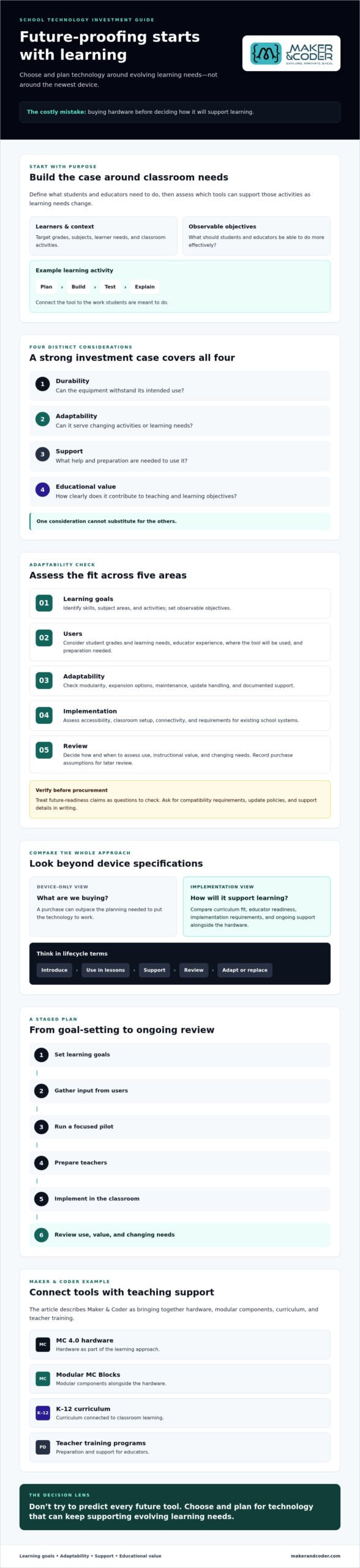
Keep four considerations distinct: durability is whether equipment can withstand its intended use; adaptability is whether it can serve changing activities or learning needs; support is the help and preparation needed to use it; and educational value is how clearly it contributes to teaching and learning objectives. A strong investment case addresses all four rather than treating one as a substitute for the others.
Which learning needs should technology investments serve?
Start with the learners and the work. Identify the target grades, subjects, learner needs, and classroom activities the technology should support. Connect these to observable objectives. For example, students might use a tool to plan, build, test, and explain a project. Ask what educators and students should be able to do more effectively with the technology. If the case rests mainly on keeping up with a trend, pause and define the instructional need first.
Why devices alone do not make an investment future-ready
Hardware doesn’t determine how learning happens. Without curriculum that gives it a purposeful role, educator confidence to guide its use, and a practical implementation plan, even capable devices may be underused. Treat technology as one part of a learning system: tools, teaching practices, learning activities, and the support that helps them work together.
Before approving a purchase, map its lifecycle. Consider how the technology will be introduced, used in lessons, supported, reviewed, and eventually replaced or adapted. This shifts the question from “Which device should we buy?” to “What will help this learning approach remain useful as our needs evolve?”
How to assess whether school technology can adapt over time
Adaptability doesn’t mean a tool will last indefinitely. It means the tool can meet defined learning needs, work within your school’s environment, and remain practical as activities and requirements change. Use this five-part assessment to make the decision concrete:
- Learning goals: Identify the skills, subject areas, and classroom activities the technology should support. Set observable objectives so you can assess whether it is helping.
- Users: Consider students’ grade levels and learning needs, as well as educators’ experience. Identify who will use the technology, where they will use it, and what preparation they may need.
- Adaptability: Check whether the system is modular, whether it can be expanded, and what maintenance it requires. Ask providers how updates are handled and what support is documented. Treat general claims about future readiness as questions to verify, not proof.
- Implementation: Assess accessibility, classroom setup, connectivity, and requirements for existing school systems. Have technical staff confirm compatibility and other requirements directly with the provider.
- Review: Decide when and how the school will assess use, instructional value, and changing needs. Record the assumptions behind the purchase so the team can revisit them.
Mark unverified claims before procurement. If a provider says a tool will work with current equipment or support future updates, ask for the relevant requirements and policies in writing. This helps the team resolve assumptions before committing.
Check technical fit, not just feature lists
Ask how components can be added or changed, what routine maintenance involves, and whether update policies are documented. Compare the answers with your school’s setup. Can students access and use the technology as intended? Does the classroom have the required connectivity and space? Will it work with existing systems? Confirm compatibility and future-support claims with the provider rather than assuming they apply.
Include curriculum and teacher readiness
Technical fit is only part of the assessment. Review whether available lessons support the progression you need across grades and activities, and account for the time educators need to build confidence. Ask what training is available and how teachers can get support as they introduce the technology. Without that preparation, useful tools can remain underused.
Maker & Coder offers a connected K-12 STEM example: its MC 4.0 hardware is paired with modular MC Blocks, the MC Curriculum (K-12), and Teacher Training Programs. This is one approach to evaluating hardware alongside learning resources and educator preparation, not a universal fit for every school. To discuss learning goals and implementation needs, connect with Maker & Coder.
How to compare school technology investments beyond device specifications
A newer device or longer feature list doesn’t automatically make an investment more future-ready. The better choice is the one that fits your school’s learning goals, classroom conditions, and implementation capacity. Compare complete approaches, including curriculum, educator preparation, and support, not just hardware specifications.
A school technology comparison framework for decision-makers
Use the same questions for every shortlisted option. Separate essential requirements from desirable features, then record assumptions that still need confirmation, such as compatibility with existing systems or how updates are handled. Invite educators to assess classroom usefulness and IT staff to review technical fit. A shared framework makes trade-offs visible and keeps attention on the features that matter to your school.
Weight criteria according to your goals and constraints. For a classroom exploring project-based STEM learning, curriculum and educator readiness may matter most. If technical integration is a priority, IT requirements may carry greater weight. Mark each criterion as essential, desirable, or unverified, then compare all options against the same priorities.
How modular STEM platforms support progressive learning
Modularity can let educators consider different components or activities for different learning needs. It doesn’t guarantee a particular product lifespan or future compatibility, so confirm the details that matter to your school. Maker & Coder’s examples include modular MC Blocks and the MC4.0 Base Kit, MC4.0 AIoT Kit, and MC4.0 STEAM Kit. These are options to compare against your criteria. The goal of future-proofing school technology investments is not to select the most advanced system, but to choose an approach with clear learning value and practical fit.
Planning School Tech Investment: Pilot to Classroom
A well-chosen tool still needs a thoughtful route into the classroom. A staged plan helps schools surface practical issues early, prepare educators, and make an informed decision before expanding an investment. It turns future-proofing school technology investments into a repeatable process, rather than a one-time guess about what may be useful.
- Define goals. State what students should learn or do, which classroom activities the technology will support, and how the school will recognize useful progress.
- Consult users. Ask educators, students, and IT stakeholders about classroom routines, accessibility, technical requirements, and likely barriers to use.
- Plan a focused pilot. Choose a setting where the team can test the intended activities and identify what it needs to learn before wider adoption.
- Train and prepare. Schedule educator learning and lesson-planning time before classroom use, not after deployment.
- Implement and review. Use the pilot’s findings to refine logistics and support. Review results against the criteria set at the start before deciding whether to expand, adjust, or pause.
What should a school pilot measure?
Set review criteria before the pilot begins. Consider whether students can use the technology for the planned activities, whether those activities connect to learning goals, how confident educators feel facilitating them, and what technical or practical support is needed. Gather teacher and student feedback with consistent questions so the team can compare experiences across classrooms. Define what evidence will inform the decision, but don’t assume one success threshold fits every school or learning goal.
Readiness also includes the work around the pilot: procurement steps, classroom setup, storage or scheduling needs, educator time, and technical validation. Ask the provider to confirm requirements that affect your school’s systems, and document any assumptions still to be checked. A classroom trial can’t answer every question about broader deployment, but it can make the next decision more grounded.
How to prepare educators and build adoption
Build training and planning into the schedule before expanding beyond the pilot. Professional development is most relevant when educators can work hands-on with the tools and connect them to activities they expect to teach. Schools exploring STEM learning can assess Maker & Coder’s MC 4.0 hardware and kits alongside its curriculum and teacher preparation as part of an implementation plan.
Once your school has defined its goals, pilot questions, and readiness needs, consider how they relate to available learning resources and training. Learn more about discussing your school’s learning goals with Maker & Coder.
How Maker & Coder connects school technology with curriculum and teacher support
A practical selection framework helps schools identify what they need. The next step is to examine how a specific offering brings learning tools and classroom preparation together. Maker & Coder provides a K-12 STEM education ecosystem built around MC 4.0 hardware, modular MC Blocks, curriculum, and teacher training. It’s one connected approach to consider, not a universal solution for every school.
What the Maker & Coder ecosystem includes
The offering includes the MC4.0 Controller and the MC4.0 Base Kit, MC4.0 AIoT Kit, and MC4.0 STEAM Kit. Modular MC Blocks are part of the ecosystem, and the MC Curriculum (K-12) is designed to integrate with the company’s hardware. Teacher Training Programs support classroom implementation by helping educators prepare to use the resources.
Start with your intended learning focus when comparing options. A school exploring general STEM activities might evaluate the MC4.0 Base Kit. A school considering AIoT or STEAM learning might compare the MC4.0 AIoT Kit or MC4.0 STEAM Kit with its curriculum goals. These are starting points for assessment, not a claim that any kit fits every grade, subject, or classroom. Confirm the activities, technical requirements, and curriculum alignment that matter to your school.
This combination is relevant to future-proofing school technology investments because it brings hardware, learning resources, and educator preparation into the same evaluation. Teacher training supports implementation, but it doesn’t guarantee a particular learning outcome. Assess the full approach against your school’s objectives and readiness.
How to explore a fit for your school
Bring specific context to the discussion: target grade levels, curriculum goals, intended classroom activities, and practical constraints such as available teaching time and classroom setup. Then confirm technical fit, the scope of teacher training, and whether the curriculum aligns with your school’s requirements. Clear questions help decision-makers assess the offering against the same criteria used for other shortlisted options.
To explore the offering, discuss your school’s STEM technology needs.
Turn technology planning into lasting learning
Future-proofing school technology investments isn’t about predicting which tools will dominate tomorrow. It means making deliberate choices grounded in learning goals, checking classroom and technical fit, and planning for educator readiness and review.
Move from comparison to action by clarifying what students should learn, involving the people who will use and support the technology, and testing assumptions before expanding an investment. A thoughtful process helps schools focus on instructional value rather than novelty alone.
Maker & Coder’s MC 4.0 offering brings together hardware, modular MC Blocks, a K-12 curriculum, and teacher training. Kit options include the MC4.0 Base Kit, MC4.0 AIoT Kit, and MC4.0 STEAM Kit. Assess them against your school’s goals and implementation requirements rather than treating them as a one-size-fits-all answer.
Discuss your school’s STEM technology needs with Maker & Coder to explore a learning-focused path forward. Clear priorities and thoughtful preparation can help your school make technology a stronger foundation for discovery and growth.
Frequently Asked Questions
What does future-proofing school technology investments mean?
Future-proofing school technology investments means choosing and planning for tools that can continue to support changing learning needs, not trying to predict every future device or trend. Start by identifying the learning goals a purchase should serve, then assess its adaptability, technical fit, curriculum, training, and support. This keeps attention on classroom usefulness and whether the investment remains relevant as needs evolve.
How can a school choose technology that will remain useful?
Match technology to defined learning goals, intended classroom activities, and the needs of students and educators. Compare options using consistent questions about adaptability, accessibility, maintenance, curriculum, training, and support. Ask providers to confirm technical requirements, compatibility, and update policies rather than relying on broad assurances. A focused pilot can show how the technology works in practice before the school decides whether to expand its use.
Is it better to invest in devices or curriculum first?
Begin with the learning need and curriculum plan, then select devices that can support them. Buying hardware before identifying lessons and classroom activities can leave educators with tools but no clear instructional purpose. Curriculum doesn’t need to be finalized before every technology decision. Assess the two together: clarify intended learning, identify needed resources and educator preparation, and confirm that the technology fits the planned activities.
How can schools evaluate the long-term value of education technology?
Look beyond the purchase itself. Consider whether the technology supports defined learning objectives, fits classroom and technical requirements, can adapt to relevant changes, and has appropriate curriculum, training, and support. Set review criteria before a pilot or implementation, such as usability and educator readiness, then revisit them using consistent feedback. Document assumptions and confirm provider claims so later decisions reflect evidence from your setting.
Why is teacher training important when schools adopt new technology?
Teacher training helps educators understand how to use technology in planned classroom activities and build confidence before wider implementation. Without preparation and time to plan, even a suitable tool may be difficult to incorporate meaningfully into lessons. Include training in the implementation plan alongside curriculum and technical readiness. Maker & Coder offers Teacher Training Programs to support classroom implementation of its STEM technology. Schools should confirm the training scope that fits their needs.
Can modular STEM kits support different grade levels?
Modular STEM kits may be worth considering when a school wants to explore varied components or activities, but modularity alone doesn’t confirm suitability for every age or grade. Review the available lessons, intended learning progression, and classroom requirements for each level, and verify details with the provider. Maker & Coder offers MC Blocks and a structured MC Curriculum (K-12) designed to integrate with its hardware. Assess fit against your school’s curriculum goals.
What should a school include in a technology pilot?
Include a clear learning goal, intended classroom activities, participating users, and review criteria set in advance. Assess classroom usability, connection to learning objectives, educator confidence, and practical or technical support needs. Gather teacher and student feedback using consistent questions. Plan procurement steps, classroom logistics, educator preparation, and technical validation as well. There’s no universal success threshold. Define what evidence will guide your school’s decision to adjust, expand, or stop.