A 45-minute lesson about connected home devices can help students examine how everyday conveniences affect people. Teaching smart home concepts in the classroom can prompt thoughtful discussion about privacy, safety, and the choices behind household automation.
These devices can make familiar tasks easier, but they also raise questions about personal information, cost, and who benefits. Invite students to consider different perspectives and explain what they would want a household device to do.
This guide offers practical ways to shape those conversations, plan classroom activities, and help learners make informed decisions about connected devices.
Key Takeaways
- Connect smart-home activities with digital technologies, design, and science learning through a clear classroom task.
- Help students weigh privacy, safety, wellbeing, and the trade-offs of connected devices.
- Guide learners to trace how an input leads to a decision, an output, and an actuator’s action.
- Assess classroom kit costs by considering the devices and resources needed for your learning goals.
- Use relevant U.S. standards to shape activities in coding, connected technology, and cybersecurity.
Curriculum links across digital technologies, design and science
Frame the lesson around household needs, thoughtful choices, and clear communication. A shared design challenge gives students a practical reason to listen, compare perspectives, and explain their ideas.
-
Map curriculum links
Choose a household routine, then connect it to reading, discussion, and design tasks. Students can interpret a short scenario, identify a person’s needs, and explain a proposed improvement. Give each task a distinct purpose: reading builds understanding, discussion develops reasoning, and a design sketch communicates an idea. Leave out activities that don’t support the central challenge.
-
Plan an unplugged design activity
Give learners paper and pencils, then ask them to sketch a familiar room and show how it could better serve someone. They might plan an easier way to find a light switch or organize frequently used items. Have students label the user’s need and explain each choice. Check that the drawing responds to the person’s situation, not just the room’s appearance.
- Match the task to the class. The lesson is designed for Years 5-6 and Years 7-8; its intended standards bands also include Grades 6-8 and Grades 9-12. Younger students can label a room sketch and describe one design choice. Older students can compare alternatives, identify trade-offs, and explain why their proposal suits its intended user.
- Use a historical timeline to prompt discussion about changing household routines. Ask students to create a pictorial timeline of modern home conveniences introduced over the preceding 100 years. They can arrange examples in sequence and describe how each changed an everyday task. Follow with a reflection: which household need still matters, and what makes a proposed solution useful?
- Include older adults and others as sources of perspective. Ask students to interview them about the benefits and possible drawbacks of smart-home technology. Organize learners into groups of three or four to compare responses. Have each group identify a different preference or concern, then revise its design sketch to reflect what interviewees value.
- Close with a short presentation and peer feedback. Each group can introduce its intended user, explain the need, and show how its sketch addresses it. Ask classmates to offer one question and one constructive suggestion. This gives students practice in respectful feedback and helps test whether their design choices are clear to someone who did not create them.
- Collect an individual reflection to assess learning. Ask each student to name the person their idea serves, describe one choice they made, and explain how feedback changed their thinking. Compare responses with the lesson’s goals before planning a follow-up. This step helps distinguish a reasoned proposal from a drawing without a clear purpose.
Digital privacy, safety and wellbeing
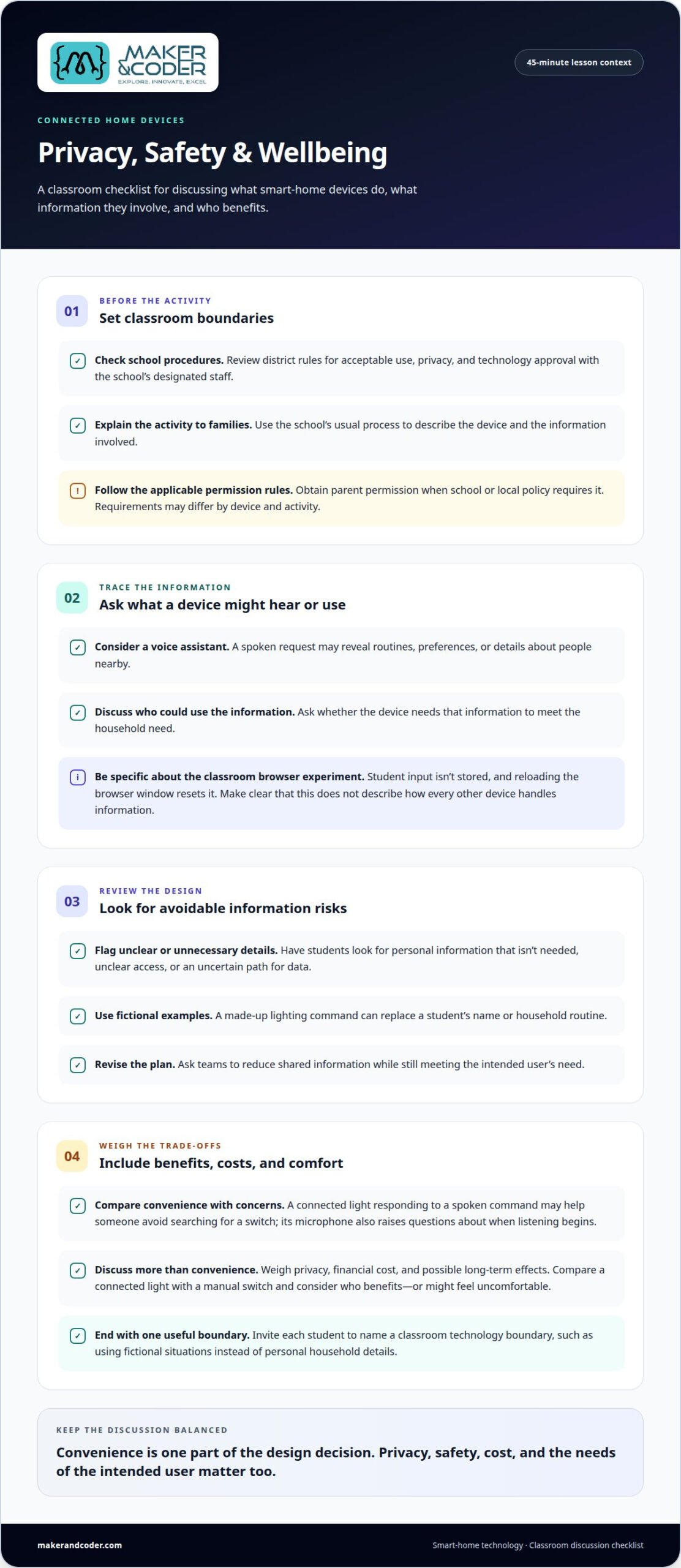
Set privacy boundaries before students discuss connected devices or try an activity. In U.S. classrooms, follow district rules for approved devices, acceptable use, and student data. Whether parent permission is required depends on applicable school policies and the activity.
-
Identify privacy concerns
Ask students to identify what a voice assistant might hear during a household task. A spoken request could reveal routines, preferences, or details about people nearby. Have groups consider who might use that information and whether the device needs it. Don’t treat convenience as the only design goal: discuss privacy, financial costs, and possible long-term effects together.
- Use a familiar scenario to distinguish usefulness from risk. A connected light that responds to a spoken command may help someone avoid searching for a switch, but a microphone raises questions about when listening begins. Ask students to identify the intended user, the information involved, and a concern. Record benefits and drawbacks before inviting a class debate.
- Set classroom boundaries before using a voice assistant or connected device. First, review district procedures for acceptable use, privacy, and technology approval with the school’s designated staff. Then explain the activity, device, and information involved to families through the school’s usual process. Obtain parent permission when school or local policy requires it. Don’t assume the same rules apply to every device or classroom activity.
-
Address information security and privacy
Explain data handling through the lesson’s browser experiment: student input isn’t stored, and reloading the browser window resets it. Ask learners to distinguish this feature from how other devices may handle information. Before any activity, identify what students enter, where it is processed, and how the session ends. Don’t present one experiment as a rule for every smart device.
- Turn security into a design review. Have students examine a proposed smart-home setup and flag unnecessary personal details, unclear access, or an uncertain data path. For example, a lighting activity can use a made-up command instead of a student’s name or household routine. Ask teams to revise their plans to reduce shared information while still meeting the user’s need.
- Include wellbeing in the closing discussion. Ask groups to weigh convenience against privacy, financial cost, and possible long-term effects. A class debate can compare a connected light with a manual switch, then consider who benefits and who might feel uncomfortable. Finish by asking each student to name one useful boundary for classroom technology, such as using fictional scenarios instead of personal household details.
Inputs, decision-making, outputs and actuators
Use a household scenario to explore how people express needs and choose responses. Keep the focus on user experience, clear communication, and whether a proposed action suits the situation.
-
Identify inputs
Ask students to list ways a person might communicate a need at home. A spoken request such as “lights” is one simple example; a written note or agreed signal offers other possibilities to compare. Discuss which option feels clear and convenient for different users. Make sure learners consider the person’s needs rather than assuming one communication method suits everyone.
- Invite students to interpret a short household scenario from different perspectives. Someone saying “lights” might want a room illuminated, but context could change the intended meaning. Ask learners what they would need to know before acting. They can explain how a misunderstanding might affect the person and suggest a clearer way to express the request.
- Help students map a conversation on paper. Ask them to write the person’s request, the listener’s interpretation, and the response in separate boxes. For example, a request for more light could prompt a clarifying question before anyone acts. Students can then revise one box and discuss how the change affects the exchange.
-
Connect outputs and actuators
Ask students to describe the response a person expects after making a request. In the lesson’s example, possible responses include switching lights or a fan on or off. Have learners discuss whether each action matches the request and how someone could tell it happened. Make sure they distinguish the person’s request from the result they experience.
- Use a four-row chart to compare household responses: lights on, lights off, fan on, and fan off. For each, students can note the request, expected result, and a way to tell whether the response fits. Ask what someone might do if the lights change in the wrong direction. This encourages careful attention to communication and user expectations.
- Explore how confidence affects a person’s willingness to act. The lesson’s example assigns 0.91 confidence to interpreting “lights” as a request to switch them on. Explain that the value is a decimal between 0 and 1. Ask students how they might respond when a request is unclear, and why asking for clarification can prevent an unwanted action.
- Finish with a scenario-based discussion. Give students a new household request and ask them to describe a suitable response, including what clarification might help. The lesson estimates that its AI training activity takes approximately 30 seconds on a 2012 laptop, and the AI runs locally in the browser. Keep the discussion centered on clear communication and appropriate responses.
How much do classroom smart home kits and devices cost?
Classroom costs depend on the activity and the equipment it requires. Compare a paper-based design task with a hands-on setup before planning purchases.
- Define the learning goal before comparing equipment. A lesson about inputs and decisions may work with a paper floor plan and command cards. A lesson where students observe a physical response needs suitable devices or a model. Write down the activity first, then identify what learners need to complete it.
- Separate activities into practical levels. An unplugged smart-home design exercise uses classroom materials such as paper and pencils. A prototype may require a controller and components that demonstrate an input and response. A connected-device activity may need additional equipment and setup. Compare each level with your learning objective instead of buying features the lesson won’t use.
- List the equipment needed for one working example. For a lighting task, identify the input method, decision process, and light response. Note which parts students need to handle and which the teacher can demonstrate. This inventory helps distinguish essential items from optional extensions, such as adding a fan response to the same lesson.
- Plan access around how students will work. If learners work in groups, decide whether each group needs a complete setup or can take turns testing one demonstration. For example, teams could first map a “lights on” command on paper, then observe a shared model. The activity structure affects how many devices the classroom needs.
- Include supporting needs in the budget plan. Record any required classroom computer, network access, storage, replacement components, or software-related expenses. These needs vary by activity and device. A browser-based demonstration, for example, has different setup requirements from a physical prototype. Separate one-time purchases from costs that may recur.
- Compare options by classroom usefulness, not feature count. For each proposed kit or device, note the concepts it supports, the activities students can complete, and the preparation required. A setup that demonstrates commands and responses may suit an introductory lesson; a more complex arrangement matters only if it supports additional learning goals.
- Build a final cost comparison using the same categories for every option: core equipment, supporting resources, group access, and ongoing needs. Use a paper-based activity as a baseline, then compare it with a physical demonstration. This makes the trade-offs visible and helps schools choose a practical approach for their curriculum and available resources.
What standards cover smart home technology, IoT, coding, and cybersecurity in U.S. schools?
Build a standards map around the lesson’s learning goals instead of treating a smart home as one subject. Match each activity to the relevant expectations used by your school or district.
- Start with your district’s curriculum documents and state standards. Identify expectations that fit a smart lamp activity, such as explaining a digital system or designing a solution. Record the standard’s exact wording and identifier from the documents your school uses. Don’t assume every curriculum framework uses the same smart-home label.
- Map digital technology concepts to visible system parts. For a smart light, students can identify a user command, the system’s decision, and the resulting action. Link the activity to expectations about how digital systems receive, process, and communicate information, where those concepts appear in your local curriculum.
- Connect coding goals to students’ work with instructions and decisions. Ask learners to write or arrange steps that respond to “lights on” and “lights off.” Then have them test a changed instruction and explain its effect. Match this evidence to local expectations for algorithms, programming, debugging, or computational reasoning.
- Use an IoT example to make connected systems understandable. A classroom model might show how a command reaches a device and triggers a light response. Ask students to diagram the parts and explain how information moves between them. Align the diagram with relevant curriculum expectations for networks, connected devices, or digital communication.
- Make cybersecurity concrete with a fictional device scenario. For example, students can identify what information a voice assistant receives and propose a privacy-conscious alternative. Connect their reasoning to local learning expectations about protecting information, responsible technology use, or digital citizenship. Keep the activity focused on analysis, not collecting personal data.
- Gather evidence for each learning goal. A student’s labeled system diagram can show inputs and outputs; a short code sequence can show decision logic; a written privacy recommendation can show security reasoning. Use a simple rubric that names the target skill, the evidence students produce, and what successful work demonstrates.
- Review the alignment before teaching. Check that each standard connects to an actual student task, rather than appearing only in the lesson plan. If a smart-home activity supports several goals, identify the primary one and the evidence for others. For help planning a coding-focused classroom activity, discuss your curriculum goals.
Maker & Coder: MC 4.0 Kit
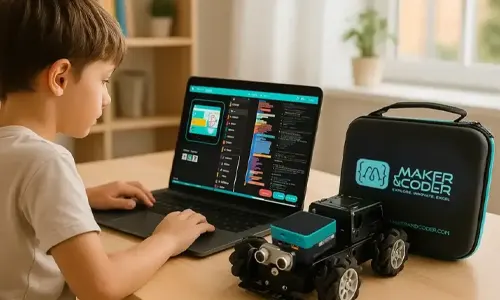
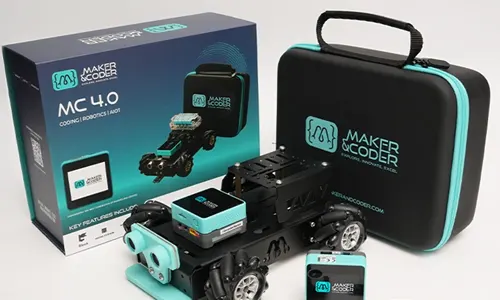
Maker & Coder’s MC 4.0 Kit offers a next step from paper-based plans to hands-on coding and hardware learning. The MC Curriculum (K-12) connects structured learning with the hardware, while MC Blocks provides modular coding resources for classroom activities.
Use these offerings when students are ready to move from diagramming a smart-home system to exploring how programmed instructions connect with physical components. Teacher Training Programs can support educators as they prepare and deliver coding lessons. Together, these options help schools build a learning pathway around practical technology concepts without requiring every lesson to begin with a connected home device.
Explore how Maker & Coder’s learning resources fit your classroom, or contact Maker & Coder to discuss your goals.
Turn Classroom Curiosity Into a Next Step
Let students’ questions shape what comes next. A discussion about connected technology can lead to exploring how people design, program, and rethink the tools around them. As you continue teaching smart home concepts in the classroom, invite learners to propose new challenges and explain whose needs their ideas address.
The strongest next step is one that fits your learners, teaching goals, and available classroom time. Start with a question students genuinely want to solve, then build their curiosity into a purposeful learning experience. Contact Maker & Coder to discuss classroom learning and explore a suitable path forward.
Every thoughtful design begins with a question. Give students room to ask, create, and discover what they can build next.
Maker & Coder for Classroom Smart-Home Learning
Maker & Coder provides a STEM education ecosystem centered on the MC 4.0 hardware platform and modular MC Blocks. Its MC4.0 Controller and Base, AIoT, and STEAM kits can give students a hands-on setting for exploring home automation concepts.
Turn to Maker & Coder when you want to connect a smart-home lesson with a structured K-12 pathway. The MC Curriculum is designed to integrate with the hardware, and Teacher Training Programs are available for educators.
Frequently Asked Questions
Why is this relevant?
Smart-home examples show how everyday tools depend on programmed choices, not magic. Teaching smart home concepts in the classroom connects computing ideas with decisions that affect people. Students can investigate who a device serves, what information it uses, and what happens when it receives a command. For example, ask learners to redesign an automatic light for someone carrying groceries. This turns an abstract concept into a meaningful design challenge.
What smart home concepts are appropriate to teach in K-12 classrooms?
Choose concepts that suit students’ experience, such as sensors, automation rules, user needs, and responsible technology use. Younger learners might sort picture cards into “detect,” “decide,” and “respond.” Older students could compare two proposed systems and explain which better addresses a household need. Keep the task focused on understanding the system and its consequences, not on asking students to share personal information about their homes.
What hands-on smart home classroom activities and lesson plans are available?
A useful way to teach smart home concepts in the classroom is to combine paper prototypes with command-sequencing exercises or design critiques. Students can draw a room and annotate how a device responds to a user’s needs. For sequencing, they arrange instruction cards and test unusual commands. During a design critique, learners identify whose needs a feature serves and consider the drawbacks it could create.
What equipment is needed for a classroom smart home learning lab?
Begin with the lesson objective, then assemble only what supports it. A planning activity can use paper, markers, and printed device cards. A coding demonstration may need a classroom computer and a beginner-friendly programming environment. A physical prototype may require a controller and components chosen for the activity. Prepare a non-device alternative so students can still analyze the system if equipment access is limited.
How can teachers demonstrate smart home automation using low-cost or simulated tools?
Represent a smart home with role cards: one student gives an instruction, another applies a rule, and a third shows the response. A slide or spreadsheet can model how different inputs lead to different outcomes. For example, students can change a fictional room’s conditions and predict what an automation rule should do. Simulation lets the class test logic before handling physical devices.
How can students program smart home devices using beginner-friendly platforms?
Start with visual, block-based programming, where students assemble instructions instead of typing full code. They can create a simple sequence, predict its result, then revise one block to change the behavior. Once the logic is clear, teachers can introduce text-based programming as a next step. Choose an activity with visible outcomes so learners can compare the program’s instructions with the device’s response.
What are the privacy and cybersecurity risks of using smart home devices in classrooms?
Potential concerns include collecting personal information, unclear data handling, unauthorized access, and recordings of nearby conversations. Reduce exposure by using fictional scenarios, limiting personal details, and following school rules for technology use. Before an activity, identify what information a device receives and who can access it. Students can then suggest safeguards, such as avoiding real names or household routines in demonstrations.
How can teachers make smart home lessons accessible and safe for students?
Offer different ways to participate: students can sketch a system, explain a sequence aloud, or arrange printed instructions. Use fictional users and classroom scenarios instead of asking learners to disclose home routines. Before using physical devices, review school procedures and explain the activity’s boundaries. Clear roles, accessible materials, and a device-free alternative help students contribute while keeping the lesson focused and considerate.