What if the most versatile tool in your student’s studio wasn’t a brush or a chisel, but a line of code? While 87% of future careers now demand STEM skills, the art classroom remains the most vital space for teaching the human element of innovation. You likely recognize the need to evolve, yet the hurdle of technical confidence or limited hardware budgets can make digital integration feel out of reach. Integrating creative coding projects for art class shouldn’t mean sacrificing the tactile joy of creation for rigid, screen-based drills. It’s about expanding the canvas and empowering the next generation of creators.
We understand that you want to move beyond static curricula toward a more dynamic, experimental environment. Discover how to transform your art curriculum with high-impact projects that merge traditional techniques with modern technical literacy. This guide provides a clear pathway from unplugged conceptual learning to tangible, “plugged” digital masterpieces. We will explore actionable strategies to engage students in building interactive art that meets both rigorous computer science standards and your own high artistic expectations. Let’s redefine the digital paintbrush together and build a future where logic and aesthetics coexist perfectly.
Key Takeaways
- Redefine code as a digital medium for expressive, non-functional output, shifting student focus from technical syntax to pure creative exploration.
- Implement high-impact generative art lessons that recreate classics by Mondrian and Sol LeWitt while mastering modern p5.js techniques.
- Transition from the screen to the studio by integrating sensors and physical computing, turning environmental inputs like light and sound into artistic data.
- Simplify the integration of creative coding projects for art class using a scaffolded approach that starts with “unplugged” logic and remixable starter sketches.
- Discover how the Maker & Coder ecosystem, including the MC 4.0 Controller and MC Blocks, provides a cost-effective bridge for comprehensive STEAM education.
Table of Contents
- The Intersection of Logic and Aesthetics: Why Creative Coding Belongs in Art Class
- Generative Art Classics: Digital Projects for Every Grade Level
- Beyond the Screen: Integrating Hardware and Physical Computing into Art
- Planning Your Unit: Overcoming Technical Barriers in the Creative Process
- Empowering the Next Generation of Creators with Maker & Coder
The Intersection of Logic and Aesthetics: Why Creative Coding Belongs in Art Class
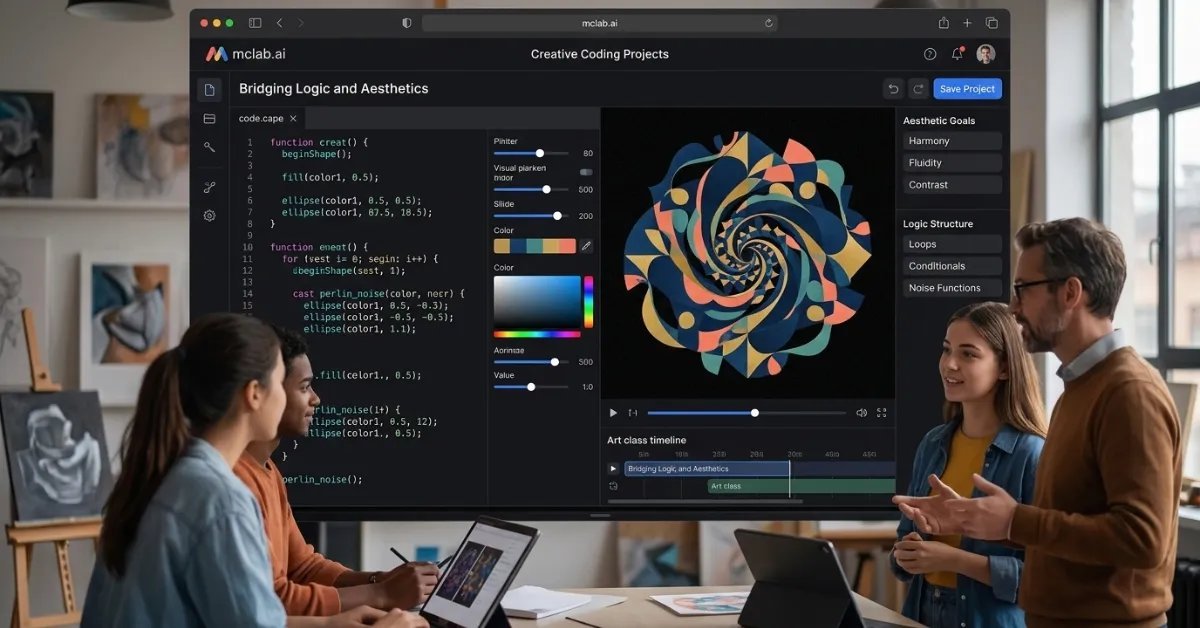
Creative coding is often misunderstood as a purely technical discipline. In the art room, however, it serves as a medium where the goal is expression rather than utility. We are witnessing a profound shift in education. Students are moving away from simply “learning to code” for software development. Instead, they are “coding to create” for the sake of beauty and exploration. This transition elevates creative coding projects for art class from a digital novelty to a fundamental necessity. It transforms the computer from a word processor into a generative studio. Logic meets paint. Syntax meets soul.
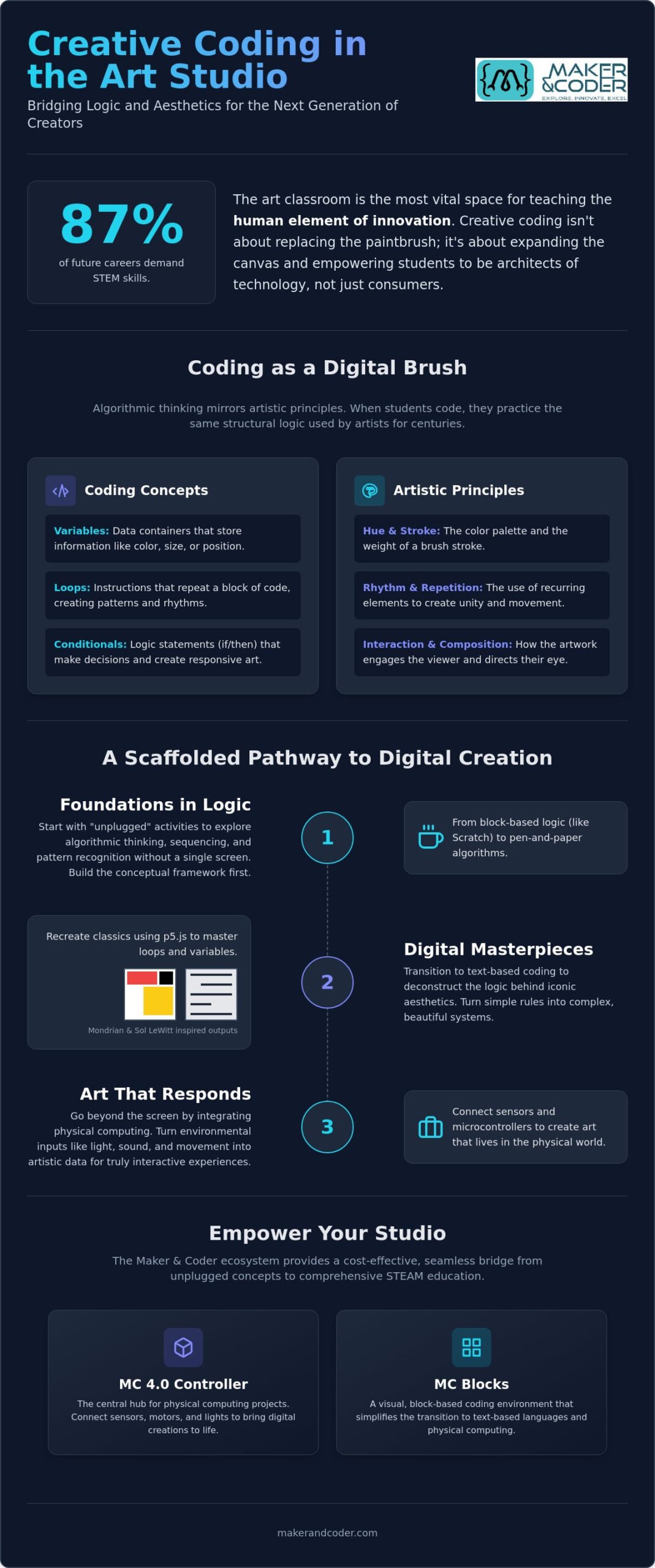
Algorithmic thinking isn’t a new concept for artists. It mirrors the structural logic found in Renaissance perspective or the geometric precision of Islamic tiling. When a student writes a loop, they are practicing the same rhythmic repetition found in a printmaker’s studio. This approach creates a “Prestige-Tech” art room. It is a sophisticated space where high-level innovation meets centuries-old tradition. By equipping your studio with tools from the Maker & Coder shop, you bridge the gap between abstract concepts and tangible masterpieces. You aren’t just teaching a skill; you’re providing a new lens through which to see the world.
Coding as a Digital Brush
Think of code as a fluid, digital medium. Variables represent the hue of a pixel or the weight of a virtual stroke. Unlike traditional media, digital code offers infinite reproducibility and the ability to iterate without wasting physical materials. Students can change one line of code to transform a single circle into a thousand shimmering orbs. In this environment, the teacher adopts the role of “expert-as-enabler.” You don’t need to be a software engineer to lead. You simply need to guide the creative vision and encourage students to experiment with the digital pigments at their fingertips.
Meeting STEAM Standards Through Creativity
Modern education demands a synthesis of skills. Logic-based art projects satisfy both National Core Arts Standards and CSTA Computer Science Standards simultaneously. Students develop spatial reasoning, pattern recognition, and problem-solving abilities while building a professional-grade portfolio. These creative coding projects for art class ensure that students aren’t just consumers of technology; they are its architects. Creative coding is a bridge between computational logic and human emotion. By integrating these projects, you prepare learners for a future where technical literacy and artistic intuition are inseparable. They don’t just learn to use a tool. They learn to master a medium.
Generative Art Classics: Digital Projects for Every Grade Level
Generative art serves as a vibrant bridge between historical masterpieces and modern technology. By revisiting the works of pioneers like Piet Mondrian or Sol LeWitt, students discover that art has always been governed by systems and rules. Recreating Mondrian’s iconic grids doesn’t require a brush. It requires a simple loop. When students use code to automate the placement of primary colors and black lines, they aren’t just copying a style. They’re deconstructing the logic behind the aesthetic. This foundational understanding is essential when developing creative coding projects for art class that resonate across all age groups.
As students progress, the complexity of their digital canvas grows. Using p5.js, learners can move from static shapes to complex, evolving mandalas that shift in real-time. These projects introduce the power of variables and trigonometry to create perfect symmetry. Beyond static imagery, interactive portraits allow art to respond to the viewer. By using mouse movements or sound inputs to distort a digital sketch, students learn that art can be a living, breathing conversation between the creator and the audience. This evolution often marks the transition from block-based platforms like Scratch to the sophisticated, text-based logic of Python.
Elementary: Block-Based Masterpieces
For younger learners, the journey begins with visual logic. Using Scratch pen tools, students can build “Etch-a-Sketch” style programs that teach the basics of coordinate systems and directional movement. We recommend starting with “unplugged” exercises before ever touching a screen. Have students write out physical instructions for a classmate to draw a simple house or star. This demystifies the idea of an algorithm. It builds spatial awareness and confidence. Experts at The Art of Education University emphasize that integrating coding into the art curriculum at this stage fosters a sense of agency over digital tools rather than mere consumption.
Middle and High School: Generative Systems
Advanced students can explore the boundaries of organic randomness through Perlin Noise. Unlike standard random functions, Perlin Noise creates smooth, natural-looking textures that mimic clouds, mountains, or flowing water. This is where technical mastery meets high-level artistic expression. Students can also dive into data visualization, turning school-wide statistics or environmental data into abstract, color-coded sculptures. To support this growth, the MC Curriculum offers structured pathways that lead students from basic sketches to professional-grade generative systems. If you’re looking for ways to tailor these high-impact projects to your specific classroom needs, feel free to reach out to our team for expert support.
Beyond the Screen: Integrating Hardware and Physical Computing into Art
While digital canvases offer infinite depth, the true magic of modern STEAM education happens when code leaps off the screen and into the physical world. Physical computing allows students to create art that doesn’t just sit behind a glass pane; it reacts, breathes, and interacts with its environment. This transition is a vital component of creative coding projects for art class, turning abstract logic into tangible experiences. By integrating sensors that detect light, sound, or motion, students transform their work from a static image into a responsive installation. They begin to see code not as a series of commands, but as a nervous system for their creations.
The MC4.0 Controller serves as the central brain of these physical masterpieces, coordinating complex signals with ease. For rapid prototyping, modular hardware like MC Blocks allows learners to snap components together, focusing on the aesthetic arrangement rather than getting bogged down in intricate wiring. This approach empowers students to build sophisticated systems without the frustration of traditional electronics, maintaining a high level of artistic quality from the first sketch to the final build. It represents the “expert-as-enabler” philosophy, where technology removes barriers to creativity rather than creating new ones.
Kinetic Sculptures and Robotics
Harnessing the power of servos and motors allows for the creation of kinetic sculptures that challenge the boundaries of traditional fine art. Students can take basic cardboard models and transform them into interactive automata using the MC 4.0 Kit. This process teaches the mechanics of motion alongside the logic of code, moving the student from a passive observer to a mechanical engineer of aesthetics. With the integration of AIoT, these sculptures can even react to real-time environmental data. Imagine a sculpture that shifts its form based on local wind speeds or changes its rhythm to match the ambient noise of the gallery. This creates a “smart” art piece that exists in a constant, living dialogue with the world around it.
Light Art and Wearables
Light serves as a powerful medium for digital expression, offering a bridge between the virtual and the visceral. Programming LEDs allows students to design custom light-painting tools or interactive wearable fashion that changes color based on the wearer’s mood or movement. This intersection of textile art and technology encourages students to envision the future of personal expression. The MC4.0 STEAM Kit bridges the gap between digital logic and physical form by providing a seamless interface for tactile experimentation. Whether they are designing a glowing gallery installation or a piece of smart apparel, they are learning that innovation is as much about the physical material as it is about the lines of code that bring it to life.
Planning Your Unit: Overcoming Technical Barriers in the Creative Process
Transitioning from traditional media to a digital studio requires more than just new software. It demands a pedagogical shift. Managing a full classroom while introducing creative coding projects for art class can feel daunting if you focus solely on the technical syntax. Instead, center your unit planning on the creative flow. By breaking down the process into manageable phases, you ensure that technology remains an enabler of expression rather than a barrier to entry. This methodical approach allows you to maintain the role of artistic mentor while students navigate the logic of their new medium.
- Step 1: Demystify with “Unplugged” Logic. Before students touch a keyboard, have them write physical instructions for a drawing. This demonstrates that algorithms are simply recipes for visual outcomes.
- Step 2: Scaffold the Experience. Provide “starter sketches” that students can remix. Starting with a blank screen is intimidating; starting with a working loop encourages immediate experimentation.
- Step 3: Value Iterative Failure. In the digital studio, a “bug” is often a happy accident. Encourage students to embrace unexpected visual outputs as part of the artistic discovery.
- Step 4: Facilitate Peer Debugging. Empower students to solve technical hurdles together. This reduces the teacher bottleneck and builds a collaborative studio culture.
- Step 5: Curate a Digital Gallery. Finalize the unit by showcasing work in a virtual space. This validates their growth and provides a professional platform for their digital portfolio.
Classroom Management for High-Tech Art
Efficiency is the backbone of a successful STEAM unit. Organize your hardware kits and modular blocks into clearly labeled stations to ensure rapid setup and teardown. Balance is key. Aim for a healthy split between screen-based logic and physical building time within your standard art block. If you feel hesitant about the technical requirements, investing in Professional Teacher Training can provide the confidence needed for seamless implementation. Don’t let technical uncertainty stall your innovation. If you need a customized roadmap for your school, connect with our educational consultants today.
Assessment and Grading
How do you grade code-based art without becoming a computer scientist? Focus on the intersection of technical execution and artistic intent. Use rubrics that prioritize problem-solving and experimentation over “perfect” code. Ask students to document their “journey of growth.” A final render is valuable, but the sketches, failed attempts, and logical breakthroughs tell the real story of their development. This approach ensures your creative coding projects for art class meet high academic standards while honoring the messy, beautiful process of creation.
Empowering the Next Generation of Creators with Maker & Coder
The transition from a traditional classroom to a tech-enabled studio doesn’t have to be a solo journey. Maker & Coder provides a complete ecosystem designed to bridge the gap between abstract computer science and high-impact visual expression. By integrating our hardware and software solutions, you move beyond mere technical instruction. You begin to cultivate a space where students feel empowered to build, break, and rebuild their creative visions. The Maker & Coder platform acts as a dedicated educational partner, ensuring that your creative coding projects for art class are both rigorous and deeply inspiring.
At the heart of this transformation is the MC4.0 Controller. It provides the processing power needed to run complex generative algorithms while remaining accessible for beginners. Paired with modular MC Blocks, the system allows students to focus on the “why” of their artistic choices rather than the “how” of complex circuitry. To support this growth, the K-12 MC Curriculum offers a ready-made roadmap for busy educators. It provides structured lessons that evolve with your students, moving from basic block-based logic to sophisticated text-based applications. This ensures that technical literacy grows alongside artistic maturity.
The MC 4.0 STEAM Kit: Designed for Discovery
Precision meets play. The MC4.0 STEAM Kit is engineered for the rigors of a busy school day. Its modular MC Blocks allow for endless artistic experimentation, enabling students to prototype kinetic sculptures or light installations in minutes. These components are built for durability, ensuring your investment serves multiple cohorts of creators. Maker & Coder functions as an expert-as-enabler, transferring deep technical knowledge to users through intuitive design and comprehensive support. This allows you to focus on what you do best: fostering the next generation of visionary artists while the technology handles the heavy lifting.
Start Your Creative Coding Journey
Envision a studio where every student has the tools to turn their wildest digital dreams into physical reality. This isn’t a distant goal; it’s a practical outcome of a well-supported STEAM department. By adopting the Maker & Coder ecosystem, you provide your students with a competitive edge in a world that increasingly values the intersection of design and technology. Explore our Teacher Training Programs to unlock the full potential of your studio and lead your department into the future of digital expression. It’s time to build something tangible. It’s time to create.
Shape the Future of Your Digital Studio
The integration of technology into the art room is no longer a futuristic concept; it’s a present-day necessity for nurturing versatile creators. You’ve seen how algorithmic thinking mirrors traditional techniques and how physical computing brings code into the tangible world. By implementing creative coding projects for art class, you empower students to master the digital paintbrush while meeting rigorous STEAM standards. This journey from basic logic to complex, responsive installations prepares learners for a world where innovation and aesthetics are inseparable.
Success in this transition depends on having the right roadmap. Our comprehensive K-12 MC Curriculum provides the structure you need to move from basic concepts to advanced generative systems. With modular MC Blocks, your students can prototype kinetic art without the frustration of complex wiring. We are here to act as your expert-as-enabler through our dedicated Teacher Training Programs, ensuring you feel confident leading this innovation. Don’t wait to transform your curriculum. Take the first step toward a prestige-tech art environment today.
Equip your art room with the MC 4.0 STEAM Kit and Curriculum
Frequently Asked Questions
Do I need to be an expert programmer to teach creative coding in art class?
You don’t need to be a software engineer to lead these initiatives effectively. Your role is that of an expert-as-enabler, guiding the creative vision while students explore technical logic. Many successful educators start alongside their students, using scaffolded resources and professional training to build confidence. Focus on the artistic outcome and the problem-solving process rather than striving for perfect syntax from day one.
What is the best programming language for art students to start with?
Visual, block-based languages like Scratch are ideal for elementary learners to grasp the basics of logic and sequence. For middle and high school students, p5.js is the gold standard because it was designed specifically for the visual arts. It provides immediate visual feedback, making it easier to connect code to aesthetics. As students mature, transitioning to Python offers a professional-grade path for building complex generative systems.
How can I teach coding if my art room doesn’t have enough computers?
You can introduce the foundations of code without a one-to-one computer ratio. Use unplugged activities to teach algorithmic thinking through physical drawing exercises or logic games. Alternatively, rotate students through a dedicated digital station while others work with traditional media. This blended approach ensures everyone gains technical literacy without requiring a massive hardware overhaul or a dedicated computer lab for every session.
What is the difference between generative art and AI-generated art?
Generative art relies on specific rules and algorithms written by the artist to produce an output. The artist maintains direct control over the underlying logic. AI-generated art, however, uses neural networks trained on vast datasets to predict and create imagery based on user prompts. While both are digital, generative art focuses on the beauty of the system, whereas AI art focuses on probabilistic interpretation of existing data.
How does hardware like the MC 4.0 Kit improve the art-making experience?
The MC 4.0 Kit transforms the experience by bringing code into the physical world. Instead of staying behind a screen, students use the MC4.0 Controller and modular MC Blocks to build responsive, kinetic sculptures. This tactile interaction makes abstract concepts tangible and reduces the frustration of complex electronics. It allows students to focus on the aesthetic arrangement and interactive potential of their work rather than getting lost in wiring.
Can creative coding projects be used for portfolios or AP Art submissions?
Absolutely. Creative coding projects for art class are excellent additions to digital portfolios and AP 2-D Art and Design submissions. These projects demonstrate a high level of technical mastery, innovative thinking, and personal voice. College admissions and the College Board value the intersection of traditional design principles and modern computational logic, especially when students document their iterative process and conceptual growth throughout the unit.
What are some “unplugged” activities to introduce coding logic?
Start with Human Robotics, where one student acts as the programmer and another as the robot, following strict, literal instructions to complete a drawing. You can also have students design Conditional Coloring sheets, where colors are determined by specific rules or if-then statements. These exercises demystify the logic behind code and build a strong conceptual foundation before students ever touch a keyboard, making the eventual transition to screens much smoother.
How do I handle students who are intimidated by the technical side of coding?
Bridge the gap by focusing on remixing rather than starting from scratch. Provide starter sketches where students only need to change a few variables to see a dramatic visual shift. Frame technical errors as happy accidents that lead to unexpected artistic discoveries. By lowering the barrier to entry and celebrating the experimental process, you transform a daunting technical challenge into an accessible and empowering tool for self-expression.