
What if the robot that reaches the finish line isn’t automatically the project that earns the highest score? When criteria are unclear, grading can feel subjective, and a working build can overshadow the planning, testing, and teamwork behind it. Creating rubrics for robotics projects means assessing more than whether the robot works.
A clear rubric sets expectations before students begin and gives educators a consistent way to assess both outcomes and learning. This guide explains how to turn project objectives into observable criteria, describe performance levels students can use to improve their work, and recognize thoughtful design, testing, collaboration, and reflection alongside functionality.
From setting learning goals to choosing evidence of progress, you’ll learn how to balance the finished robot with the thinking behind it. The result is a practical guide students can use to understand what success looks like and learn through iteration.
Key Takeaways
- Start with learning goals, then connect each one to evidence students can demonstrate during the project.
- When creating rubrics for robotics projects, choose criteria that match those goals, such as planning, programming, testing, or explaining design choices.
- Use clear performance descriptions to make scores easier to understand and act on, whether you choose a three-level or four-level scale.
- Share the rubric before building and revisit it at project checkpoints to guide progress and support consistent assessment.
- Explore how the MC 4.0 ecosystem, MC Blocks, and K-12 MC Curriculum can support structured, hands-on project learning.
Creating Robotics Project Rubrics Starts With Clear Learning Goals
Start with the learning, not the scoring grid. A robotics project rubric connects observable student work to stated learning goals. Put simply: A robotics rubric makes learning visible by describing what students can demonstrate, not just what they can build. An academic rubric similarly uses criteria and descriptions of quality to support assessment.
A robot that completes its task is useful evidence, but it doesn’t tell the whole story. Students may reach the same result through different design choices, and a robot that doesn’t work as planned can still reveal strong reasoning, careful testing, or productive iteration. Name the knowledge and skills students should develop, then decide what work would make that learning observable. This goal-first approach helps a rubric recognize both the final build and the thinking behind it.
Which robotics learning goals should the rubric measure?
Choose goals that match the challenge and instruction. A line-following robot project might target coding logic and sensor use; a structure-building challenge might focus on mechanical design and stability. Problem-solving can be part of either project. Separate subject-specific knowledge from transferable skills, such as explaining decisions, communicating with teammates, or improving a design after testing.
Before adding a criterion, ask whether students had a fair opportunity to learn and practise that skill. If collaboration is assessed, for example, students need clear opportunities to share responsibilities and contribute. Keep the rubric focused on a manageable set of important goals instead of scoring every visible activity.
How can a rubric preserve creativity while setting expectations?
Set expectations for the quality of evidence, not for one prescribed design. Instead of requiring every robot to use the same structure, assess whether students can explain how their design addresses the task and use test observations to support their choices. Different solutions can demonstrate learning when students provide clear reasoning.
Share the goals and criteria before building begins. Students can use them to plan, check their progress, and reflect on what they would change. Revisit the criteria during the project, not only at submission. That makes the rubric a guide for decision-making while leaving room for curiosity, experimentation, and more than one path to a successful solution.
Choose Robotics Rubric Criteria That Reveal the Whole Design Process
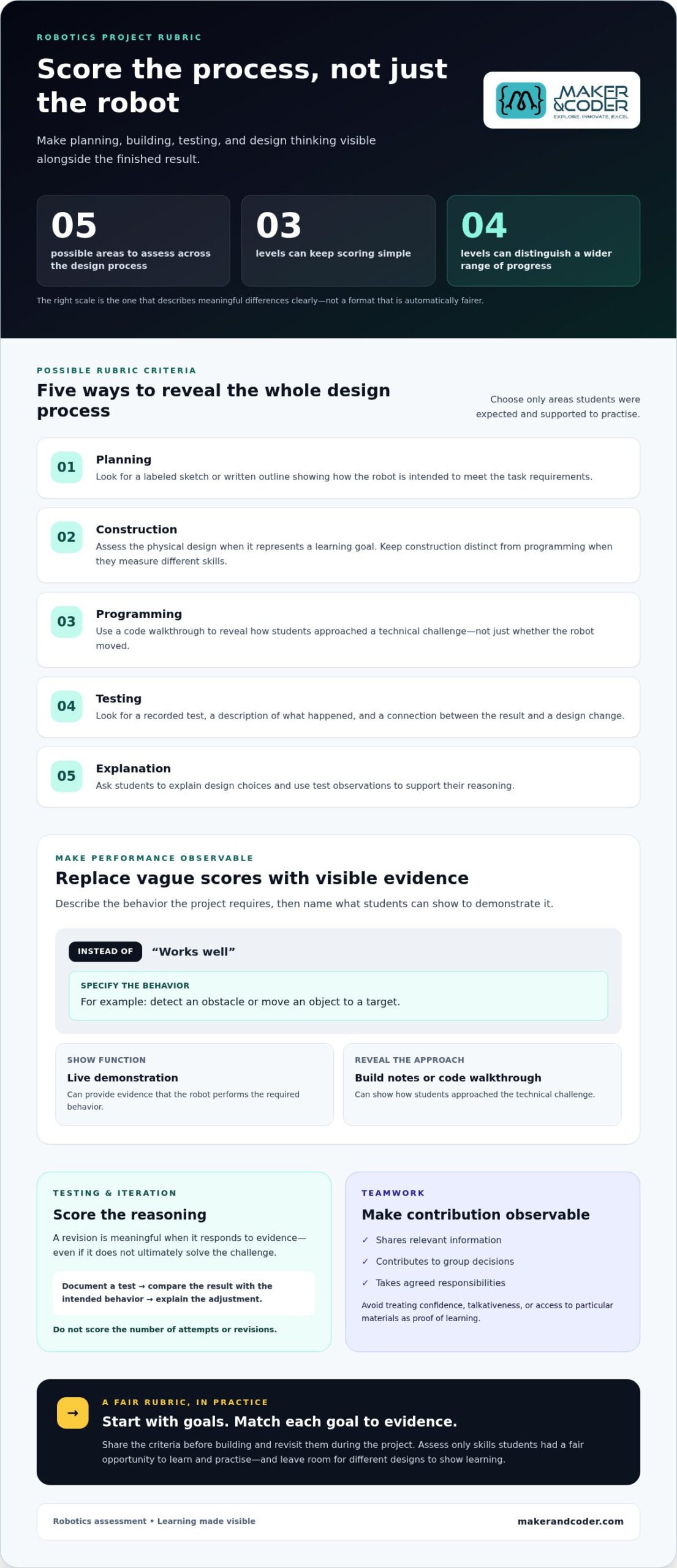
A useful rubric connects project goals to evidence students produce. Choose criteria that reflect meaningful stages of the work, not every action students take. Depending on the learning goals, a concise menu might include planning, construction, programming, testing, and explanation. Select only the areas students were expected and supported to practise.
Strong robotics criteria assess both what students build and how they make, test, and explain decisions along the way. For example, “testing” becomes observable when students record a test, describe what happened, and connect the result to a design change. “Planning” might be evidenced by a labeled sketch or a written outline of how the robot will meet the task requirements.
How do you assess a robot’s function and technical design?
Describe required behaviors precisely. Instead of scoring whether a robot “works well,” identify the project specification it must meet, such as detecting an obstacle or moving an object to a target. Then decide what evidence will demonstrate that behavior. A live demonstration can assess function; build notes or a code walkthrough can reveal how students approached the technical challenge.
Assess construction and programming separately when they represent distinct learning goals. A robot’s movement may depend on both, but one score can obscure whether students understand the physical design, the code, or how the two work together. Match each criterion to evidence students can show, and don’t score technical features that weren’t part of the learning objectives.
How should testing, iteration, and teamwork appear in a rubric?
Assess the quality of the process, not the number of attempts or revisions. Students might document a test, compare the result with the intended behavior, and explain why they adjusted a mechanism or changed code. A revision is meaningful when it responds to evidence, even if it doesn’t ultimately solve the challenge.
Make collaboration observable, too. Consider whether students share relevant information, contribute to group decisions, and take agreed responsibilities. Avoid using confidence, talkativeness, or access to particular materials as stand-ins for learning. Those signals may not reflect a student’s understanding or contribution.
Set Performance Levels That Make Robotics Project Scores Fair
Once criteria are clear, define what different levels of evidence look like. A three-level scale can keep scoring simple, while a four-level scale offers an extra distinction when students may show a wider range of progress. Neither format is automatically fairer. Choose the one that lets you describe meaningful differences without forcing work into unclear categories.
Use labels that describe demonstrated learning, such as “Beginning,” “Developing,” “Proficient,” and “Extending,” rather than labels that characterize students. Keep each level focused on the same criterion and explain a difference students can recognize, such as completeness, reasoning, or independence.
What makes a performance-level descriptor useful?
Replace subjective terms like “good” or “poor” with observable evidence. For a testing criterion, “uses test results to explain a design change” is clearer than “tests well.” Make neighboring levels distinct, too: one may identify a result, while the next uses that result to justify a revision. Keep the criterion constant across every level so the scale measures progress in one skill, not a changing set of expectations.
Illustrative example: Testing and evidence, on a four-level scale
- Beginning: Records a test result but doesn’t connect it to the project goal.
- Developing: Describes whether the robot met the goal during a test.
- Proficient: Uses a test result to explain a design or code adjustment.
- Extending: Compares test results across trials and justifies a next step using the evidence.
This example assesses how students use evidence, not whether their robot succeeds every time. For a three-level version, combine adjacent descriptions only if the distinction between them isn’t essential to the learning goal. Read each level aloud and check that students and teachers can tell what separates one from the next.
How can teachers reduce bias when scoring robotics work?
Separate team outcomes from individual learning evidence where appropriate. A group demonstration can show whether a shared robot meets its specifications, while an individual explanation or code walkthrough can reveal each student’s understanding. This helps prevent a team result from standing in for every learner’s contribution.
Before scoring, confirm that each criterion was taught, communicated, and accessible to students. Then review a few examples of student work together and discuss how the descriptors apply. Comparing interpretations can surface ambiguous wording before you score the full class set. Fairness comes from clear expectations and consistent attention to evidence, not from guessing at effort or rewarding confidence.
Use a Robotics Project Rubric Before, During, and After the Build
A rubric works best as a project guide, not just a grading sheet opened at the end. Use it to make expectations visible before students begin, support decisions as they build, and reflect on learning once the robot is complete. This keeps assessment connected to the design process and gives students opportunities to act on feedback.
Use this workflow to put the rubric into practice:
- Set goals: Identify the knowledge and skills students should demonstrate.
- Choose criteria: Select observable evidence tied directly to those goals.
- Define levels: Describe what different degrees of progress look like for each criterion.
- Share the rubric: Review expectations and examples before building starts.
- Assess progress: Revisit relevant criteria at project checkpoints and evaluate final evidence.
- Reflect: Ask students what they learned, then revise unclear criteria for the next project.
How should teachers introduce the rubric to students?
Walk through the criteria before students start building. Use a concrete example, such as a sample test note or a short explanation of a design decision, to show what counts as evidence. Invite students to restate expectations in their own words and ask what they’ll need to document or demonstrate.
Revisit the rubric at meaningful checkpoints, such as after the first prototype or a test run. A brief self-check can help students identify a next step: “Which criterion have we demonstrated, and what evidence should we gather next?” Self-assessment supports reflection and revision, but it doesn’t replace the teacher’s judgment of the work.
Students should use the rubric before building, during key decisions, and after testing to guide their next step.
How can teachers calibrate scoring and give useful feedback?
Before scoring a full class set, compare a small sample of project evidence against the descriptors. Check whether the same evidence would lead to the same level across different examples, and discuss wording that leaves room for conflicting interpretations. This calibration helps keep scoring aligned with the stated criteria.
Make feedback specific and actionable. Rather than saying “improve your testing,” point to the relevant criterion and suggest a next move, such as recording what happened in a trial and using that result to explain a revision. After the project, note which descriptors students misunderstood or couldn’t demonstrate because expectations weren’t clear. Refine those areas before the next build. A deliberate rubric process keeps assessment useful from the first planning conversation through final reflection.
For support in structuring hands-on robotics learning, explore Maker & Coder’s classroom learning resources.
Connect Robotics Rubrics to Hands-On STEM Learning With Maker & Coder
A well-chosen robotics project gives students tangible ways to show their thinking, from an early plan to a tested build and a final explanation. Maker & Coder’s MC 4.0 ecosystem includes the MC4.0 Controller and modular MC Blocks, which provide a hands-on classroom context for connecting construction to learning goals. The goals, instruction, and rubric define what students are asked to demonstrate.
How can structured robotics activities support rubric-based assessment?
Map project milestones to criteria before students begin. A planning sketch can provide evidence of design thinking; a programming demonstration can show whether the robot performs a required behavior; test notes can reveal how students respond to results. A brief reflection helps students explain why they made a change and what they learned from it.
For example, if the goal is to use code to control a robot’s movement, assess the relevant code and behavior rather than adding unrelated construction criteria. If testing is also a goal, build in a checkpoint where students record what happened and explain a next step. Demonstrations and reflections complement one another: the build shows what the robot does, while students’ explanations reveal the reasoning behind it.
What can educators explore when planning a hands-on robotics project?
Start with the learning goal, then select a project that gives students a fair chance to practise and demonstrate that learning. Maker & Coder’s MC4.0 Base, AIoT, and STEAM kits offer hardware options for hands-on technical learning, alongside the K-12 MC Curriculum. The curriculum, hardware, modular MC Blocks, and teacher training programs support educators in shaping a structured classroom pathway from introducing a concept to building, testing, and reflecting.
To put that pathway into practice, identify what students should know, decide which project milestones will make their learning visible, and align rubric criteria with evidence gathered at each stage. A robotics rubric can guide the activity without prescribing one design or promising a particular result. Keep the focus on matching the classroom task, learning objectives, and assessment evidence.
Explore the MC 4.0 ecosystem and consider how its hardware, curriculum, and teacher training can support your classroom goals.
Turn Clear Criteria Into More Meaningful Robotics Learning
A fair robotics rubric starts with learning goals, then translates them into observable criteria and performance levels students can understand. Assess the design process as well as the finished robot, and use the rubric before, during, and after the build to guide planning, feedback, and reflection.
That structure helps students see how their choices connect to learning, whether they’re programming, constructing, testing, or explaining a design. Maker & Coder’s K-12 MC Curriculum is designed to integrate with its hardware, and its teacher training programs focus on classroom STEM implementation. These resources support educators in shaping hands-on activities around clear objectives and meaningful evidence.
Creating rubrics for robotics projects makes expectations transparent while leaving space for curiosity, iteration, and creative solutions. Discuss your classroom robotics learning goals with Maker & Coder and explore how the MC 4.0 ecosystem can support your STEM learning pathway.
Frequently Asked Questions
How do you create a rubric for a robotics project?
Start by naming the knowledge and skills students should demonstrate. Choose criteria that turn those goals into observable evidence, such as a code walkthrough or a documented test. Define performance levels with distinct descriptions, then review the rubric and examples with students before building. Revisit it at project checkpoints. After assessment, ask students what they learned and revise wording that proved unclear. Tailor every descriptor to the task and evidence available.
What should a robotics project rubric include?
Include only criteria connected to the project’s objectives. Depending on the activity, these may cover design planning, construction, programming, testing, explanation, or teamwork. A robot challenge focused on sensor coding may prioritize programming and test evidence, while a group build may also assess shared decisions. Treat this menu as adaptable, not a checklist. Select criteria students had a chance to practise, and specify what evidence demonstrates each learning goal.
How many performance levels should a robotics rubric have?
Three or four performance levels can both work. Choose based on how much distinction you need to describe progress and what students can readily understand in the project context. More levels aren’t automatically more precise. Clear differences between neighboring descriptors matter most. For example, one level might describe recording a test result, while the next explains how that result informed a design change. Keep each level tied to the same criterion.
Should a robotics rubric grade the final robot or the building process?
It can assess both, with the balance guided by the project’s learning goals. A final demonstration can show whether the robot meets specified requirements, while planning notes, test records, and explanations can reveal students’ reasoning along the way. If the goal is functional programming, give appropriate weight to the behavior and code. If iteration is also a goal, include evidence of how students used testing to inform their decisions.
How can teachers assess teamwork in a robotics project?
Assess observable contributions rather than personality or confidence. Look for evidence such as sharing relevant information, completing agreed responsibilities, listening to teammates’ ideas, and contributing to group decisions. If teamwork is a stated objective, make those expectations clear before the project starts. Where individual understanding matters, pair the team’s robot demonstration with individual evidence, such as a short explanation of a design choice or a student’s role in testing.
How can a robotics rubric be fair to students with different experience levels?
Assess the objectives taught in the project, not skills students may have gained through prior access to robots, tools, or coding experiences. Explain expectations early and provide accessible ways for students to show learning, such as a demonstration, build notes, or a verbal explanation. Descriptors can recognize progress toward the learning goals without lowering clarity. Check that each criterion was taught and practised, and don’t reward unrelated prior experience.
When should students receive a robotics project rubric?
Share the rubric before students begin building, so they can use the criteria to plan their approach. Walk through examples and invite questions about what counts as evidence. Revisit the rubric at meaningful checkpoints, such as after a first prototype or test, so students can identify what to work on next. After the project, students can use the same criteria to reflect on their decisions and learning, alongside the teacher’s assessment.