What if a robotics program could take students from their first hands-on experiment to increasingly complex engineering challenges, instead of treating every build as a one-off activity? That’s the promise of a well-designed K-12 robotics curriculum, and it starts with a clear progression across grade bands.
Robotics can make learning tangible. The challenge is connecting building, coding, engineering, and classroom goals without overwhelming teachers or leaving gaps between lessons. A coherent pathway gives each activity a purpose and helps students build on what they already know.
This practical guide will help you evaluate curriculum scope, progression, and hands-on learning, then plan for implementation and teacher preparation. You’ll see how foundational concepts can lead to more advanced applications, and how curriculum and compatible hardware can work together to support that growth. Maker & Coder’s K-12 MC Curriculum is designed to integrate with MC 4.0 hardware, and modular MC Blocks support experimentation and project work. Teacher training programs help educators prepare for classroom implementation.
Key Takeaways
- Evaluate a K-12 robotics curriculum by how well it connects building, coding, engineering, and reflection into a purposeful learning pathway.
- Use explore, build, program, and integrate-and-refine as a flexible framework for planning progression, not as fixed grade assignments.
- Compare curriculum options against instructional time, learners’ experience, classroom resources, hardware fit, and teacher support.
- Begin with a realistic unit or class sequence, prepare educators, pilot activities, and review learning before expanding.
- Maker & Coder connects its K-12 MC Curriculum with MC 4.0 hardware and modular MC Blocks for hands-on experimentation.
What Should a K-12 Robotics Curriculum Help Students Learn?
A K-12 robotics curriculum is a planned progression of concepts, builds, coding, and reflection. It gives each activity a learning purpose and helps students connect what they make with how they think. A kit supplies materials; a one-off lesson offers a single experience; a project library provides activities to choose from; and a competition program centers on preparing for events. A curriculum pathway connects learning across activities, so students can revisit ideas and extend them over time.
Robotics offers a tangible way to explore engineering design, computational thinking, and problem-solving. It draws on the interdisciplinary study of robots, bringing together physical systems, instructions, and purposeful tasks. The right scope depends on learners’ age and prior experience, available instructional time, and school goals. Those factors shape which concepts to introduce and how much time students need to test, reflect, and revise.
How robotics learning connects coding, engineering, and real-world problem-solving
Start with a challenge: how could a small robot move an object from one point to another? Students can identify what the task requires, sketch a design, build a mechanism, and write code to control its movement. Testing shows where the design or instructions fall short. Learners can then adjust, try again, and explain what changed.
Coding gives students a way to control and refine a physical system. A sequence of commands can direct movement, and revised instructions can change how the robot responds. Computational thinking is the practice of breaking a problem into steps a system can follow, then testing and improving those steps. Building, programming, and reflection become connected parts of one learning process.
Why a K-12 pathway needs progression rather than isolated projects
Concepts such as sequence, movement, sensing, and testing can return across a pathway with greater depth as students gain experience. A familiar idea might first appear in a simple build, then reappear in a project that asks learners to coordinate more parts or justify their design choices. The goal isn’t to repeat the same activity. It’s to deepen understanding through new contexts.
Project variety keeps learning purposeful: students can encounter different challenges while practicing shared concepts. Progression doesn’t require every class to follow identical pacing. Schools can adapt activities to learner readiness, prior exposure, available time, and instructional goals. Maker & Coder’s K-12 MC Curriculum is designed to work with MC 4.0 hardware, and modular MC Blocks support hands-on experimentation. Together, curriculum and materials can connect individual builds to a broader learning pathway, rather than treating a kit alone as the curriculum.
How Should a K-12 Robotics Curriculum Progress from Foundations to Advanced Projects?
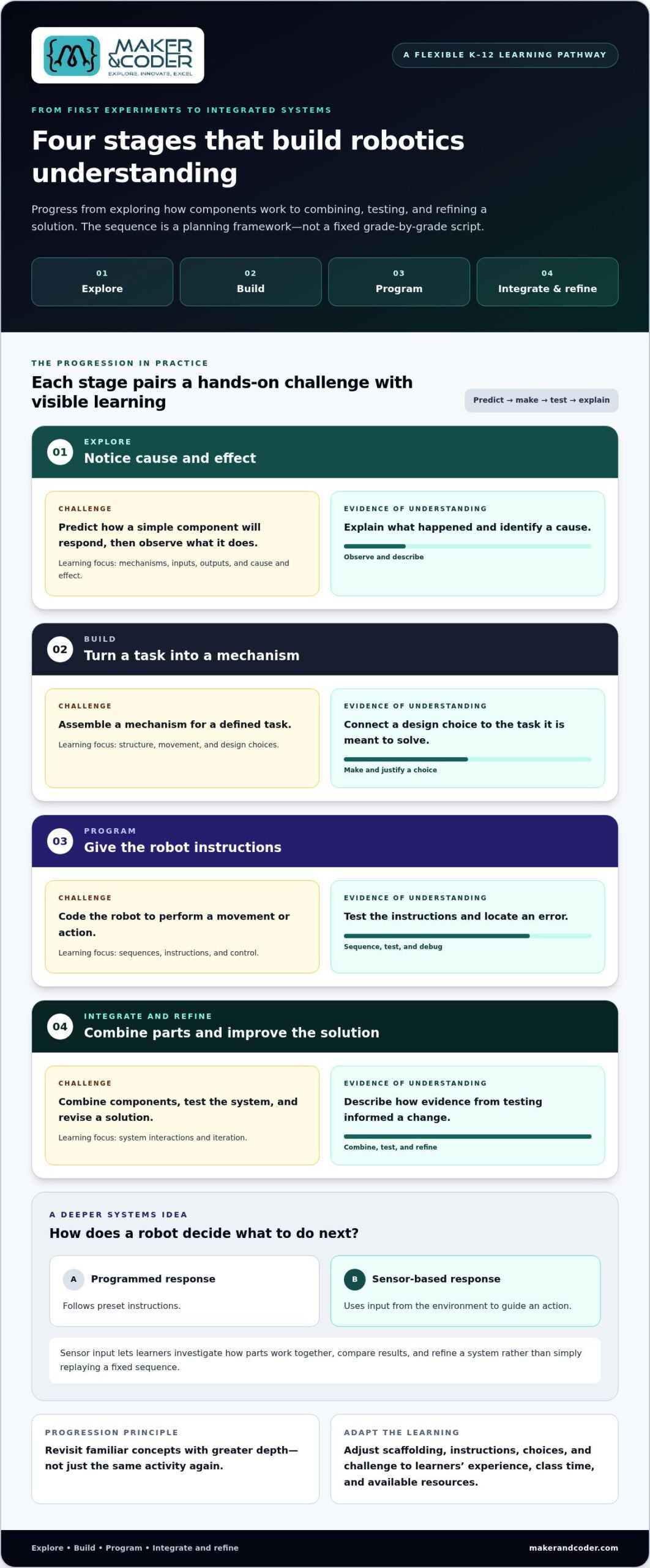
Build progression around growing independence, not a rigid grade-by-grade script. A useful planning model moves through four stages: explore, build, program, then integrate and refine. Each stage can combine a new concept, guided practice, student choices, and reflection. The sequence gives educators a way to plan ahead while adapting activities to learners’ experience, class time, and available resources. It’s a flexible framework, not a promise that every student will reach the same outcome on the same schedule.
Short activities can make mechanisms, inputs, outputs, sequencing, and cause and effect visible before students take on open-ended designs. Ask learners to predict what a component will do, try it, and describe what changed. Scaffolding means adjusting instructions, choices, and challenge to support the learners in front of you. It’s an instructional decision, not a fixed age rule.
| Stage | Learning focus | Student activity | Evidence of understanding |
|---|---|---|---|
| Explore | Mechanisms, inputs, outputs, cause and effect | Predict and observe how a simple component responds | Explains what happened and identifies a cause |
| Build | Structure, movement, and design choices | Assemble a mechanism for a defined task | Connects a design choice to the task |
| Program | Sequences, instructions, and control | Code a robot to perform a movement or action | Tests instructions and locates an error |
| Integrate and refine | System interactions and iteration | Combine components, test, and revise a solution | Describes how evidence informed a change |
How coding, sensors, and integrated systems deepen learning
Once learners can give a robot basic instructions, they can investigate how parts work together. A sensor adds an input that can affect what the robot does next. A programmed response follows preset instructions, while a sensor-based response uses input from the environment to guide an action. This distinction opens the door to testing conditions, comparing results, and refining a system instead of simply replaying a fixed sequence.
For an advanced application, educators can introduce AIoT, meaning artificial intelligence combined with the Internet of Things, where connected devices gather or exchange information and AI can help interpret it. Keep the focus on a clear learning question and manageable system interactions. A systematic review of the literature can help educators explore research on robotics in K-12 education as they shape a pathway. Maker & Coder’s MC4.0 AIoT Kit is part of its hardware lineup for connecting curriculum with more advanced applications.
How Do You Compare K-12 Robotics Curriculum Options for Classroom Fit?
Compare the learning pathway, not just the kit or the number of projects. A strong fit connects learning goals to builds, coding activities, teacher guidance, and evidence of student understanding. Use the questions below to assess whether a K-12 robotics curriculum matches your teaching context.
| What to compare | Look for | Classroom-fit question |
|---|---|---|
| Progression | Concepts and projects that build on one another | Can learners move from guided introductions to more independent challenges? |
| Project quality | Clear build instructions, meaningful design choices, and reflection prompts | Does each project teach something specific, or is it mainly an assembly task? |
| Coding approach | A suitable entry point and a path toward greater complexity | Can beginners participate without starting with advanced coding? |
| Hardware fit | Materials that support the stated learning goals | Do the builds and components reinforce the lesson, and can they be used with available classroom resources? |
| Teacher support | Lesson guidance, preparation resources, and assessment suggestions | Can educators see how to introduce, guide, and review the activity? |
| Adaptability | Options for adjusting pacing, scaffolding, or challenge | Can the class work toward the same goal through different levels of support? |
Examine the teaching sequence and materials
A broad catalogue of topics isn’t the same as a coherent teaching sequence. Look for clear learning goals linked to sequenced projects, build instructions, reflection prompts, and practical assessment guidance. Hardware should serve those goals, not appear as an unrelated add-on. For example, if an activity teaches sequencing, the instructions and robot task should give students a reason to plan, test, and explain a sequence.
Review sample activities and teacher resources as if you were preparing to teach them. Can you identify the purpose, materials, steps, likely points of difficulty, and a way to reflect on learning? This quick review can show whether a curriculum fits your instructional time and classroom setup.
Match scope to learners and resources
Robotics doesn’t require every learner to begin with advanced coding. Students can start with guided instructions and hands-on exploration, then take on more coding decisions as they build confidence. When comparing options, look for adjustable scaffolding, extensions, or multiple entry points that suit your learners.
Consider learners’ prior experience, time for building and testing, educator preparation, and the hardware your school can use. Grouping and pacing can change while the core learning objective stays consistent. Maker & Coder’s K-12 MC Curriculum is designed to integrate with MC 4.0 hardware, connecting lessons with hands-on materials. Include the MC 4.0 hardware options in your evaluation of how curriculum and equipment can work together.
How Can Schools Plan a Manageable Robotics Curriculum Rollout?
A successful rollout starts with a focused plan. Instead of launching a K-12 robotics curriculum across every grade at once, choose a realistic unit or class sequence, learn from it, and expand with purpose. This helps schools identify practical needs before they become barriers.
Use five steps to shape the rollout:
- Define goals. Identify what students should learn and how robotics supports existing school priorities.
- Map lessons. Choose a connected sequence that fits the instructional time available, including time for setup, building, testing, and reflection.
- Prepare educators. Review the hardware and lesson flow so teachers can guide activities and anticipate common questions.
- Pilot activities. Run the sequence with a class or group, noting practical constraints such as device access, storage, group size, and workspace.
- Review learning. Gather observations and student work, then adjust support and sequencing before expanding.
Plan classroom logistics alongside the lessons. Decide where materials will be stored, how learners will access devices, how groups will share equipment, and how the room can accommodate building and testing. A plan that fits the real timetable and classroom is more useful than an ambitious sequence that’s difficult to deliver.
Prepare teachers to facilitate hands-on learning
Teacher preparation doesn’t require every educator to be an engineer. It means becoming familiar with the hardware, trying key activities, understanding the lesson flow, and anticipating where learners may need guidance. Maker & Coder’s teacher training programs support educators as they prepare to facilitate robotics lessons. After each class, a brief reflection on pacing, instructions, and student questions can help shape the next session.
Use the pilot to guide your next step
Review more than whether students completed a build. Ask educators what engaged learners, which instructions needed clarification, how setup and cleanup worked, and whether the lesson fit its allotted time. Look at student explanations and design iterations, too. Can learners describe why they changed a design or code sequence? What did they test, and what did they learn from the result?
Use those observations to refine lesson order, clarify teacher support, and decide what’s practical to expand. Maker & Coder’s teacher training programs support classroom implementation, and its K-12 MC Curriculum is designed to work with MC 4.0 hardware. Discuss a robotics curriculum for your school as you plan a manageable starting point.
How Does Maker & Coder Connect Its K-12 MC Curriculum with Robotics Hardware?
A robotics kit gives students something to build with. A curriculum gives those activities direction. Maker & Coder connects its structured K-12 MC Curriculum with the MC 4.0 hardware platform, bringing learning materials and hands-on work together as parts of a school’s K-12 robotics curriculum. This connection helps educators plan what students will learn alongside the equipment they’ll use to explore those ideas.
What role do MC 4.0 and MC Blocks play in hands-on learning?
Hardware is most useful when it supports a learning goal, rather than becoming the goal by itself. With a planned activity, students can use materials to explore a concept, test an idea, and reflect on what they observe. MC Blocks support modular experimentation, giving learners a hands-on way to engage with technical ideas through building and revising.
That distinction matters for implementation. A collection of components alone doesn’t define what students should learn or how lessons connect. The curriculum provides the pathway; hardware gives learners a tangible medium for investigation and project work. Schools can compare the MC 4.0 classroom kits with their instructional goals and classroom context.
Maker & Coder’s MC 4.0 lineup includes the MC4.0 Base Kit, MC4.0 AIoT Kit, and MC4.0 STEAM Kit. These are distinct offerings within the hardware ecosystem. Consider how each fits with the curriculum and the hands-on learning your school wants to support, rather than assuming equipment alone will determine a learning sequence.
How can teacher training support curriculum implementation?
Educators bring the pathway to life. Preparation can help teachers connect lesson goals with hardware use and student activity: what learners are exploring, how materials support the task, and where students may need guidance. Maker & Coder’s professional teacher training programs provide practical support for classroom adoption, helping educators prepare for hands-on lessons without requiring them to be engineers.
Training also gives school teams a chance to think through how activities fit their setting, from lesson flow to classroom routines. Combined with a structured curriculum and compatible hardware, that preparation can help schools move from individual builds toward a more intentional learning experience. Review curriculum goals, hardware fit, and implementation needs with Maker & Coder.
Build a Robotics Pathway That Grows with Your Students
A strong K-12 robotics curriculum connects hands-on projects to a purposeful learning progression. Start with clear school goals, choose activities that fit your learners and classroom resources, and pilot a manageable sequence before expanding. Then use student explanations, design revisions, and teacher feedback to refine the pathway.
Maker & Coder’s structured K-12 MC Curriculum is designed to integrate with MC 4.0 hardware. Modular MC Blocks support hands-on experimentation, while the MC4.0 Base, AIoT, and STEAM kits offer options within the hardware lineup. Professional teacher training programs support classroom implementation, helping educators connect lesson goals with materials and student activities.
Robotics can become more than a series of builds. With thoughtful planning, it can create space for students to explore, create, test, and improve. Discuss a K-12 robotics curriculum for your school and take a practical next step toward a learning pathway that fits your community.
Frequently Asked Questions
What should a K-12 robotics curriculum include?
A K-12 robotics curriculum should connect learning goals to a planned sequence of concepts, builds, coding activities, and reflection. Look for lessons that help students explore how systems work, design and build solutions, program robot behavior, test results, and explain revisions. Teacher guidance and ways to observe student thinking also matter. A strong pathway ties hardware activities to learning goals instead of treating projects as unrelated builds.
How do you choose a robotics curriculum for different grade levels?
Choose a robotics curriculum by considering learners’ age, prior experience, available instructional time, classroom resources, and school goals. Look for a flexible progression that revisits core ideas with increasing complexity, rather than assuming every class follows the same pace. Review sample activities, instructions, coding demands, and teacher resources. These can help you judge whether learners have accessible entry points and whether activities fit your teaching context.
Can robotics be taught without advanced coding experience?
Yes. Students can begin with guided activities that introduce simple instructions, sequencing, and cause and effect, then take on more coding decisions as their skills develop. Teachers don’t need to be engineers to facilitate learning; preparation, clear lesson guidance, and practice with the hardware can help. Focus first on the learning goal and give students opportunities to predict, test, and adjust what their robot does.
How can schools assess learning in a robotics curriculum?
Assess learning through more than a completed robot. Observe how students plan, test, explain results, and revise a design or program. For example, ask learners to describe what they expected, what happened during a test, and why they changed an instruction or structure. Use those explanations and design iterations as evidence of understanding, alongside any assessment guidance in the curriculum. A successful build alone doesn’t prove mastery.
What is the difference between a robotics kit and a robotics curriculum?
A robotics kit provides equipment and components for hands-on work; a curriculum organizes learning over time. It connects goals, concepts, activities, and reflection so each project contributes to a broader pathway. A kit can support that learning, but it doesn’t automatically provide lesson sequencing or teacher guidance. Maker & Coder’s structured K-12 MC Curriculum is designed to integrate with its MC 4.0 hardware platform.
How can teachers prepare to teach robotics in the classroom?
Teachers can prepare by exploring the hardware, reviewing lesson flow, trying key activities, and anticipating where students may need help. They don’t need advanced engineering expertise to guide learners through building, testing, and reflection. Maker & Coder’s professional teacher training programs support classroom implementation and help educators connect lesson goals, hardware use, and student activity. After lessons, teacher reflections on pacing and student questions can inform adjustments to future sessions.
How can a school introduce robotics across multiple grades?
Start with a manageable unit or class sequence, then use what you learn to plan expansion. Define school goals, map connected lessons, prepare educators, pilot activities, and review student learning and classroom logistics. Consider instructional time, device access, storage, group size, and workspace before extending the program. As it grows across grades, keep shared concepts in view while adapting project complexity and pacing to students’ experience.