You do not need an engineering degree to teach robotics.
That may be the most important thing to hear if you are a classroom teacher who loves the idea of robotics but feels nervous about leading it. Many teachers want to give students more hands-on STEAM experiences. They know robotics can build problem-solving, teamwork, coding skills, and confidence. But one thought gets in the way: What if I am not technical enough?
That fear is common, and it is valid. Robotics can sound complex. Wires, ports, code, setup, troubleshooting, and student questions can feel like a lot, especially if your background is not in computer science or engineering. If you have ever searched how to teach robotics in school and hoped to find a simple answer, you are not alone.
The good news is that some robotics systems are built for specialists, and some are built for teachers. MC4.0 was designed for the second group. It removes the usual barriers that make robotics feel intimidating and replaces them with tools that are visual, structured, and easy to use from day one.
In this post, we will walk through what makes MC4.0 a strong fit for robotics for non-technical teachers, what a first lesson can look like, and how free built-in support can help you teach with confidence.
Why robotics feels intimidating for many teachers
For many non-specialist teachers, the concern is not whether robotics is valuable. It is whether it is manageable.
Common worries often sound like this:
- “I do not know how to code.”
- “What if I connect something wrong?”
- “What if the robot does not work and I cannot fix it?”
- “What if the students know more than I do?”
- “How can I fit this into real classroom time?”
These concerns are exactly why the right platform matters. A good classroom robotics system should not ask the teacher to become a robotics engineer first. It should guide both teacher and student through the learning process in a way that feels clear and low-pressure.
That is where MC4.0 stands out.
MC4.0 is designed for teachers, not just tech experts
MC4.0 works well for robotics for non-technical teachers because each part of the system removes friction instead of adding it.
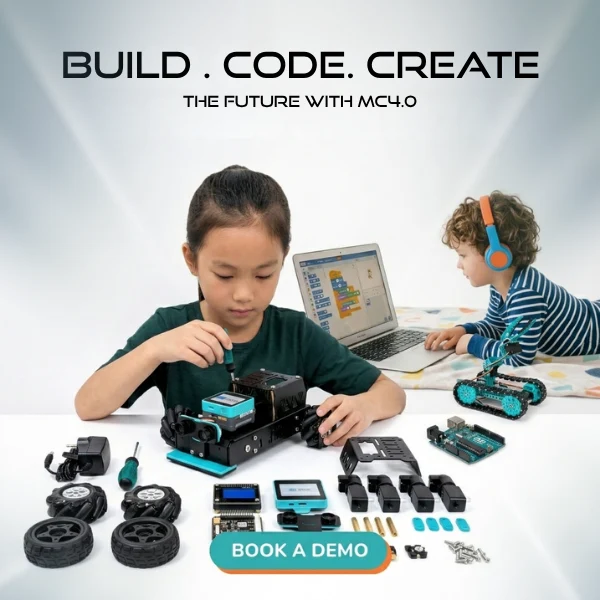
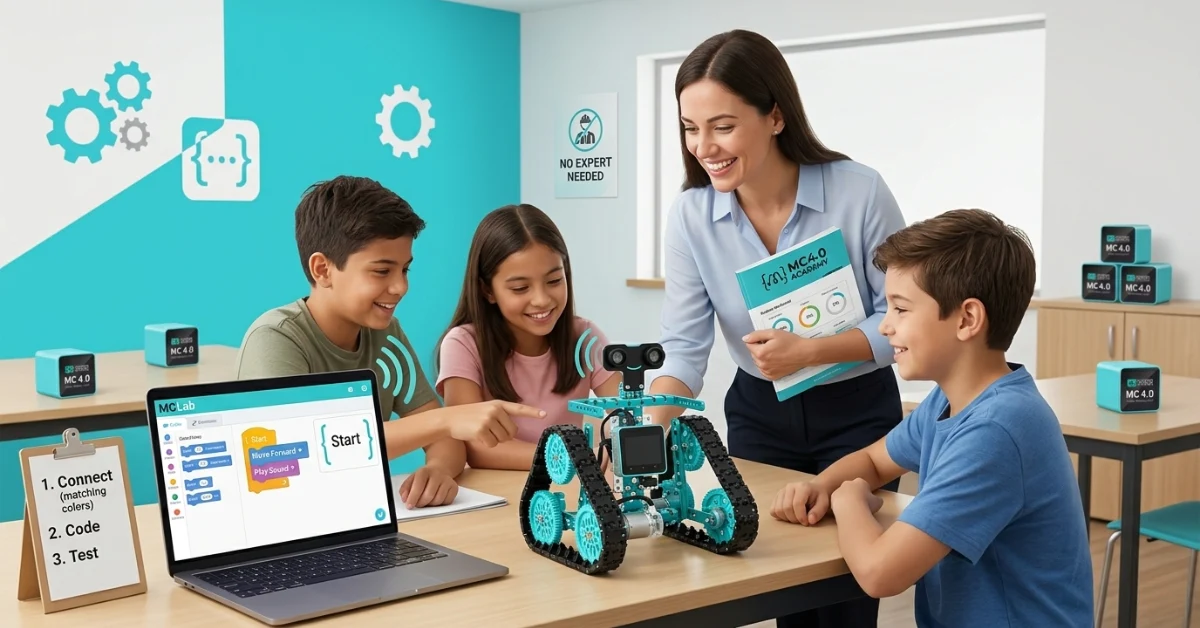
The hardware is modular and plug-and-play. The ports are color-coded, so there is no need to guess where parts should connect. You do not need wiring knowledge or prior electronics experience to get started.
The software uses MCLab block coding. That means students can drag, drop, and run code without worrying about typing errors or syntax mistakes. Instead of spending time fixing punctuation, they can focus on logic, sequence, and cause and effect.
The system also includes a built-in speaker. That may sound like a small detail, but it matters in the classroom. Audio feedback helps confirm that the robot is doing what the code says. For beginners, that immediate response builds confidence fast.
On top of that, MC4.0 Academy gives teachers access to more than 300 structured lessons, with progress tracking and a teacher dashboard. So you are not starting from scratch or trying to invent your own robotics unit on a Sunday night.
And every Class Pack includes a teacher training programme. You are not expected to figure it all out alone.
What your first robotics lesson can look like
If you are wondering how to teach robotics in school without feeling overwhelmed, it helps to picture the first lesson step by step.
Step 1: Start with one simple goal
Your first lesson does not need to be impressive. It needs to be clear.
A strong beginner goal might be: Make the robot move forward and play a sound.
That is enough to introduce the class to coding, hardware, testing, and observation without making the lesson feel crowded.
Step 2: Set up the hardware with students
With MC4.0’s plug-and-play modular hardware, students can connect the needed parts by matching color-coded ports. There is no complicated wiring map to decode. The standardised port connections make the setup visual and obvious.
This also means students can self-check their work. If something is not connected correctly, they can often spot it on their own. That reduces the pressure on the teacher and builds independence in the classroom.
Instead of answering every technical question yourself, you can guide students with prompts like:
- “Do the colors match?”
- “Is the motor connected to the correct standard port?”
- “Can you compare your setup with your partner’s?”
That is a big shift. You are not the only troubleshooter in the room. The design helps students troubleshoot too.
Step 3: Build the code with drag-and-drop blocks
Next, students open MCLab and use block coding to create a simple program.
For example, they might drag in blocks that say:
- Start
- Move forward for 2 seconds
- Play sound
- Stop
Because it is block-based, students can focus on what the robot should do instead of how to type code perfectly. There are no syntax errors to hunt down. No missing brackets. No extra semicolons. For beginner learners and beginner teachers, that lowers stress right away.
This is one reason block coding has become so widely used in introductory computing. Research and classroom practice both show that visual programming can reduce cognitive load for novices, helping them understand core programming concepts before moving to text-based coding.
Step 4: Run, observe, and adjust
When students click run, they see the robot move and hear the built-in speaker respond. That audio feedback matters because it confirms the connection between code and action.
The robot did not just “do something.” It did exactly what the code instructed.
That kind of instant feedback is powerful in a classroom. It helps students test ideas, notice mistakes, and improve their code with less confusion. It also helps teachers lead discussion more easily:
- “What happened first?”
- “Why did the sound play after the movement?”
- “What should we change if we want the robot to stop sooner?”
At this point, you are not teaching advanced robotics theory. You are teaching sequence, logic, observation, and revision. That is excellent STEAM learning.
Why visual hardware makes classroom teaching easier
Many robotics tools become difficult when physical setup is unclear. If ports are confusing or inconsistent, students rely heavily on the teacher to fix every issue.
MC4.0 reduces that dependence.
Its standardised port connections and color-coded design make the system easier to read. Students can compare components, follow patterns, and solve many setup issues on their own. In a busy classroom, that saves time and supports better learning habits.
It also changes the teacher’s role in a positive way. You are not stuck doing emergency repairs at every table. You are free to circulate, ask questions, and support thinking.
That matters because great robotics teaching is not about knowing every technical detail. It is about helping students explore, test, reflect, and improve.
Quick feature takeaways for busy teachers
If you need the short version, here is why MC4.0 works for non-specialist staff:
- Plug-and-play modular hardware makes setup simple
- Color-coded ports remove the need for wiring knowledge
- Standardised port connections help students self-troubleshoot
- MCLab block coding lets beginners drag, drop, and run code easily
- No syntax errors means less frustration for first-time coders
- Built-in speaker gives instant audio feedback when code works
- MC4.0 Academy includes 300+ structured lessons
- Progress tracking and teacher dashboard help manage classroom learning
- Teacher training programme is included with every Class Pack
- Designed for real classrooms so teachers can focus on teaching, not technical stress
You do not need to create every lesson from scratch
One of the biggest barriers in school technology is planning time. Even teachers who feel open to robotics may worry about where they will find the lessons, pacing, and assessment tools.
That is why MC4.0 Academy is such an important part of the system.
With more than 300 structured lessons, it gives teachers a clear path forward. The teacher dashboard helps you see student progress, while the lesson structure supports pacing and consistency. For schools looking for STEAM lesson plans for teachers, this kind of built-in support can make adoption much easier.
Instead of asking, “What do I teach next?” you can move directly into delivery.
For technology coordinators, this also supports wider rollout across a school. A clear lesson library and tracking system helps different teachers teach robotics with a shared framework, even if their technical confidence levels vary.
Teaching robotics is more possible than you think
If you have been holding back because robotics feels too technical, it may help to reframe the goal.
You do not need to be the smartest person in the room.
You do not need to know every answer.
You do not need to master electronics before your students touch a robot.
You need a system that supports teaching step by step.
MC4.0 does that by making robotics visible, structured, and approachable. It turns setup into matching. It turns coding into drag-and-drop logic. It turns troubleshooting into something students can often do themselves. And it gives teachers the lesson support and training they need to begin with confidence.
That is what makes it a practical answer for schools searching for how to teach robotics in school and for teachers who need robotics for non-technical teachers that actually feels manageable.
Start with support, not stress
Robotics should open doors for teachers, not make them feel shut out.
If you want hands-on, engaging STEAM lesson plans for teachers without the usual technical barriers, MC4.0 offers a clear place to start. With simple hardware, beginner-friendly coding, built-in feedback, teacher training, and hundreds of ready-to-use lessons, it helps you teach robotics with confidence from the very first class.
Access MC4.0 Academy for free and see how simple robotics teaching can be.
Robotics Teaching FAQ
Frequently Asked Questions
No. You do not need a technical background to teach robotics with confidence. MC4.0 is designed for classroom teachers who want to bring hands-on STEAM learning into school without needing engineering or coding experience first. The system removes common barriers with plug-and-play hardware, color-coded ports, and beginner-friendly block coding, so you can focus on teaching rather than troubleshooting.
That is completely okay. MC4.0 uses MCLab block coding, which lets students drag, drop, and run code without typing syntax. This makes programming much easier for beginners because there are no spelling mistakes, missing symbols, or confusing code errors to fix. It is a simple way to introduce coding logic, sequencing, and problem-solving in a way that feels manageable for both teachers and students.
The hardware is built to be visual and easy to use. With plug-and-play modular components and color-coded ports, teachers and students can connect parts without needing wiring knowledge. The setup is clear, fast, and less intimidating than traditional robotics systems. This helps non-technical teachers get started quickly and reduces the stress that often comes with new classroom technology.
MC4.0 is designed to make troubleshooting easier. Its standardised port connections help students spot connection issues on their own because the setup is consistent and easy to follow. This means students can often self-correct before needing teacher support. The robot’s built-in speaker also provides audio feedback, which helps confirm when the code has run as expected. Together, these features make classroom problem-solving more manageable.
Yes. MC4.0 includes free access to MC4.0 Academy, which offers 300+ structured lessons designed to support classroom teaching. This is especially helpful for teachers who want robotics lessons without creating everything from scratch. The platform also includes progress tracking and a teacher dashboard, making it easier to monitor learning and keep lessons organized across a class or school.
You do not need to have every answer before you begin. In fact, robotics often works best when students learn through testing, observing, and improving. Features like block coding, visual hardware connections, and the built-in speaker give students immediate feedback, which keeps lessons interactive and rewarding. Your role is to guide the learning process, not to be a robotics engineer.
Yes. Every MC4.0 Class Pack includes a teacher training programme. This gives schools extra support so teachers feel prepared from the start. Instead of figuring everything out on your own, you have access to guidance that helps you use the kit, understand the lesson flow, and build confidence teaching robotics in school.
MC4.0 is a strong fit for robotics for non-technical teachers because every part of the system is designed to reduce complexity. Key benefits include:
- Plug-and-play modular hardware
- Color-coded ports with no wiring knowledge needed
- MCLab block coding for easy beginner programming
- Standardised connections for student self-troubleshooting
- Built-in speaker for instant audio feedback
- Free MC4.0 Academy with 300+ lessons
- Teacher dashboard for progress tracking
- Teacher training included with Class Packs
This makes it easier for schools to introduce robotics in a way that feels practical, supportive, and realistic for everyday classroom teaching.
Author Bio
Maker and Coder is a STEM education advocate and writer dedicated to empowering teachers with practical tools and strategies for hands-on learning. Specializing in robotics and classroom technology, they focus on simplifying complex systems like MC4.0 to make them accessible for non-technical educators. Their mission is to help teachers confidently bring STEAM education into schools, fostering creativity, problem-solving, and innovation in students of all skill levels.