A good coding tool should do more than teach one skill for one school year. It should grow with the student.
That is what many parents, teachers, and school technology leaders want most: a clear coding progression for kids that starts simple, builds real confidence, and leads to advanced skills without forcing a full hardware change every few years. MC4.0 is designed for that long path. It begins with block coding, moves into Python and Arduino C++, and reaches AI and IoT projects at higher grade levels.
This matters because students do not learn best in isolated steps. They learn best when each stage unlocks the next one. A child who starts with visual logic should be able to grow into text-based coding. A middle school student who reads sensor data in Python should be able to build toward control systems, connected devices, and edge AI later on.
In this post, we will map the full block coding to Python to AI journey with one kit and show why MC4.0 is a strong long-term investment for homes, classrooms, and school programs.
The Journey Overview: A Coding Progression for Kids That Makes Sense
The best coding pathway does three things well:
- It meets students at their current level
- It makes each new stage feel achievable
- It avoids wasting time and budget on tools students outgrow too fast
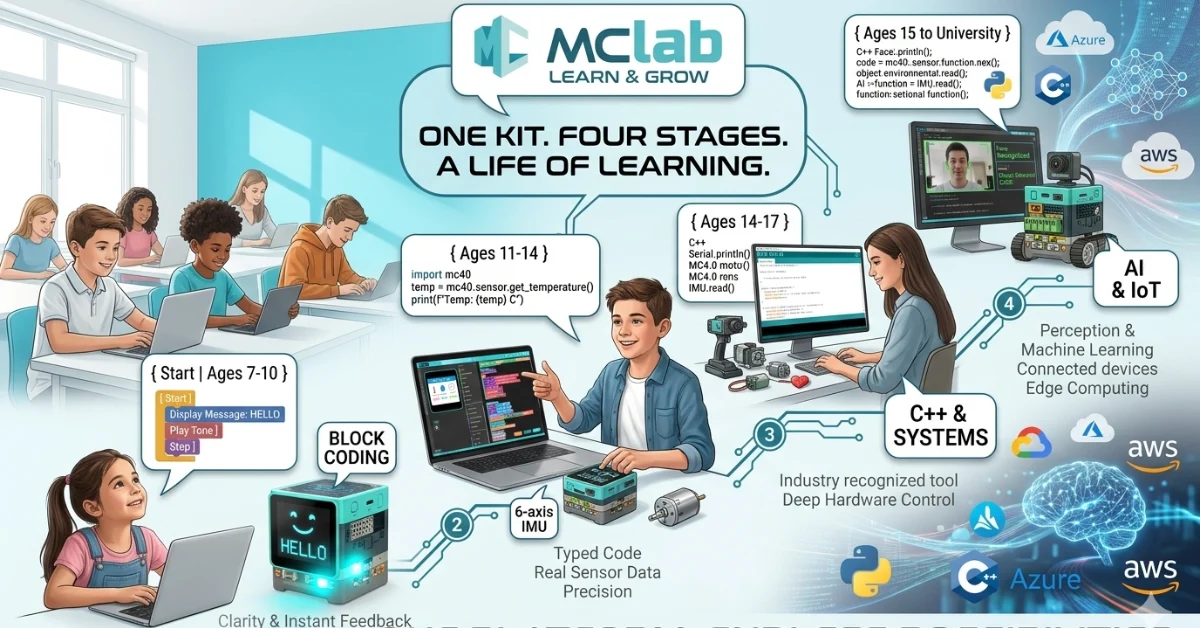
MC4.0 supports that journey from ages 7 to university by combining beginner-friendly software with advanced hardware features. Students do not need to start over on a completely different platform every time they level up.
Here is the big picture:
- Ages 7–10: Students build logic with drag-and-drop coding and instant feedback
- Ages 11–14: They move into Python and work with real sensors and motion control
- Ages 14–17: They expand into Arduino C++, communication protocols, and more complex engineering projects
- Ages 15–University: They explore AI, IoT, cloud systems, and edge computing
That is a powerful model for anyone looking to learn coding with robotics in a structured and future-ready way.
Stage 1: Ages 7–10 — Start with Block Coding and Fast Wins
For younger learners, success depends on clarity and feedback. If students can see and hear what their code does right away, they stay engaged and build confidence faster.
MC4.0 starts that journey with MCLab’s drag-and-drop interface, which works on any device. This lowers the barrier to entry for both schools and families. Students can focus on logic, sequence, cause and effect, and problem-solving without worrying about syntax errors.
Key features unlocked at Stage 1
MCLab drag-and-drop interface on any device
Young students can begin programming with visual blocks instead of typed commands. This helps them learn core ideas like:
- Sequencing
- Loops
- Conditions
- Events
- Input and output
Because MCLab works across devices, access is simpler for classrooms with mixed hardware.
Touch LCD showing real-time output
The Touch LCD gives students a direct way to see what their program is doing. Instead of abstract code on a screen, they get visible results in real time.
This helps students connect code to outcome:
- Displaying messages
- Showing counters
- Responding to touch input
- Visualizing simple program states
RGB LED and buzzer for instant feedback
Immediate feedback matters at this age. Lights and sound turn coding into something physical and exciting.
Students can create projects that:
- Change LED colors based on actions
- Play tones when tasks are complete
- Trigger alerts during games
- Build cause-and-effect understanding
3 programmable touch buttons
The programmable touch buttons introduce user input in a simple, hands-on way. Students begin to understand that code can react to people and environments.
They can build:
- Quiz games
- Reaction tests
- Music triggers
- Menu-based interactions
At this stage, the goal is not just to “do coding.” It is to make coding feel natural, playful, and repeatable.
Stage 2: Ages 11–14 — Move from Blocks to Python
Once students understand logic, they are ready for typed code. This is where many learners hit a wall if the jump feels too big. MC4.0 smooths that transition by connecting Python to hardware they already know.
This is the heart of the block coding to Python to AI pathway. Students move from visual coding into real programming while still getting hands-on results.
Key features unlocked at Stage 2
MCLab Python editor with syntax highlighting
The Python editor helps students write clean, readable code with visual support. Syntax highlighting makes programs easier to follow and debug.
Students start learning:
- Variables
- Functions
- Conditionals
- Loops
- Lists and structured logic
This builds coding fluency without making the environment feel intimidating.
6-axis IMU for real sensor data
The 6-axis IMU introduces motion and orientation sensing. Students can read live sensor values into Python variables and use them in projects.
This is a big step because students begin working with real-world data, not just preset commands.
Example projects include:
- Tilt-based games
- Motion alarms
- Balance testing
- Gesture-controlled actions
DC encoder motors for precise movement control
Motors add a strong engineering layer to coding. With encoder feedback, students do more than turn motors on and off. They learn precision.
They can code:
- Distance-based movement
- Speed control
- Turning angles
- Repeatable motion paths
This introduces important robotics concepts in a practical way.
MCLab 3D simulator for testing before running
The 3D simulator helps students test ideas before sending code to the hardware. That saves time, reduces frustration, and supports faster iteration.
Benefits include:
- Safer experimentation
- Easier debugging
- Better understanding of movement logic
- More efficient classroom workflows
At this stage, students are no longer just learning commands. They are learning how software controls physical systems.
Stage 3: Ages 14–17 — Expand into Arduino C++ and Systems Thinking
As students grow, they need tools that reflect real engineering and computer science pathways. MC4.0 supports this with Arduino IDE integration, opening the door to C++ programming and deeper hardware control.
Key features unlocked at Stage 3
Arduino IDE integration
This gives students access to a widely used development environment. It is valuable for secondary school learners because it connects classroom learning to broader maker, robotics, and engineering ecosystems.
Students gain experience with:
- Writing structured code
- Managing libraries
- Compiling and uploading programs
- Working in an industry-recognized toolchain
I2C and UART protocol coding
Communication protocols are a major step forward. Students begin to understand how components and systems talk to each other.
They can explore:
- Sensor communication
- Device addressing
- Serial data exchange
- Multi-device integration
This is where coding starts to look much more like real embedded systems work.
Heart rate and environmental sensors
Real data projects become more meaningful when they connect to health, science, and environmental topics.
Students can build projects around:
- Heart rate monitoring
- Temperature and humidity tracking
- Air quality studies
- Data logging and analysis
That makes coding cross-curricular and useful across STEM programs.
Multi-motor control with encoder feedback
More advanced robotics projects often require several motors working together with precision. This allows students to tackle larger design and engineering challenges.
Projects may include:
- Robotic vehicles
- Smart movement systems
- Coordinated mechanisms
- Automation prototypes
By this point, students are not just coding. They are designing systems.
Stage 4: Ages 15 to University — AI and IoT with Real-World Relevance
The final stage is where MC4.0 becomes more than a learning kit. It becomes a platform for future-ready computing.
Students can work on the same topics that shape modern technology: artificial intelligence, connected devices, cloud systems, and edge processing.
Key features unlocked at Stage 4
AI Camera for object and face recognition
The AI Camera makes computer vision tangible. Students can create projects that detect and respond to objects or faces.
Use cases include:
- Smart access systems
- Object sorting
- Interactive displays
- Vision-based automation
MCLab IoTCloud with MQTT, Azure, and AWS connections
Cloud connectivity helps students understand how devices send, receive, and manage data in larger systems.
This supports projects involving:
- Remote monitoring
- Dashboard reporting
- Smart school or smart home models
- Data collection across networks
Edge computing on ESP32
Edge computing teaches students to process data locally on the device instead of always sending it to the cloud. That matters for speed, privacy, and efficiency.
Students can learn how to:
- Reduce latency
- Trigger local actions fast
- Build more reliable connected devices
- Optimize data flow
Python and C++ for custom AI model deployment
This is the advanced end of the pathway. Students can use Python and C++ to go beyond packaged demos and build more custom AI applications.
That makes MC4.0 relevant not only in school, but also in pre-university and university-level project work.
Why One Kit Covers the Whole Journey
The biggest value of MC4.0 is continuity.
Instead of buying one tool for beginners, another for Python, another for Arduino, and another for AI, schools and families can invest in one platform that supports growth over time.
Why that matters
- Lower long-term cost: Fewer platform changes mean better budget use
- Less retraining: Teachers can build on one ecosystem instead of relearning new ones
- Stronger student confidence: Familiar hardware reduces friction during harder transitions
- Better curriculum planning: Schools can map a full progression across year levels
- Real skill development: Students move from logic to programming to systems and AI in one path
For decision-makers, that makes MC4.0 more than a kit. It is a scalable learning pathway.
FAQ
Students can begin around age 7 with block coding activities and continue using the platform into university-level AI and IoT work.
No. It also supports coding, engineering, design, STEM, computer science, and project-based learning.
Students start with logic in MCLab’s drag-and-drop interface, then transition into the Python editor while using the same hardware features they already know.
One kit creates a smoother learning experience, lowers costs over time, and helps teachers build a clear coding progression for kids.
Yes. With Arduino IDE integration, AI Camera features, IoTCloud connections, and ESP32 edge computing, MC4.0 supports advanced secondary and university-level work.
Author Bio
Maker and Coder is passionate about hands-on STEM learning, robotics education, and helping students build real technical skills step by step. With a strong interest in coding, electronics, and creative problem-solving, they write practical content that helps schools and families choose tools that grow with learners.
Final Thought
If you want students to learn coding with robotics in a way that starts simple and leads somewhere meaningful, MC4.0 offers a rare advantage: one connected pathway from first code to advanced AI.
Download the MC4.0 learning pathway guide to see how one kit can support the full journey from block coding to Python to AI.