Buying a robotics kit for a classroom can look simple at first. A school sees colorful parts, a coding app, and a list of activities, then assumes the kit will meet student needs for years. That is often the first mistake.
Many schools buy for the demo, not for the long term.
A kit may look engaging in a sales pitch but fall short once teachers need real lesson support, students want to move past basic coding, or school leaders ask how it fits curriculum goals. That is why a smart purchase starts with better questions.
This STEAM robotics buying guide is built for teachers, school procurement teams, STEAM coordinators, and parents who want to make a thoughtful choice. If you are wondering how to choose a robotics kit for school, the five questions below will help you evaluate any platform clearly. As a benchmark, we will use the MC4.0 platform, because it answers each question in a strong and practical way.
By the end, you will know what to look for in the best educational robotics kit 2026 and beyond.
The buying mistake most schools make
The biggest buying mistake is choosing a kit that only solves today’s need.
A school may want to introduce coding in Year 5, support a robotics club in middle school, or launch a STEAM lab in secondary. If the kit only handles one age band or one skill level, the school will need to replace it sooner than expected. That creates extra cost, extra training, and extra disruption.
A better approach is to choose a robotics platform that grows with students, supports non-specialist teachers, and already connects to real classroom outcomes.
Question 1: Will it still be relevant in 5 years?
This is the first and most important question. A robotics kit should not become outdated as soon as students move beyond beginner activities.
The MC4.0 platform performs well here because it is designed to scale. It supports 6 coding languages, which means students can begin with simple environments and move into more advanced programming as their confidence grows. That matters in schools where learners progress at different speeds and teachers need one platform for multiple year groups.
It also includes access to an AI Camera, which opens the door to computer vision and object recognition. These are not niche extras anymore. They are part of the wider shift toward AI literacy in schools and universities. When a robotics kit includes AI tools from the start, students can explore modern technology in a hands-on way instead of treating AI as a theory topic.
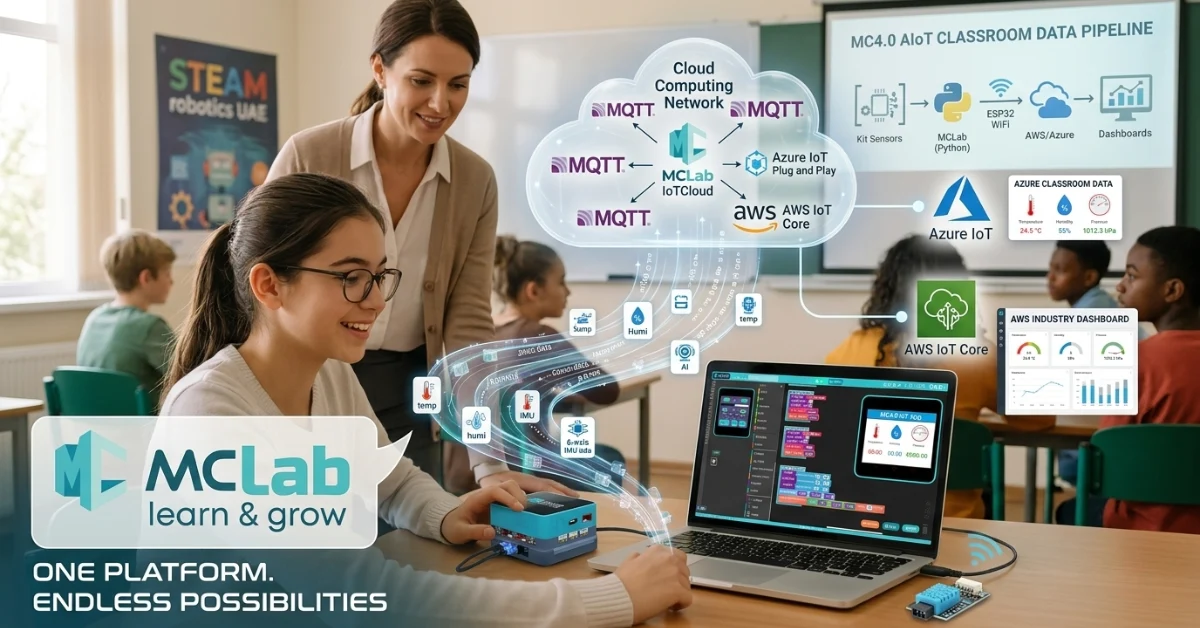
Cloud readiness also matters. MC4.0 supports AWS and Azure cloud learning, which helps students understand how real devices send, receive, and process data. That takes robotics beyond movement and motors into connected systems, dashboards, and live data analysis.
Most importantly, the platform can scale to university-level work. That means schools do not need to replace the whole system when students are ready for harder projects. A platform with that kind of headroom offers stronger long-term value.
What to look for
- More than one coding pathway
- Support for AI and cloud computing
- Progression from primary or secondary into advanced study
- Hardware that does not cap student ambition too early
Question 2: Can a non-specialist teacher actually use it?
A robotics kit can have impressive specs and still fail in the classroom if teachers do not feel confident using it.
This is where many buying decisions go wrong. Schools often assume a good product will automatically be easy to teach. In reality, teacher usability matters just as much as student engagement.
MC4.0 stands out because it reduces friction for non-specialists. Its plug-and-play ports simplify setup, so teachers do not need deep technical knowledge to connect components correctly. That lowers the risk of wasted lesson time and classroom frustration.
Then there is MCLab block coding, which gives teachers and students a gentle starting point. Block-based programming helps learners understand logic, sequence, inputs, and outputs without getting stuck on syntax too early. For many schools, this is the difference between a robotics lesson that flows and one that stalls.
Support is just as important as hardware. MC4.0 Academy and included teacher training give schools a stronger implementation path. A platform becomes far more usable when teachers have lesson guidance, onboarding help, and professional development built in.
What to look for
- Easy hardware connections
- Beginner-friendly coding tools
- Clear teacher training and documentation
- Support that continues after purchase
Question 3: What does it teach beyond basic coding?
A strong robotics kit should teach far more than “move forward” and “turn left.”
Robotics is at its best when it connects coding with science, design, engineering, and problem solving. MC4.0 answers this well because it supports a wide range of themes beyond basic programming.
Students can explore IoT by connecting devices and sending data. They can work with AI through camera-based recognition and smart behaviors. They can learn cloud computing by linking hardware to online platforms and dashboards. These are useful, current skills that connect directly to modern industry.
The learning does not stop there. The platform also supports biomimicry, which helps students study how living systems inspire robot design. It brings in gear mechanics, so learners understand motion, force, and mechanical relationships. It supports sensor fusion, which is a key engineering concept where multiple sensor inputs work together to guide a system.
This matters because schools are not just buying a coding toy. They are investing in a platform for real-world engineering thinking.
What to look for
- Cross-curricular use in science, design, and computing
- Real engineering concepts, not only drag-and-drop coding
- Pathways into IoT, AI, and data-driven projects
- Projects that help students explain how systems work
Question 4: Will it work for both home and classroom learning?
Flexible learning still matters. Schools need tools that can move between classroom use, homework, clubs, and blended learning without creating extra barriers.
MC4.0 is built well for this. MCLab works on any device, which makes access simpler for schools and families. Students can continue learning without depending on one specific lab setup or one operating system.
The hardware is also practical. It is USB-C rechargeable, which reduces cable confusion and makes charging easier. This may sound like a small detail, but in school use, small details often decide whether a kit feels smooth or difficult to manage.
The 1 Kit 1 Student model is another clear strength. It supports individual ownership and continuity. Students can work on the same project in class and at home, which helps build independence and cuts down on setup time in shared sessions.
What to look for
- Software that runs across devices
- Simple charging and connectivity
- Easy shipping or home-use support
- A format that works for both individual and group learning
Question 5: How do I know it is curriculum aligned?
Even an excellent robotics kit becomes hard to justify if teachers must build every lesson from scratch.
Curriculum alignment is one of the strongest reasons to choose carefully. MC4.0 supports key frameworks including UAE MOE, US NGSS, IB MYP, and CBSE. That gives schools confidence that the platform is not just exciting, but also relevant to formal learning goals.
Just as important, the lesson plans are already built. That means teachers can spend less time on prep and more time teaching. For busy schools, this can be a deciding factor. It reduces staff workload and speeds up adoption across departments.
A curriculum-aligned platform also helps procurement teams. It gives them a clearer answer when school leaders ask how the purchase supports measurable educational outcomes.
What to look for
- Named alignment with recognized frameworks
- Ready-made lesson plans
- Minimal teacher prep time
- Clear links to assessment and outcomes
Summary comparison: what a strong robotics kit should deliver
When schools compare options, the best choice is usually the one that combines future-readiness, teacher usability, broad learning value, flexible access, and curriculum fit.
MC4.0 performs strongly across all five areas:
| Buying Question | What Good Looks Like | MC4.0 Benchmark |
| Long-term relevance | Grows with student ability | 6 coding languages, AI Camera, AWS/Azure, university scalability |
| Ease of use | Works for non-specialists | Plug-and-play ports, MCLab block coding, MC4.0 Academy |
| Educational breadth | Goes beyond beginner coding | IoT, AI, biomimicry, engineering, sensor fusion |
| Home and school use | Flexible access and setup | Any-device MCLab, USB-C, 1 Kit 1 Student model |
| Curriculum alignment | Easy to adopt and justify | UAE MOE, US NGSS, IB MYP, CBSE, ready lesson plans |
If you are still deciding how to choose a robotics kit for school, use these five questions as your filter. A platform that answers all five well is far more likely to deliver value over time.
Final thoughts
The right robotics kit should do more than impress at first glance. It should help teachers teach, help students grow, and help schools invest with confidence.
That is what separates a short-term purchase from a strong long-term platform.
If your team is reviewing options for the best educational robotics kit 2026, start with the five questions above. They will lead you toward a smarter choice and a better classroom experience.
Download the free school buyer’s guide.
FAQ
Start by checking five things: long-term relevance, ease of use for teachers, educational breadth, flexibility for home and class use, and curriculum alignment.
A future-ready kit supports multiple coding levels, modern topics like AI and cloud computing, and project pathways that scale into advanced study.
Yes. Features like plug-and-play ports, MCLab block coding, and MC4.0 Academy make it easier for non-specialist teachers to use confidently.
It helps schools adopt the platform faster, reduce teacher prep, and show clear links between robotics lessons and formal learning goals.
Yes, if the software is device-friendly, the hardware is easy to charge and transport, and the learning model supports individual student use.
Author Bio
Maker and Coder writes about educational robotics, classroom technology, and hands-on STEM learning. Their work helps teachers, parents, and school leaders understand complex tools in plain English and choose technology that creates lasting value.
Key Points at a Glance
- The smartest way to buy is to ask five clear questions before choosing a kit
- Long-term value matters more than a short demo
- MC4.0 supports 6 coding languages, AI learning, and AWS/Azure cloud projects
- Plug-and-play ports and MCLab block coding help non-specialist teachers succeed
- The platform teaches IoT, AI, biomimicry, engineering, and sensor fusion
- MCLab works across devices for classroom and home learning
- USB-C charging and the 1 Kit 1 Student model support flexibility
- Curriculum alignment includes UAE MOE, US NGSS, IB MYP, and CBSE
- Ready-made lesson plans reduce teacher prep time
- A strong choice today can save schools from replacing the platform too soon