
What if the classroom robot that sparks the most excitement isn’t the one that supports the strongest learning? Choosing well means looking beyond first impressions. The criteria for selecting a classroom robot should connect activities to learning goals, fit teachers’ comfort levels, and give students room to progress from first explorations to more advanced projects.
It’s reasonable to ask whether a robot will support meaningful learning or simply capture attention, and whether teachers need extensive technical expertise to use it. Compare the hardware, software, curriculum, and implementation support as one learning experience rather than as separate features.
This guide explains how to assess learning fit, classroom usability, student progression, and teacher support. It also shows how Maker & Coder’s MC 4.0 ecosystem connects modular hardware with a K-12 curriculum and teacher training programs. Choose with purpose, and robotics can give students a pathway to build, code, and explore.
Key Takeaways
- Start with the learning outcomes you want students to explore, such as programming, design, collaboration, or interdisciplinary STEM.
- Compare learning progression, connected projects, teacher resources, and classroom fit, not feature counts alone.
- Assess whether activities can grow from introductory exploration to more advanced projects as students develop their skills.
- Plan for practical classroom needs, including lesson preparation, storage, routines, and individual or group work.
- Consider the full learning ecosystem: MC 4.0 combines a controller and modular MC Blocks with a K-12 curriculum, multiple kit options, and teacher training programs.
What Makes a Classroom Robot Worth Choosing? Start With Learning Goals
A classroom robot is a tool for exploring ideas through programming and hands-on experimentation. Its educational value isn’t measured by how quickly it captures attention, but by what learners can do with it after the first demonstration. A moving robot may delight a class, while a repeatable challenge can also prompt students to plan, test instructions, spot errors, and improve their approach.
Start with the outcomes your school wants to support. These might include computational thinking, design, collaboration, or interdisciplinary STEM learning. The overview of educational robotics offers broader context, but your selection should connect directly to your own learning objectives.
Educational fit means aligning a robot’s learning goals and practical classroom use with the support teachers need to guide students. Ask what students will think, create, and explain, not only what the hardware can do.
Which learning goals should a classroom robot support?
Map activities to planned objectives before comparing options. For example, students might design a route, program a sequence of actions, test it, and revise their instructions when the robot doesn’t behave as intended. Movement is only one part of the task. The learning lies in the students’ decisions and refinements.
Look for ways to observe the learning process. Can students explain why they chose an approach, collaborate on a design, or reflect on what they would change? Successful movement can be satisfying, but it shouldn’t be the only sign of progress.
How can a school tell whether robotics fits its students?
Consider students’ prior experience, developmental needs, and classroom realities. A group new to programming may need a different starting point from learners ready for open-ended projects. Don’t assume one activity or robot will suit every age group or experience level.
Check whether activities accommodate different starting points. Some students might follow or adjust a prepared sequence, while others extend the challenge with their own ideas. A flexible activity gives everyone an entry point and room to deepen the work.
- Goal: What should students learn or be able to explain?
- Evidence: What will they design, program, test, or refine?
- Fit: How can the activity adapt to learners and classroom routines?
Compare the Learning Path: Programming, Projects, and Curriculum
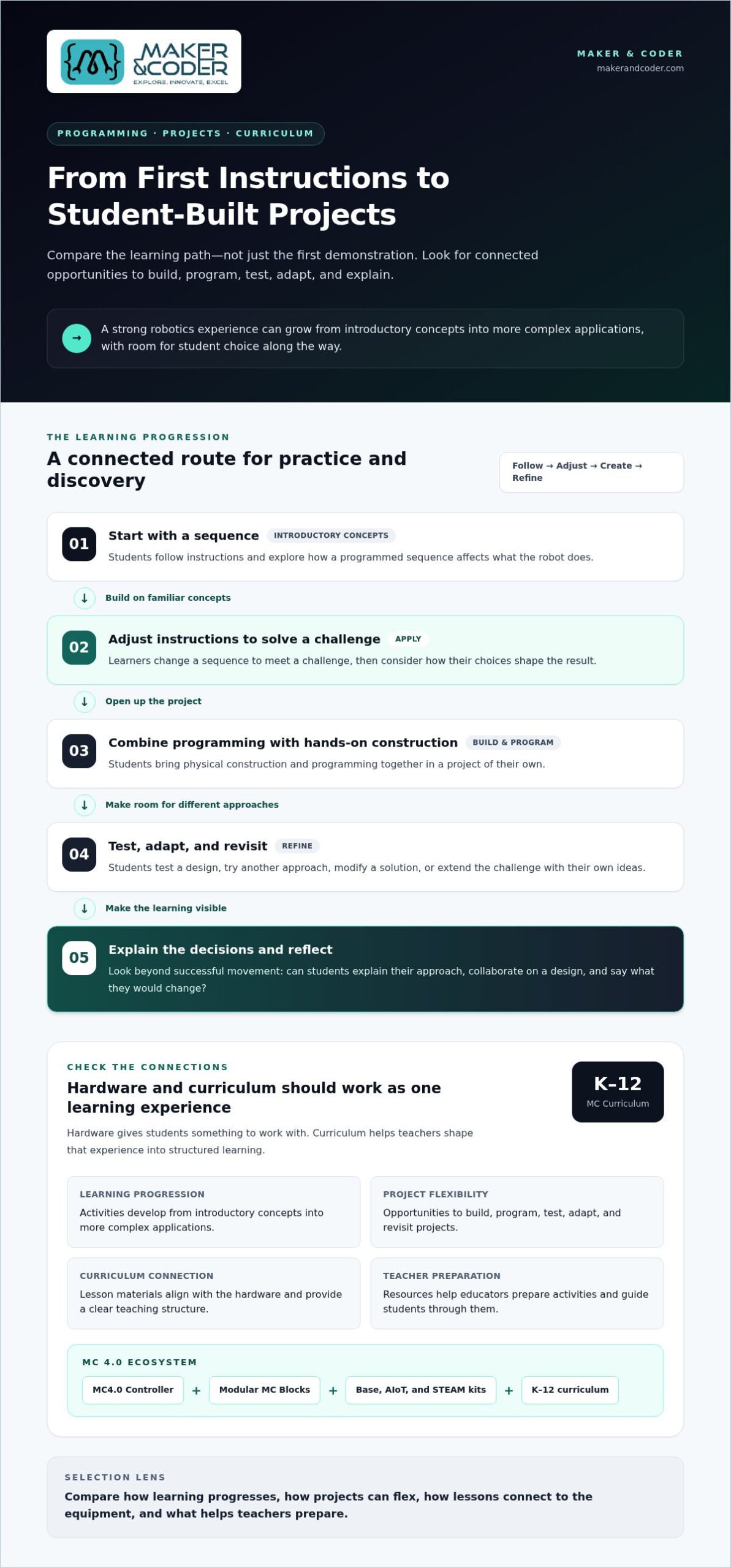
A strong robotics experience offers more than a memorable first activity. Consider how students might progress from exploring simple instructions to building, programming, testing, and extending projects. Look for a coherent route for practice and discovery, rather than assuming a particular learning outcome.
Does the robot support progression beyond a first activity?
Look for activities that can be revisited with increasing complexity. Students might start by following a sequence, adjust it to solve a challenge, and later combine programming with hands-on construction in a project of their own. This progression builds on familiar concepts while giving learners opportunities to apply them in new ways.
Check whether projects allow student choice. Can learners modify a design, test another approach, or extend a solution? Flexible projects can support a shared class theme while accommodating different levels of readiness. These are useful criteria for selecting a classroom robot because they focus on the learning journey, not just the first demonstration.
How should curriculum and hardware work together?
Hardware gives students something to work with; curriculum helps teachers shape that experience into structured learning. Lesson materials are most useful when they connect clearly to what the equipment enables and guide preparation, exploration, and reflection. Without that connection, educators may need to create the learning sequence themselves.
The K-12 MC Curriculum is designed to integrate with Maker & Coder hardware. The MC 4.0 ecosystem includes the MC4.0 Controller, modular MC Blocks, and Base, AIoT, and STEAM kits. Together, these show how learning resources and hardware can form a broader pathway rather than separate parts of a classroom plan.
| What to compare | What to look for |
|---|---|
| Learning progression | Activities that develop from introductory concepts into more complex applications. |
| Project flexibility | Opportunities to build, program, test, adapt, and revisit projects. |
| Curriculum connection | Lesson materials that align with the hardware and provide a clear teaching structure. |
| Teacher preparation | Resources that help educators prepare activities and guide students through them. |
Use the comparison to spot gaps. A versatile kit may still need a clear teaching sequence, while structured lessons are more useful when they connect to the equipment students will use. Explore Maker & Coder’s MC 4.0 learning resources to see how these elements fit together.
Can Teachers Use the Robot Confidently? Evaluate Classroom Readiness
A robot may have strong learning potential but be difficult to use in a real lesson if preparation, setup, or routines are unclear. Consider the experience from the teacher’s perspective: how activities are introduced, how students access equipment, and how the class moves from building or programming to testing and reflection. These practical details belong among the criteria for selecting a classroom robot.
Classroom readiness depends on usable resources and educator preparation working together. Clear guidance helps teachers focus on student thinking instead of working out every step as they go. Teachers don’t need to arrive with advanced robotics or coding experience for students and educators to learn through experimentation.
What makes a robot manageable during a real lesson?
Picture the activity within an ordinary class period. Teachers need to prepare materials, make equipment accessible, support student experimentation, and bring the group together afterward. Consider how the robot and its resources fit existing routines, including where components are stored and how students handle them between activities.
Instructional materials should explain concepts in language teachers can apply. Look for guidance that helps an educator introduce a task, anticipate where students may need support, and facilitate exploration without taking over the problem-solving. Consider whether the setup suits individual exploration, small-group collaboration, or both.
- Before: Can teachers understand the activity and prepare the materials?
- During: Can students access the equipment and experiment without losing focus?
- After: Can equipment be collected, stored, and prepared for the next session?
Why should teacher training factor into the decision?
Training is part of implementation, not an optional extra. It can help educators feel more comfortable facilitating hands-on STEM activities, responding to student questions, and connecting activities to learning goals. That support matters when a lesson invites learners to test ideas and learn from unexpected results rather than follow a fixed sequence.
Maker & Coder’s teacher training programs support educators using classroom robotics resources. Alongside the hardware and K-12 MC Curriculum, training is part of a broader approach to classroom implementation. Compare not only what students will use, but also what will help teachers guide the experience with confidence.
How to Compare Classroom Robots for Your School’s Needs
A side-by-side comparison is most useful when it reflects how your school will teach. Consider educational use, teacher resources, adaptability, and everyday classroom routines, not just a long list of features. Use this five-step process to make a decision grounded in your school’s needs.
- Define the goals. Identify what students should explore and how robotics will support planned learning objectives. Separate essential outcomes from appealing extras.
- Assess the learners. Consider students’ prior experience, developmental needs, group dynamics, and classroom context. Look for activities that welcome different starting points.
- Review the curriculum. Examine how lesson materials connect to the hardware, guide instruction, and develop into a learning pathway. Consider what educators need to prepare and teach confidently.
- Evaluate classroom fit. Think through setup, student access, equipment handling, storage, transitions, and whether activities suit individual or group work. Consider how a sample activity would fit into a typical lesson.
- Plan implementation. Account for teacher preparation, professional learning, and how the school will use the robot beyond an initial activity. Treat hardware, curriculum, and training as connected parts of the decision.
Which questions should a school team answer before comparing options?
Bring teachers and decision-makers together to clarify who will use the robot, in what teaching context, and toward which outcomes. Discuss the preparation and collaboration time educators can devote to implementation. Then separate requirements into two groups: what the classroom needs to make learning possible, and what would be useful but optional. This keeps attention on educational fit instead of feature counts.
How can a school assess long-term classroom value?
Consider whether learners can return to activities, adapt projects, and take on greater complexity as they gain experience. Review the hardware, curriculum, and professional learning together: a capable robot alone doesn’t show how it will be taught or fit into classroom routines. Maker & Coder’s kits, K-12 curriculum, and teacher training programs bring these elements together. Explore the classroom robotics shop to view the available kits.
Compare instructional resources and teacher training alongside the hardware. Discuss your classroom goals with Maker & Coder as you plan an approach that fits your school.
Build a Classroom Robotics Pathway With Maker & Coder
Choosing classroom robotics involves more than selecting hardware. Schools also need to consider how learning resources and educator support fit their goals and day-to-day teaching. Maker & Coder’s MC 4.0 ecosystem brings these elements together through the MC4.0 Controller, modular MC Blocks, a K-12 curriculum designed to integrate with the hardware, and teacher training programs.
How does an integrated robotics ecosystem support planning?
Match equipment and learning resources to the school’s intended use. The MC4.0 Controller and MC Blocks are part of the hardware ecosystem, while the K-12 MC Curriculum provides structured learning materials designed for that hardware. Teacher training programs support educators as they bring activities into the classroom.
Maker & Coder’s kit options include Base, AIoT, and STEAM. Compare them against your learning goals, learner context, and implementation priorities rather than assuming one kit suits every purpose. The criteria for selecting a classroom robot should include how equipment, curriculum, and teacher preparation work together, not treat them as separate decisions.
What should the next step look like for an interested school?
Prepare a short planning brief before exploring options. Include the concepts students will explore, their robotics experience, the classroom setting, and the support educators will need. This gives teachers and decision-makers a shared starting point for discussing equipment, curriculum, and training.
Then compare those priorities with the available MC 4.0 kit options. The goal is to identify a learning pathway that serves your classroom purpose, rather than selecting equipment on features alone.
Ready to shape a practical plan? Talk with Maker & Coder about classroom implementation and discuss how your goals, learners, and educator support needs can guide the next step.
Choose a Robotics Pathway That Can Grow With Your Classroom
Choose classroom robotics by starting with learning goals, then considering how projects can develop and how teachers will guide them. Look beyond initial excitement: meaningful robotics depends on activities students can revisit and resources educators can use confidently. These criteria help align classroom practice with a longer-term learning pathway.
Maker & Coder’s MC 4.0 ecosystem brings these considerations together through the MC4.0 Controller and modular MC Blocks, a K-12 MC Curriculum designed to integrate with the hardware, and teacher training programs to support classroom implementation. Schools can consider these elements alongside their goals, learners, and teaching context.
Start with what you want students to explore and what teachers need to make implementation practical. Then shape a plan that supports curiosity, experimentation, and growth. Discuss your classroom robotics goals with Maker & Coder and take the next step toward a learning experience built around your students.
Frequently Asked Questions
What criteria should I use to select a classroom robot?
Connect the robot to learning goals, student needs, and practical classroom use. Consider what learners will program, build, test, or explain, and whether projects can develop beyond an introductory activity. Review curriculum resources, teacher preparation, setup, storage, and options for individual or group work. Focus on the complete learning experience, not simply the number of features.
How do I know if a classroom robot is suitable for my students?
Match activities to students’ prior experience, developmental needs, and classroom context. Consider whether learners can begin at different levels and adapt projects as they gain familiarity. A suitable robot should offer an accessible starting point while leaving room for exploration. Think about how it will work with your students and teaching routines instead of assuming one activity or platform will suit every group.
Do teachers need coding experience to use a classroom robot?
Teachers don’t necessarily need advanced coding experience, but they do need resources to prepare activities and guide student experimentation. Look for clear instructional materials and professional learning opportunities. Training can help educators build confidence, support students through challenges, and connect activities to learning goals. Consider educator support alongside the robot itself.
Why is curriculum important when choosing a classroom robot?
Curriculum turns equipment into a structured learning experience. It can give teachers a sequence for introducing activities and connecting them to classroom goals, rather than leaving them to plan each lesson from scratch. Check that learning materials relate to the hardware and its activities. Maker & Coder’s K-12 MC Curriculum is designed to integrate with its hardware.
Should a classroom robot support more than one type of project?
Project flexibility can help a robot remain useful as students revisit activities and explore new approaches. Consider whether learners can modify a design, adjust instructions, test changes, or extend a project as their experience grows. Different project formats may also support individual exploration or group collaboration. Focus on whether activities suit your learning goals and classroom context, rather than assuming more project types always mean a better fit.
What should schools compare besides a robot’s hardware?
Compare curriculum, teacher resources, training, and practical classroom requirements alongside hardware. Consider how activities are prepared, how students access and handle equipment, and whether storage and lesson transitions fit your routines. Review how learning materials connect to the robot and what support educators receive during implementation. Looking at these elements together helps you assess the full classroom experience, not just equipment capabilities.
How can Maker & Coder support classroom robotics learning?
Maker & Coder provides the MC4.0 Controller and modular MC Blocks, with Base, AIoT, and STEAM kit options. Its K-12 MC Curriculum is designed to integrate with the hardware, and teacher training programs support classroom implementation. Consider these resources together when planning robotics learning around your goals, learners, and educator preparation needs.